

Connect your own Twilio number
Twilio is a phone company for software. If you already have a Twilio number, connect it so your agents use your number and your Twilio balance for SMS, WhatsApp and AI voice calls.
Find it: Sidebar → Integrations → Apps → System → Twilio → + ConnectWho can use it: Owners and Admins
Should I connect Twilio?
| If you… | Then |
|---|---|
| Don't have a phone number yet | You don't need Twilio. Buy a number in Voxido instead: Get your first phone number. |
| Already have customers who know your Twilio number | Connect Twilio, and turn on Use this number for AI voice. |
| Only want SMS or WhatsApp from Twilio | Connect Twilio and leave AI voice off. |
Before you start
From your Twilio Console, have ready:
- Account SID (starts with
AC) and Auth Token. - A Twilio phone number you own, with the country code.
- Optional: a Twilio WhatsApp sender. For testing you can use Twilio's sandbox number
+14155238886.
Connect
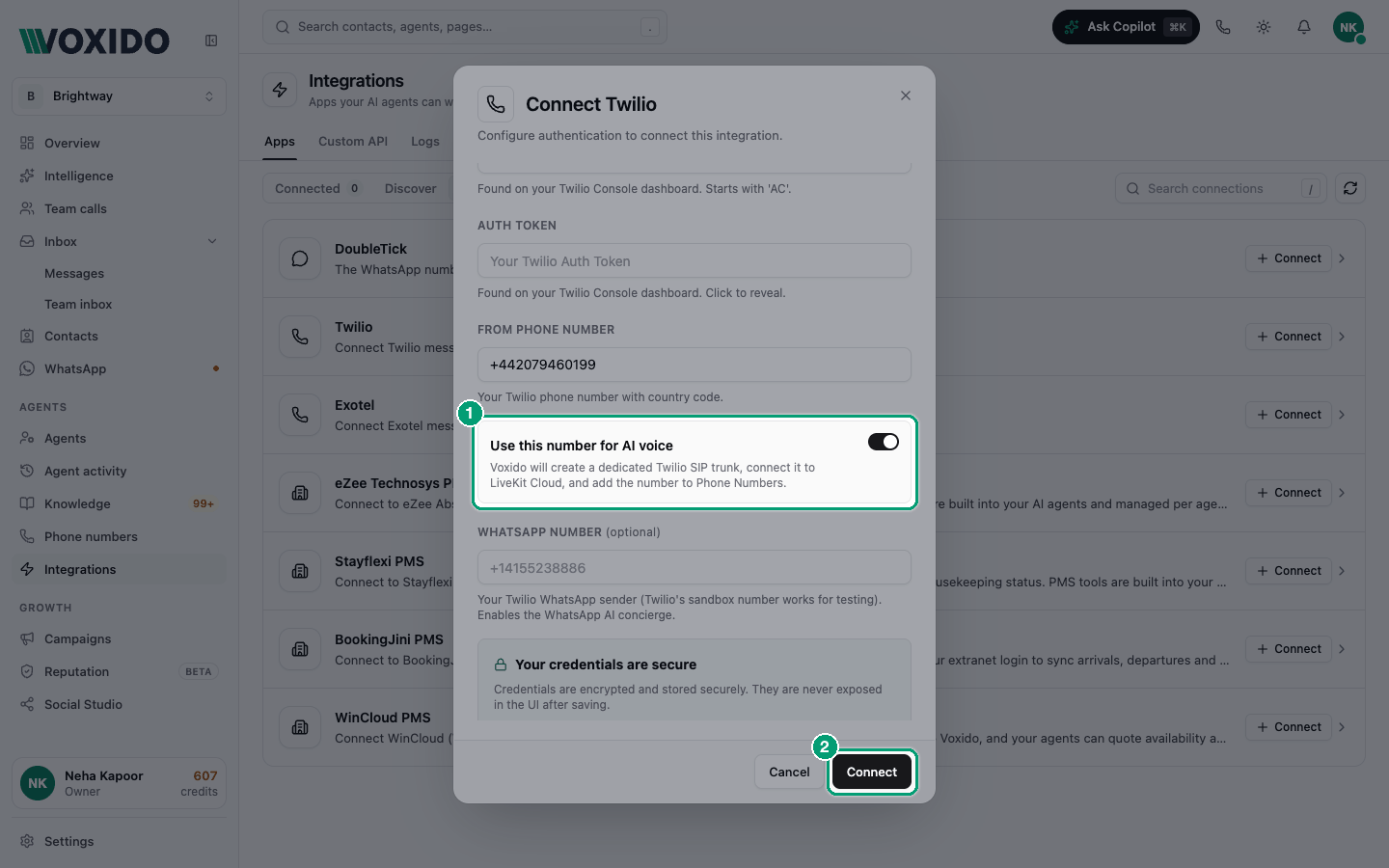
- Go to Integrations → Apps → System, find Twilio and click + Connect. You'll see: a Connect Twilio form.
- Fill in the fields:
| Field | What to enter |
|---|---|
| Connection Name | A label, such as Brightway Twilio |
| Account SID | From your Twilio Console. Starts with AC. |
| Auth Token | From your Twilio Console. It's a password — keep it private. |
| From Phone Number | Your Twilio number with country code, such as +14155550123 |
| Use this number for AI voice | Switch on to let agents answer and make calls on this number. Voxido sets up the calling link and adds the number to Phone numbers. |
| WhatsApp Number (optional) | Your Twilio WhatsApp sender. Turns on WhatsApp for your agents. |
- Click Connect. You'll see: Twilio in the System list with a Connected pill and Test, Settings and Disconnect buttons.
- If you turned on AI voice, open Sidebar → Phone numbers and give the number to an agent. See Assign the agent that answers a number.
Check it works
- Click Test on the Twilio row. You'll see: Connection Test with a success message, or Connection Test Failed with the reason.
- Click Settings to see the status. With AI voice on, the AI voice via LiveKit box shows whether calling is ready. Click Provision again if it shows a problem.
Change or disconnect
- Settings → Edit lets you change the name, details and credentials. Leave a credential blank to keep the current one. Click Save Changes.
- Disconnect asks "Are you sure you want to disconnect this integration?" Your agents stop using this Twilio account.
Common problems
Connection Failed. Check the Account SID and Auth Token. Copy them again from the Twilio Console.
AI voice shows "Carrier Setup Required" or "Voice Provisioning Failed". Open Settings, read the message in the AI voice via LiveKit box, fix it in Twilio, then click Provision again.
Messages fail with a Twilio error. Check your Twilio balance and that the number belongs to this Twilio account.