

Choose which agent answers a number
Each number is answered by one AI agent. That agent takes the calls and the WhatsApp chats on that number. This page shows how to choose it, change it, and avoid surprises.
Find it: Sidebar → Agents → open an agent → TriggersWho can use it: Owners and Admins
Pick your path
The problem: "Calls to my new number aren't answered", or "the wrong agent answers my number".
| If you want… | Do this | Why |
|---|---|---|
| One agent to answer one number (most businesses) | On that agent, add a trigger for this exact number | The clearest setup. It always wins. |
| To set the agent while buying | Pick it in Assign to agent on the Confirm step | Quickest for a brand-new number. |
| One agent to answer all your numbers | Add a trigger set to Any connected number | Handy for a one-person business. But it can take over numbers you gave to other agents (see below). |
| An agent to answer WhatsApp on a number | Add a When a customer messages on WhatsApp trigger for that number | Needed for Your number lines (your WhatsApp Business app number). |
Set the answering agent on the agent
- Open Agents, then open the agent that should answer, for example "Front Desk".
- Click Triggers, then click Add trigger. You'll see: a list of trigger types, grouped (Time-based, Inbound messages, Voice calls…).
- Pick When a customer calls one of my numbers for calls, or When a customer messages on WhatsApp for chats. You'll see: "Trigger added" and a new trigger card.
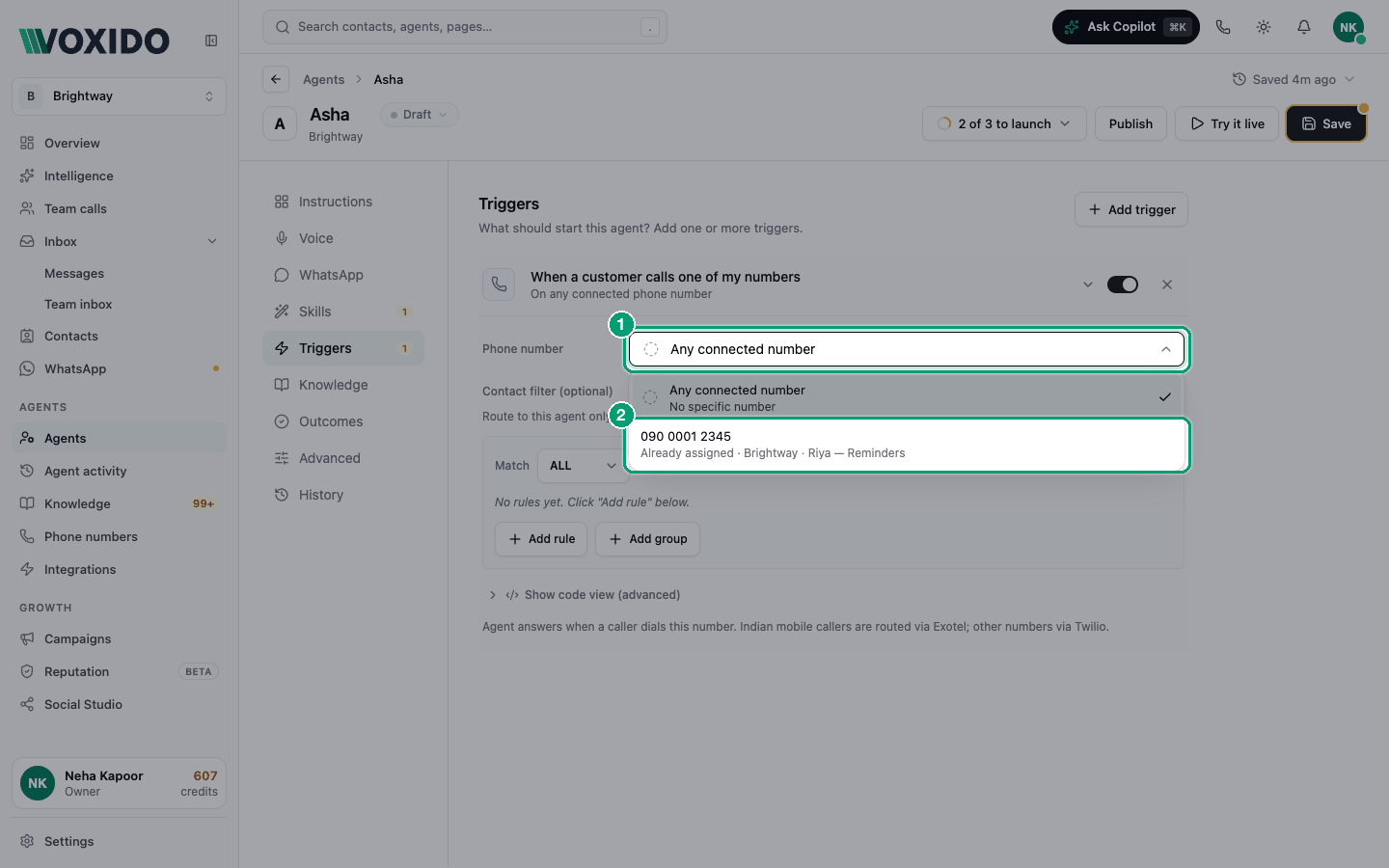
- In Phone number (or WhatsApp number), open the list and pick your number. You'll see: each number with a note: Available to assign, or Already assigned · workspace · agent.
- If the number already belongs to another agent, Voxido asks "Reassign this number?". Click Reassign to move it. You'll see: the number on this agent's trigger. The other agent stops answering it.
Trigger changes save straight away. To learn every trigger option, see How triggers work.
One number, one agent
Picking a number on a trigger makes that agent the number's agent, for calls and WhatsApp. Voxido removes the number from every other agent's triggers, so two agents never fight over one number. The number's workspace also moves to the agent's workspace.
Set it while buying
On the last step of Buy a number, choose the agent in Assign to agent. See Buy a phone number.
There is no agent picker in the number's details panel. To change who answers, use the agent's Triggers.
Which rule wins for a call
When a call comes in, Voxido checks in this order and stops at the first match:
- An agent has a trigger for this exact number. It answers. This always wins.
- The number has an answering agent (set while buying, or by a trigger for this number). Then:
- if an agent you built has an Any connected number trigger, that agent answers;
- otherwise the number's own agent answers.
- Nothing matches. The call is not answered.
An "Any connected number" trigger never answers a number that has no agent. This is on purpose: a new, unfinished number should never be answered by the wrong agent.
Examples
Brightway, one number. Brightway buys "Main line" and assigns "Front Desk" while buying. Calls go to Front Desk. Done.
A clinic with two numbers. "Appointments" is set on the "Reception" agent's trigger. "Reports" is set on the "Lab results" agent's trigger. Each number answers with its own agent.
The surprise catch-all. A coaching centre has "Admissions" answering its main number. Later someone builds "Tara" with an Any connected number trigger. Now Tara answers the main number too, because step 2 lets a catch-all on a built agent step in. Fix: add a trigger for the exact number on "Admissions". Step 1 always wins.
Common problems
Calls to my number aren't answered. The number has no agent. Add a trigger for this number on the right agent, or check that agent wasn't archived.
The wrong agent answers. Look for an Any connected number trigger on another agent. Either remove it, or add a trigger for this exact number on the agent you want.
My WhatsApp Business number gets no AI replies. For Your number lines, the AI stays silent until an agent has a When a customer messages on WhatsApp trigger for that number.
The test call says "Assign an agent before testing this number." A catch-all trigger doesn't count as an assignment. Add a trigger for this exact number.