

Advanced settings
The Advanced section holds the fine-tuning for calls, the models, and who the agent may talk to. As the screen says: "Sensible defaults — most properties never change these."
Find it: Sidebar → Agents → open an agent → Advanced
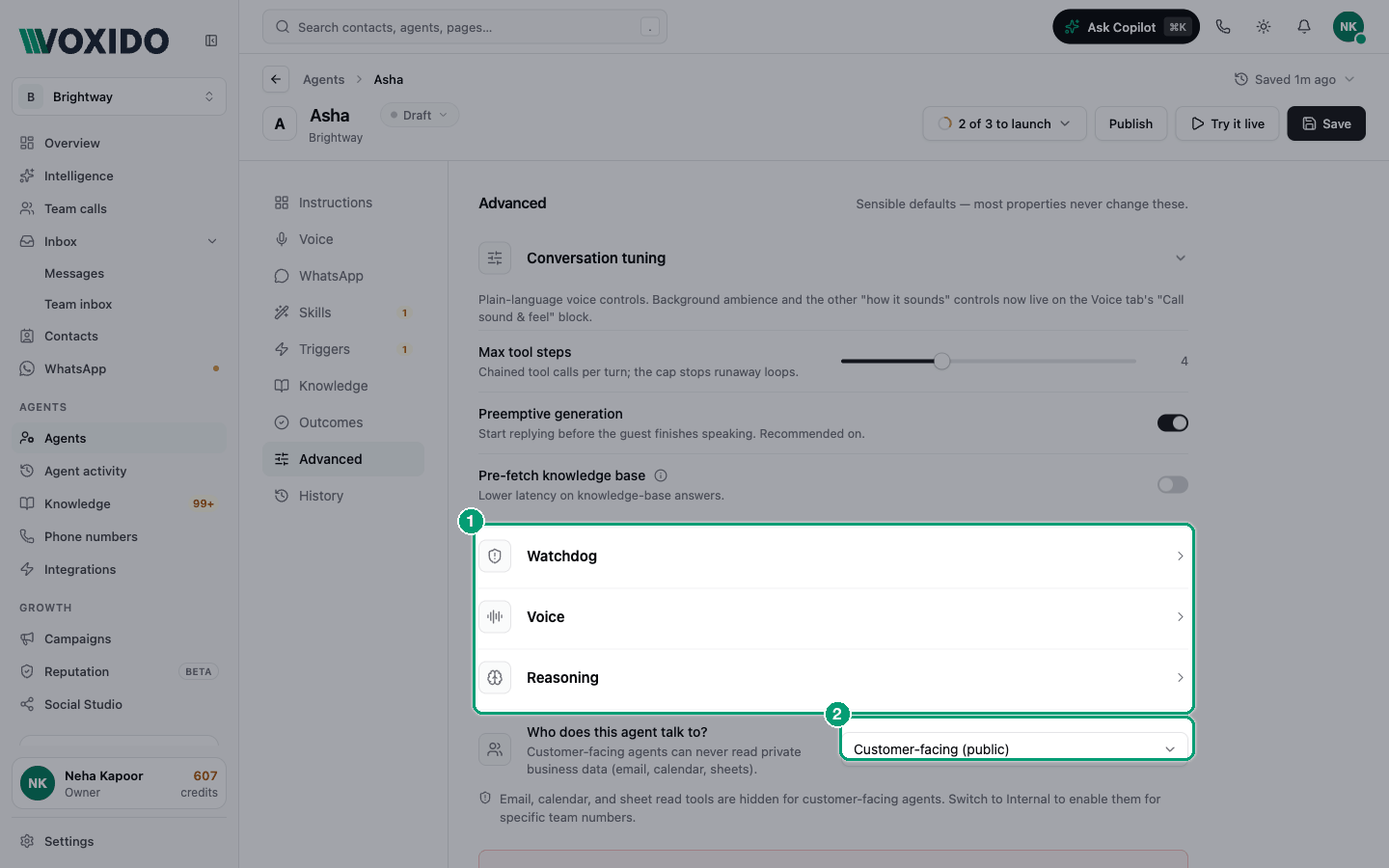
What's in this section
From top to bottom:
| Group | What it controls | Read more |
|---|---|---|
| Conversation tuning (open by default) | Skill steps per turn, early replies, knowledge pre-fetch | Below |
| Watchdog | When the agent says its "still working" line | Below |
| Voice | Persona name, speaking model, voice, listening model, listening language | Choose the models |
| Reasoning | Thinking model, creativity, reply length | Choose the models |
| Rate-quote strategy | Which hotel rate the agent says on calls (only when the Quote a room rate skill is on) | Below |
| Who does this agent talk to? | Customer-facing or internal, and who may get private data | Customer-facing vs internal agents |
| Delete this agent | Removes the agent for good | Below |
Everything except Delete agent is saved with the Save button at the top.
Looking for Guardrails or ambience?
Guardrails are now written inside the agent's Instructions document — see Write guardrails that work. Background ambience, thinking sound, filler phrases and the status phrase moved to Voice → Call sound & feel — see Make calls sound natural.
Conversation tuning
These change phone calls.
| Setting | What it does | Default | When to change it |
|---|---|---|---|
| Max tool steps | How many skills the agent may use one after another before it must answer (1 to 10). The cap stops runaway loops. | 4 | Raise to 5–6 if a task really needs several lookups in a row (check a date, check a price, save a booking). Lower it if the agent keeps calling skills instead of answering. |
| Preemptive generation | The agent starts preparing its reply before the caller finishes speaking, so answers come faster. | On | Leave on. Turn off only if testing shows it answers before the caller is done. |
| Pre-fetch knowledge base | Looks up your knowledge base for the caller's question before the agent answers, instead of searching as a separate step. | Off | Turn on when most questions are about your FAQs and answers feel slow. It can raise model cost, so try it on one agent first. |
Example: Brightway's agent answers "What are your opening hours?" in one step. Its booking flow needs three: check the calendar, save the contact's details, then send a confirmation. Max tool steps at 4 covers that.
Watchdog
The watchdog keeps callers informed when a lookup runs long. It speaks the Status phrase you set on Voice → Call sound & feel.
| Setting | What it does | Default | Range |
|---|---|---|---|
| First nudge after | Seconds of waiting before the first status line. | 5 s | 2–20 s |
| Max repeats | How many status lines a caller can hear in the whole call. 0 turns the watchdog off. | 2 | 0–5 |
When to change it:
- Your lookups are fast (a simple FAQ agent): keep 5 s, or set Max repeats to 1.
- Your system is slow (an old booking system, a slow spreadsheet): raise First nudge after to 7–8 s so the agent doesn't talk over an answer that's about to arrive.
- You never want a status line: set Max repeats to 0, and turn on the thinking sound instead.
Rate-quote strategy (hotels)
This group appears only when the Quote a room rate skill is on (in Skills → Stays). It decides which online travel agency (OTA) price the agent says out loud on a call.
| Option | What the agent says | Choose it when |
|---|---|---|
| Cheapest | The lowest OTA rate. "Safe default — customers appreciate the honesty." | You want to be the honest, low-price option |
| Preferred OTA | One OTA's rate when it has one for the date, otherwise the cheapest. Pick it in Preferred OTA (Booking.com, Agoda, Cleartrip, Goibibo, MakeMyTrip, Expedia, Hotels.com, Trip.com). | You have a partnership, e.g. with Booking.com |
| Direct booking | The cheapest rate, plus a push to book on your own site. | You want guests to book direct and skip OTA fees |
Whatever you pick, the guest also gets the full price list on WhatsApp after the call, so they see every option.
Who does this agent talk to?
| Option | Meaning |
|---|---|
| Customer-facing (public) (default) | Talks to customers. Can never read private business data such as email, calendar or sheets. |
| Internal (private) | Talks to your team. May read private data, but only for the team members you list under Internal recipients. |
Most agents should stay Customer-facing (public). Read Customer-facing vs internal agents before switching.
Delete this agent
At the very bottom. Delete agent opens a confirmation. The agent stops taking calls and WhatsApp messages; a conversation already in progress finishes first. This can't be undone. If you only want it to stop for now, pause it instead.
Safe defaults at a glance
| Setting | Safe default |
|---|---|
| Max tool steps | 4 |
| Preemptive generation | On |
| Pre-fetch knowledge base | Off |
| First nudge after / Max repeats | 5 s / 2 |
| Models | The ones tagged default |
| Creativity / Max output tokens | 0.70 / 120 |
| Who does this agent talk to? | Customer-facing (public) |
Common problems
The agent goes quiet for a long time, then answers. Turn on the thinking sound and filler phrases on Voice. Check the watchdog isn't set to 0 repeats.
The agent keeps using skills and never answers. Lower Max tool steps, and make your instructions say when to stop and reply.
I can't find "Rate-quote strategy". Turn on the Quote a room rate skill first.