

The WhatsApp page: a quick tour
The WhatsApp page is your home for everything WhatsApp: your numbers, what needs fixing, how chats are going, and the tools your agent uses.
Find it: Sidebar → WhatsAppWho can use it: Owners and Admins
A small dot next to WhatsApp in the sidebar means something needs your attention.
The tabs
| Tab | What it's for | Read more |
|---|---|---|
| Overview | Setup progress, things that need you, your numbers, and chat numbers. | This page |
| Templates | Messages Meta approves, so you can message customers first. | WhatsApp message templates |
| Chat flows | Menus with buttons that run by themselves when customers tap. | WhatsApp chat flows |
| Replies & hours | Your working hours and who agreed to get offers. | Replies & hours |
| Commerce | A shop inside WhatsApp, and orders from chats. | Commerce |
| Forms (Beta) | Short forms customers fill in without leaving WhatsApp. | WhatsApp forms |
If you have more than one WhatsApp number, a Number filter appears next to the title. Use it to see one number at a time.
Overview
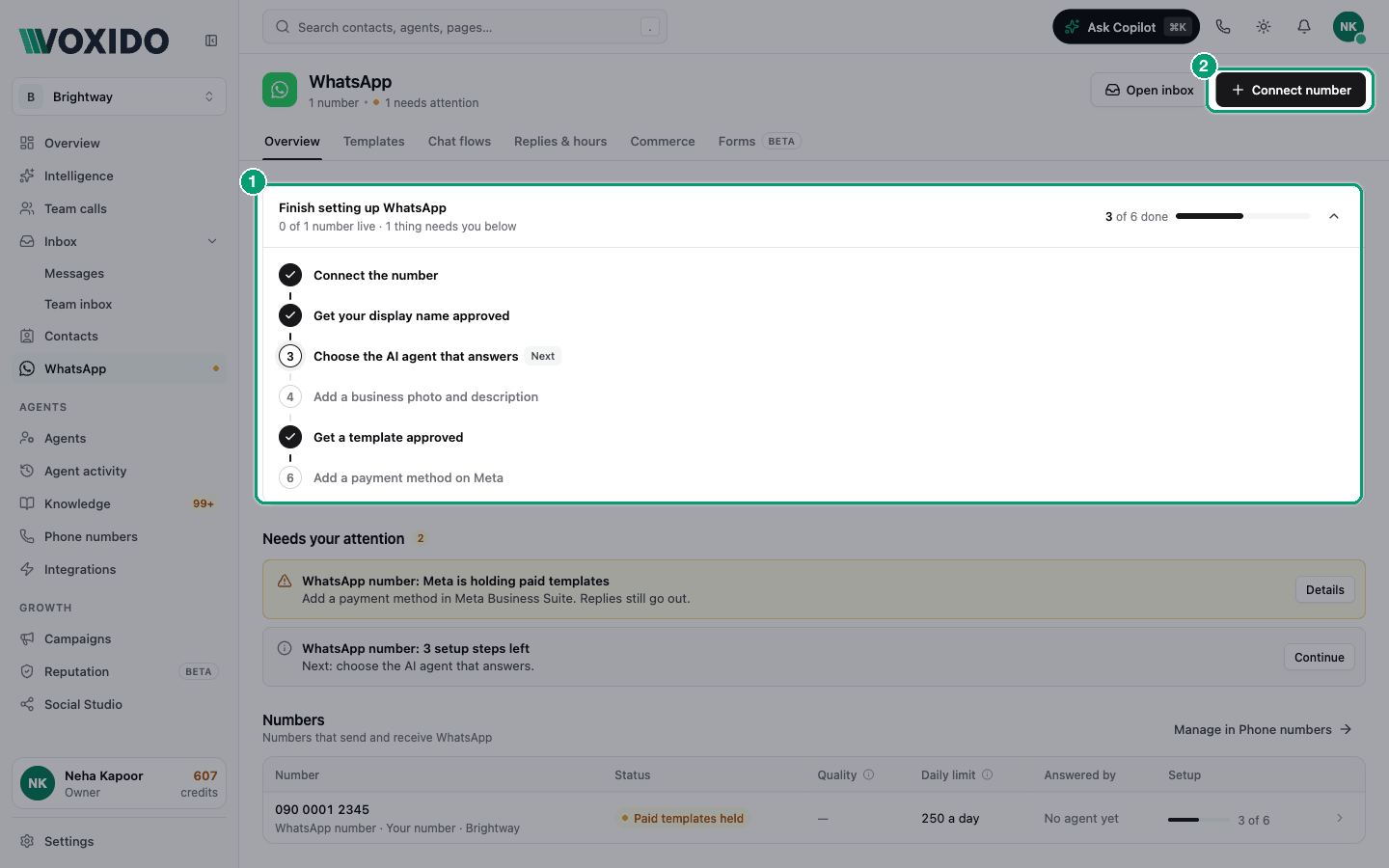
With no number yet, you'll see Put your hotel on WhatsApp and a Connect a WhatsApp number button. See Connect WhatsApp to a number.
Once you have a number, the Overview has four parts.
1. The setup card
It says Finish setting up WhatsApp (or Your WhatsApp is live), how many numbers are live, and a checklist of six steps for the first unfinished number. Click a step to open that number. Click the arrow to fold the list away.
2. Needs your attention
The most urgent items come first. Each has a button that takes you to the fix.
| Item | What it means | What to do |
|---|---|---|
| "Meta is holding paid templates" | No working payment method on Meta. | Add a card in Meta Business Suite. Replies still go out. |
| "flagged by Meta" | Too many people blocked or reported your messages. | Send fewer marketing messages for a week. |
| "message quality is low" | People are blocking or reporting messages. | Send less, and make messages more useful. The daily limit can drop. |
| "display name was declined" / "expired" | Customers see your number, not your name. | Choose a name that matches your business, in Meta. |
| "template was paused / rejected / turned off by Meta" | A template stopped working. | Click Fix to open Templates. |
| "n setup steps left" | The number isn't fully set up. | Click Continue. |
| "n templates are with Meta" | Meta is still reviewing. | Wait. Nothing reaches customers until approval. |
When nothing is wrong you'll see "All clear. Nothing needs you right now."
3. Numbers
| Column | What it shows |
|---|---|
| Number | The number, its name, Voxido number or Your number, and its workspace. |
| Status | Live, Paid templates held, Not connected or Failed. |
| Quality | Meta's rating of your messages: High, Medium or Low. |
| Daily limit | How many people this number can start chats with in 24 hours, for example "1K a day". Meta sets it. |
| Answered by | The agent that answers, or No agent yet. |
| Setup | Steps done, like "4 of 6", or Done. |
Click a row to open the number's details. Manage in Phone numbers takes you to the full numbers list. Open inbox opens Messages.
4. Chats and messages
Numbers for the period you pick (Last 7 days, Last 30 days or Last 90 days):
| Number | Meaning |
|---|---|
| Chats | Conversations, and how many were handed to your team. |
| Handled by AI | The share the AI handled, and how fast it first replied. |
| Delivered | The share of your sent messages that reached the phone. |
| Read | The share that was read, and how many failed to send. |
Replies & hours
Working hours
Set the hours your business is open, day by day, with a Timezone. Add Holidays (closed all day, or different hours).
Campaign calls and scheduled messages only go out in these hours. AI replies and booking confirmations are never held back. Click Save changes when done.
Consent
Marketing messages only go to people who said yes. This section is read-only.
| Number | Meaning |
|---|---|
| Can get offers | People who agreed to marketing messages. |
| Service messages only | People who get service messages (like confirmations) but not offers. |
| Unsubscribed | People who asked to stop. |
You'll also see the Words that unsubscribe someone and the Words that subscribe them again. A reply like "cancel" or "end" goes to your AI agent, which can tell whether the person means their booking or your messages. The Unsubscribed list can be searched by name or number.
Commerce
Commerce puts a small shop inside WhatsApp. Customers browse, add to a cart and send it in the chat. Your team and AI agent follow up.
- Create catalog makes a catalog in your Meta business and links it to WhatsApp. Or, under Already have a catalog?, pick one you already have.
- Add items (with photos and prices). Use Sync now to pull changes from Meta, or open Commerce Manager.
- Turn on Show catalog and Allow cart for each number.
- Orders from chats lists carts customers sent. Change an order to Mark payment requested, Mark paid, Confirm or Cancel order.
Good for: a bakery taking cake orders, a gift shop, a spa selling packages, a hotel selling room upgrades.
Common problems
My number says "Not connected". WhatsApp isn't linked yet. See Connect WhatsApp to a number.
Quality dropped to "Low". Customers are blocking or reporting you. Send marketing messages less often, and only to people who said yes.
"Creating needs a Meta business on record for your number." Reconnect WhatsApp, or pick an existing catalog instead.