

Intelligence
Intelligence reads your agents' calls and chats for you. It tells you what people asked about, how they felt, where the agent struggled, and what to fix next.
Think of it as a manager who listened to every conversation and wrote you a one-page note.
Find it: Sidebar → Intelligence
How it helps a business
| Problem you have | What Intelligence shows | Example |
|---|---|---|
| "We're missing bookings and don't know why." | Follow-ups the agent promised but never made, and competitors people mention. | A hotel learns guests compare prices with another hotel and leave. |
| "Customers keep complaining." | The top topics, and topics where negative sentiment went up. | A clinic sees "waiting time" turn negative this month. |
| "The agent can't answer some questions." | Questions your agents couldn't answer, with how often each was asked. | A school sees "Is there a bus route to Sector 21?" asked 14 times. |
| "Which agent needs coaching?" | A quality checklist for each agent, like Confirmed details. | A real-estate agent rarely confirms the site-visit time. |
For step-by-step playbooks, see Answer business questions with your numbers.
How it works, and how often
- After each conversation ends, Voxido reads the transcript. It notes the topics, sentiment, what the agent promised, and how the agent handled it.
- Once a day, Voxido looks across the last 60 days for patterns. It turns them into action items.
- Every Monday, a weekly report is emailed to the account owner.
The numbers on the page are worked out fresh each time you open it. The header shows "Updated" with how long ago the newest conversation was read. If your workspace has a daily run, the toolbar also shows "Next run" with a time in IST.
Use the filters
| Filter | What it does | Default |
|---|---|---|
| Agent | Pick one agent, or leave it on all agents combined. | All agents |
| Period | The days to read: Last 7 days, Last 30 days, Last 60 days, Last 90 days, other presets, or Custom. | Last 60 days |
Both filters apply to all three tabs. Inside one workspace, the numbers and topics focus on that workspace's calls.
The Briefing tab
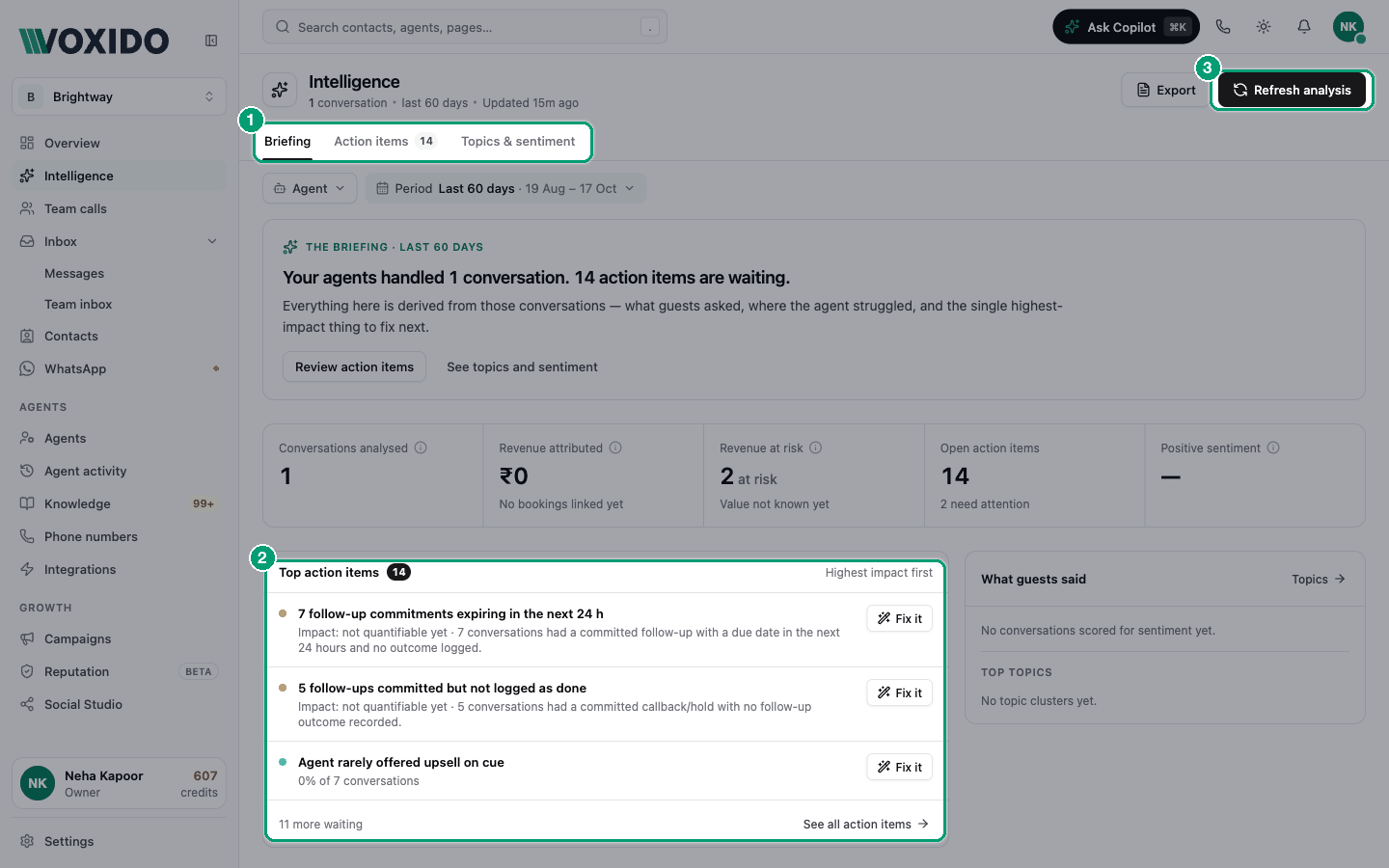
The briefing is one sentence, like "Your agents handled 120 conversations. 72% positive sentiment. 4 action items are waiting." Click Review action items or See topics and sentiment to jump to the other tabs.
Below it are five numbers:
| Number | What it means |
|---|---|
| Conversations analysed | Calls and chats in the period that Intelligence has read. |
| Revenue attributed | Booking value linked to conversations in the period. Mostly used by hotels with booking stages or a connected PMS. For everyone else, use Revenue won on Overview. |
| Revenue at risk | The value of open action items marked "revenue at risk". If the value isn't known yet, it shows how many items there are and "Value not known yet". |
| Open action items | How many to-dos are waiting, and how many "need attention". |
| Positive sentiment | The share of scored conversations that ended positive. Unscored ones aren't counted. |
Three of them show the change against the period before.
Then two cards: Top action items (the three most urgent, highest impact first) and What guests said (the sentiment split and the top four topics).
The Topics & sentiment tab
| Card | What it shows | Click it to… |
|---|---|---|
| What guests called about | Each topic with its number of conversations and share. One conversation can have several topics. | see the conversations for that topic |
| Sentiment | Positive, neutral and negative, plus the change against the period before. "Unrated" conversations are left out. | see the conversations with that feeling |
| Questions your agents couldn't answer | Questions people asked that the agent couldn't answer, with "Asked N times". Marked Property-wide: it covers all agents. | click See calls to read them |
| Quality checklist | Only when you pick one agent. The share of calls that passed each point, like Greeting on standard or Handled objection. | see the calls that missed a point |
| Agent's instruction changes | Only when you pick one agent. The latest versions of its instructions; Live marks the current one. | — |
Pick one agent to see the full list
Questions your agents couldn't answer fills in when you pick one agent in the Agent filter. With all agents picked, it can look empty.
A side panel opens when you click something. It lists the matching conversations with their outcome and sentiment. Click one to read the full conversation.
The Action items tab
Every open to-do, grouped from most to least urgent. Each one can be fixed, snoozed for 14 days, or dismissed. See Intelligence action items.
Refresh analysis and Export
| Button | What it does |
|---|---|
| Refresh analysis | Looks for new patterns and action items now, instead of waiting for the daily run. Then reloads the page. While it runs you'll see "Reading N conversations…". |
| Export | Builds a Weekly intelligence report for the period you picked and opens it. |
The report
Click Export to open a clean report you can print or send. It covers the whole company, not just one agent.
- Pick the Period you want (for example Last 7 days).
- Click Export. You'll see: the Weekly intelligence report page with a Back to Intelligence link.
| Section | What's in it |
|---|---|
| Key metrics | Conversations, Revenue booked, Revenue at risk, Open action items, Positive sentiment |
| Open action items | The to-dos with their urgency |
| Trends | Top topics and the sentiment split |
| Agent summary | Per agent: Conversations, Conversion, ₹ Attributed, Quality |
| AI improvements this week | Prompt versions promoted, FAQs approved, follow-ups completed |
| Closed this period | Action items finished in the period |
| Methodology notes | How the numbers were worked out |
The same report is emailed to the account owner every Monday, covering the past 7 days.
Common problems
"Hasn't had any analysed conversations … yet." No call or chat finished in the period. Make a test call, wait a minute, then reload.
The numbers differ from Overview. They measure different things. Overview counts stage moves and every call. Intelligence counts conversations it has read, and Revenue attributed counts booking outcomes. Use Overview for "how much", Intelligence for "why".
"All caught up." but I expected items. Patterns need a few conversations first. For example, a quality item needs at least 3 calls for that agent.