

Agent roles: how agents hand work to each other
An agent role is a job title for an AI agent, like "Support" or "Qualifier". Roles let agents pass a customer to the right next agent. They also group agents in role reports. A role doesn't change what an agent says; its instructions do that.
Find it: Sidebar → Settings → Agent rolesWho can use it: Owners and Admins
Not the same as Permissions
Permissions (in Settings) are for people: what a teammate can see and do. Agent roles are for AI agents: which job each agent does. See Roles and permissions for people.
Do you need agent roles?
The problem: "Our enquiry agent answers questions well, but when someone wants to book, it should pass them to the booking agent."
| Your setup | What to do | Why |
|---|---|---|
| One agent does everything | Leave it on No specific role | Nothing to hand off to. |
| Two or more agents with different jobs | Give each one a role, then set who it hands off to | Customers move to the right agent without starting over. |
Examples:
- Brightway: an "Enquiries" agent hands off to a "Bookings" agent when a customer is ready to book.
- A clinic: "Reception" books visits and hands billing questions to "Billing".
- Real estate: a Qualifier agent asks buyers what they want, then hands serious buyers to a "Site visits" agent.
- A hotel: Front Desk hands guests who want extras to Pre-Arrival Upsell.
The roles page
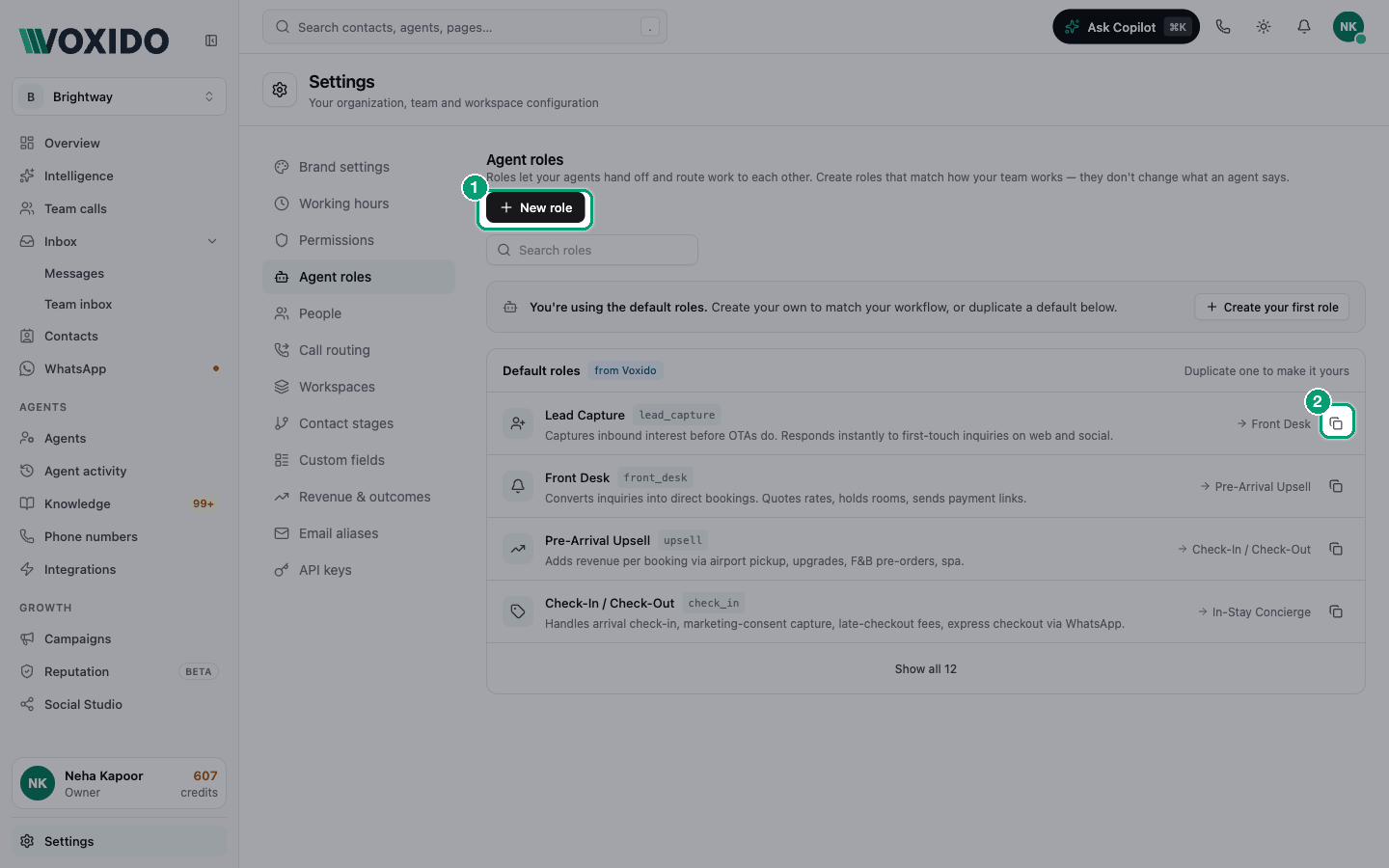
The page has two lists:
| List | What's in it |
|---|---|
| Your roles | Roles your business created. You can edit and delete these. |
| Default roles (from Voxido) | Ready-made roles, like Lead Capture, Qualifier, Support, Retention, Front Desk and Reputation. You can't edit them, but you can copy them. Click Show all to see every one. |
Until you create one, the page says "You're using the default roles."
Create a role
- Click New role. You'll see: New role, "Roles are how agents hand off to each other."
- Type a Name, like "Bookings". You'll see: the Key fills in by itself, like
bookings. - Write a short Description, like "Books appointments for customers who are ready."
- Click Create role. You'll see: "Role created", and the role in Your roles.
The Key is the name agents use to find this role. You can't change it after you create the role, so pick it with care.
Copy a default role to make it yours
- In Default roles, click the copy icon ("Duplicate to make it yours") on a role. You'll see: the role form, filled in from the default.
- Change the name or description, then click Create role.
If you keep the same key, your copy replaces the default one in your account.
Edit or delete a role
Use the pencil (Edit) or bin (Delete) icons on a role in Your roles.
When you delete a role, agents already using it keep it. It just leaves the list, so you can't pick it for new agents.
Give an agent its role
- Go to Sidebar → Agents and open an agent.
- Open the Skills section and scroll to Role. You'll see: "Sets how leads route between agents and which scorecard applies. Does not change the persona's wording."
- Click the role box and pick a role, or No specific role. You'll see: the role saves at once on an existing agent.
- Below it, under When done, hand off to, pick the role that should take over. Leave it to use the role's suggestion (shown as "Default: …").
- Click Save at the top of the editor. You'll see: the handoff choice is kept. (The role itself saved in step 3.)
Need a role that isn't in the list? Click Use a custom role key under the picker and type a key. Voxido creates the role for you.
Common problems
My agent doesn't hand off. Check that another Active agent has the role you picked in When done, hand off to.
I can't edit a default role. Default roles are read-only. Copy it with "Duplicate to make it yours", then edit your copy.
I don't see Agent roles. Only Owners and Admins can open it.