

Working hours: set your time zone, opening hours and holidays
Working hours tells Voxido when it may reach out to customers on its own: campaign calls and scheduled messages. It also holds your company time zone, which shifts, reports and many other features use.
Find it: Sidebar → Settings → Working hoursWho can use it: Owners and Admins
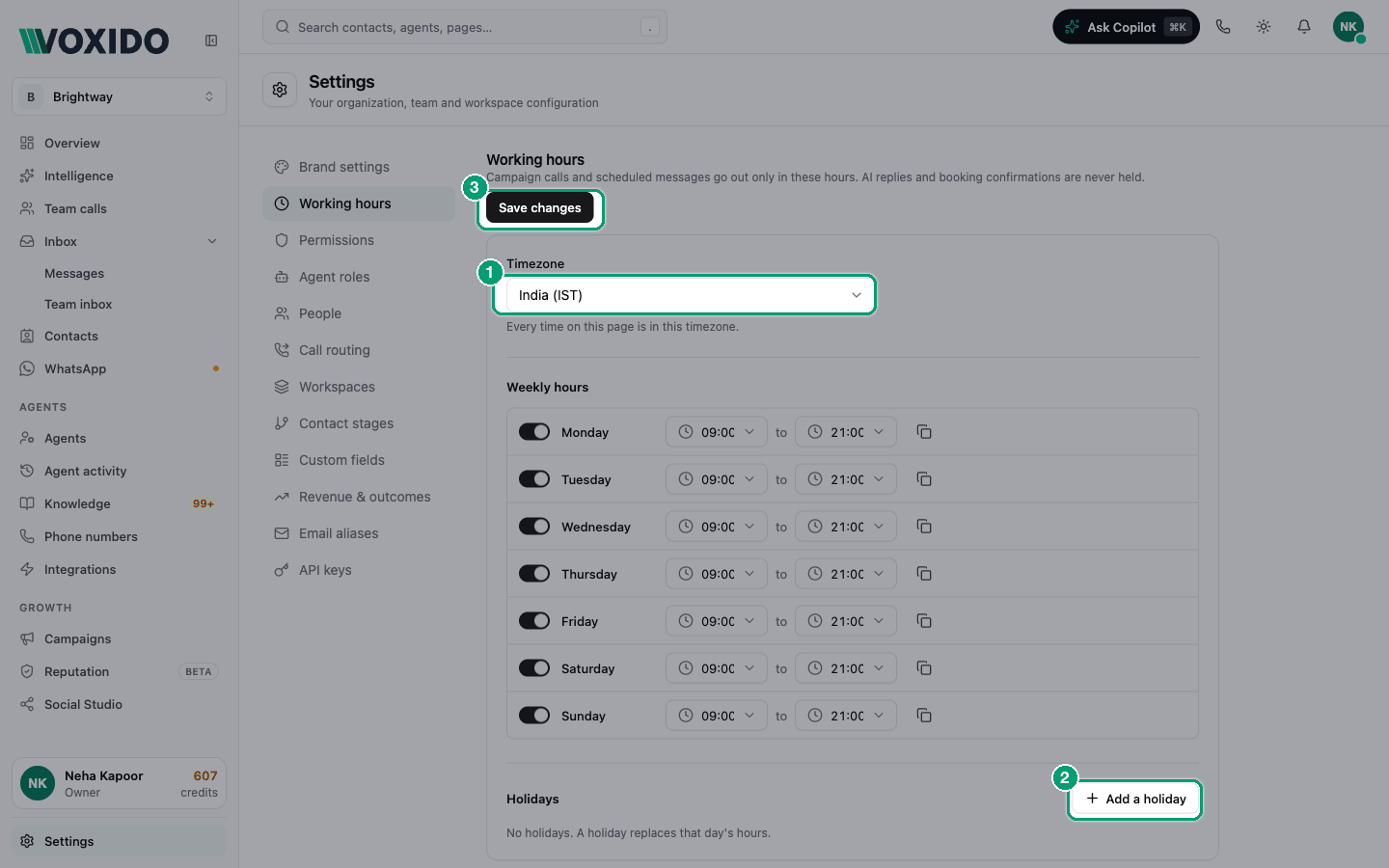
The page says: "Campaign calls and scheduled messages go out only in these hours. AI replies and booking confirmations are never held."
What working hours do (and don't do)
| Inside working hours only | Any time, day or night |
|---|---|
| Campaign calls and campaign messages | Your AI agent answering calls and WhatsApp |
| Scheduled outreach your agents start on their own | Booking confirmations |
| Calls passed to your team (they follow each person's shift instead) | |
| Team inbox alerts |
Something due outside working hours is held, not dropped. It goes out when your hours open again. In the campaign log it shows as "Outside working hours".
There's one more guard: if a customer's phone number is from a place with a different time zone, outreach must also fall between 09:00 and 21:00 their time.
Choose your hours
| Your business | Good working hours | Why |
|---|---|---|
| Brightway (service business) | Mon–Sat, 09:00–19:00 | Follow-ups arrive while you can take the reply. |
| Clinic | Mon–Sat, 08:00–20:00 | Reminders before the first appointment. |
| School or coaching centre | Mon–Sat, 09:00–18:00 | Parents don't want calls at night. |
| Loan recovery | Check your local rules | Many places limit collection calls to set hours. |
| Hotel | Every day, 09:00–21:00 | Guests travel on weekends too. |
If you close all seven days, the page warns: "Nothing will go out automatically."
Set your time zone and hours
- Open Settings → Working hours. You'll see: Timezone at the top, then Weekly hours and Holidays.
- Pick your Timezone. Type to search, for example "Kolkata" or "Dubai". "Every time on this page is in this timezone."
- For each day, use the switch to open or close it. For an open day, set the start and end times (24-hour clock). You'll see: "Closed" on a day you switched off. "End must be after start" if the times are the wrong way round.
- To use one day's times everywhere, click the copy button next to it: Copy to every open day.
- Click Save changes. You'll see: "Working hours saved."
New accounts start with every day open, 09:00–21:00, in Asia/Kolkata.
Add a holiday
A holiday replaces that day's normal hours.
- Under Holidays, click Add a holiday. You'll see: a small form with Date and Name.
- Pick the Date (today or later) and type a Name if you like, for example "Diwali".
- Choose Closed all day, or Different hours and set the times.
- Click Add holiday, then Save changes at the top. You'll see: a chip such as "Closed 8 Nov · Diwali" or "24 Dec · Christmas Eve · 10:00-14:00". Click its × to remove it.
Past holidays drop off the list on their own.
What else uses the time zone
The company time zone is used across Voxido:
| Feature | How it uses the time zone |
|---|---|
| People's shifts and working days | "Times are in the company time zone." Outside a shift, people aren't rung for calls. See People and teams. |
| Daily check-ins | Sent at each person's shift start, in company time. See Daily attendance check-ins. |
| Team calls report and daily email | Days start and end at midnight company time. See Team calls. |
| Feedback after the call | Quiet hours (9 pm – 8 am to start) use the workspace's time zone, or the company's. See Feedback after the call. |
| Your AI agent | Knows today's date and whether to say good morning or good evening. |
Workspaces with their own time zone
If your workspaces are in different places, each one can have its own time zone. Campaigns and scheduled outreach for that workspace then follow its time zone, with the same working hours.
Find it: Settings → Workspaces → ⋯ on a workspace → Set timezone and access → Timezone
Pick Company timezone to follow this page. Shifts, check-ins and the Team calls report always use the company time zone.
Common problems
My campaign didn't call anyone. Check that today is open and the time is inside your hours, in the right time zone. Calls held for working hours go out when the hours open.
Someone shows Off shift at the wrong time. Check the time zone here. Shift times are read in the company time zone, not the person's own.