

Roles and permissions: which role to give each person
Every person who signs in to Voxido has one role. The role decides which pages they see and what they can change. There are four roles: Owner, Admin, Manager and Member.
Find it: Sidebar → Settings → PermissionsWho can use it: Owners and Admins can open this page. Roles are given in Settings → People.
The four roles in one line each
| Role | In plain words |
|---|---|
| Owner | Full access, including billing, logins, roles and account settings. There is always exactly one owner. |
| Admin | Everything an owner can do, except editing roles, deleting the account and transferring ownership. |
| Manager | Runs the team day to day: reassigns contacts, sets status and leave for anyone in their workspaces, and sees everyone's numbers. No billing, settings, agents or inviting people. |
| Member | Day-to-day work and view-only reports. No settings, billing or account setup. |
Which role should each person get?
The problem: "I want my staff to answer customers, but I don't want them changing my agents or seeing the bills."
Give each person the smallest role that lets them do their job. You can raise it later in one click.
| This person… | Give them | Why |
|---|---|---|
| Is you, the person who signed up | Owner (already yours) | There's exactly one Owner. |
| Is a partner or office manager who sets up agents, numbers and billing | Admin | They can change everything except roles and ownership. |
| Leads a shift or a team, and moves work between people | Manager | They can reassign contacts, book leave and see the team's numbers, without touching setup. |
| Answers chats, calls back customers, updates contacts | Member | They get the Inbox, Contacts and reports, nothing more. |
| Only gets alerts or calls on their mobile, and never signs in | No login | Add them as a person in People and teams without a login. |
| Works for one branch only | Member or Manager, limited to that workspace | They only see that branch's data. See Workspaces. |
Examples:
- Brightway: the founder is Owner, the operations lead is Admin, two front-office staff are Members.
- A clinic with two branches: each branch head is a Manager limited to their branch; reception staff are Members.
- A loan recovery team: the team lead is a Manager who reassigns cases; the callers are Members.
What each role can do
| What | Owner | Admin | Manager | Member |
|---|---|---|---|---|
| View, add and edit contacts | ✓ | ✓ | ✓ | ✓ |
| Assign contacts to people, change the reporter | ✓ | ✓ | ✓ | – |
| Delete contacts | ✓ | ✓ | – | – |
| Read conversations, view and send messages | ✓ | ✓ | ✓ | ✓ |
| View reports and logs | ✓ | ✓ | ✓ | ✓ |
| See everyone's numbers in reports | ✓ | ✓ | ✓ | Own only |
| Pause and resume agents | ✓ | ✓ | ✓ | – |
| Create, edit and delete agents and campaigns | ✓ | ✓ | – | – |
| Add and edit knowledge | ✓ | ✓ | – | – |
| Manage phone numbers and WhatsApp | ✓ | ✓ | – | – |
| Reply to reviews, publish social posts | ✓ | ✓ | – | – |
| Set anyone's status and leave | ✓ | ✓ | ✓ | – |
| Invite people, change roles and access, remove logins | ✓ | ✓ | – | – |
| Settings, integrations, API keys, billing | ✓ | ✓ | – | – |
| Edit role definitions | ✓ | – | – | – |
Settings tabs: Owners and Admins see every tab. Managers see only People and Revenue & outcomes. Members don't see Settings at all; if they open its link, Voxido sends them to Overview.
See the exact permissions
- Go to Settings → Permissions. You'll see: Roles and permissions, "What each role can access in your workspace. Pick a role to see its permissions." One card per role, with a badge: Full access for the Owner, or how many permissions the role has.
- Click a role card. You'll see: a table, What a Manager can do, listed by area (Contacts, Messages, AI agents and so on).
- Turn on Only show differences to see just what changes between roles.
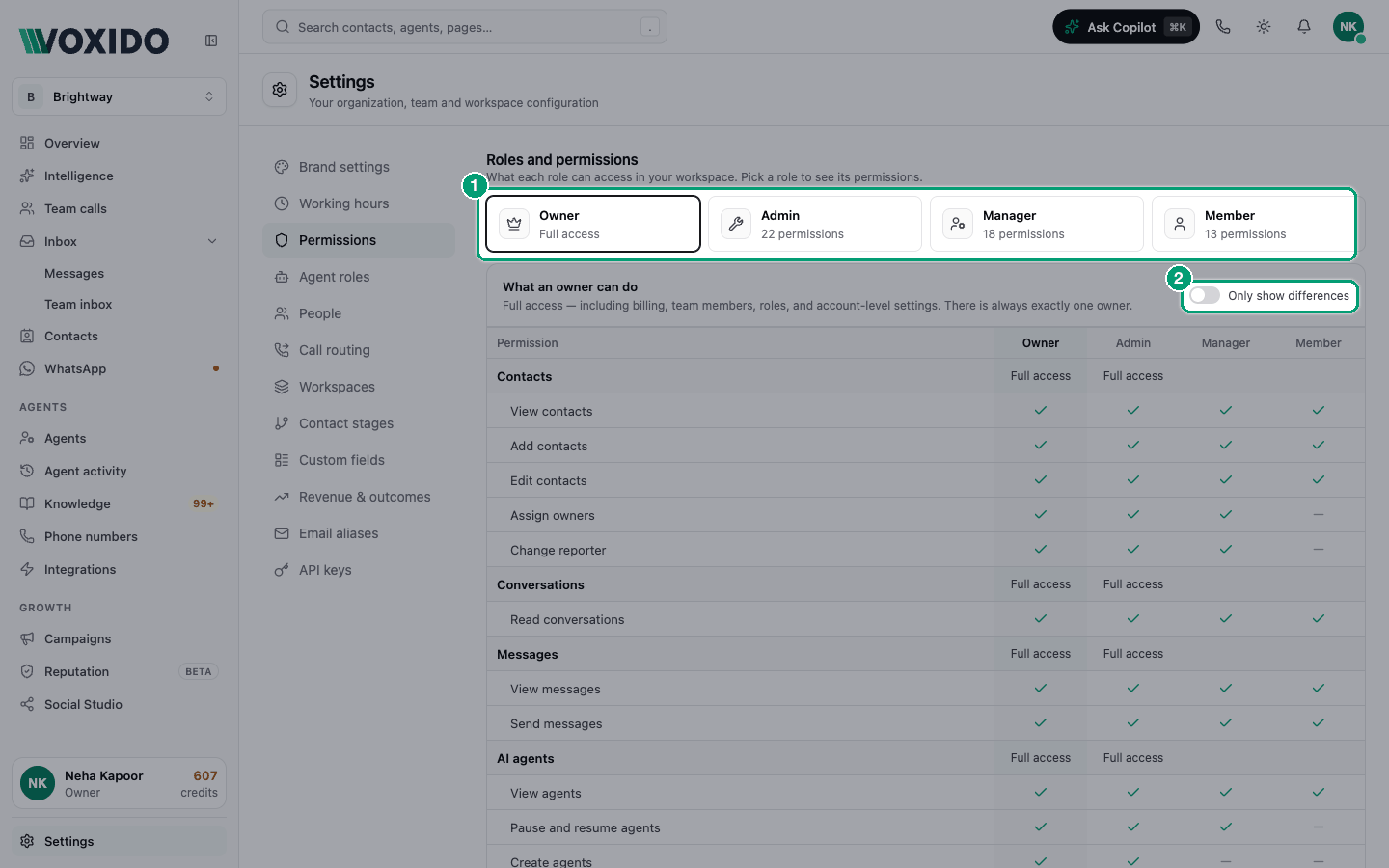
These are the built-in roles. Custom roles aren't available yet, so you can't create a new role or change what a role allows.
Rules that protect your account
- Only the Owner can make someone an Admin. Admins can invite and manage Members and Managers only.
- Nobody can change the Owner's role from the People list, and nobody can invite someone as Owner.
- There is always one Owner. You can't remove, suspend or demote the last Owner.
- Ownership transfer isn't in the app. Ask Voxido support if the Owner needs to change.
- Owners and Admins always see every workspace. Only Managers and Members can be limited.
Common problems
I can't pick "Admin" when inviting. Only the Owner can give the Admin role.
My teammate can't see Agents. Managers and Members can't open Agents, Campaigns, Knowledge, Phone numbers, WhatsApp or Integrations. Make them an Admin if they need to set these up.
A Member says Settings is missing. That's expected. Members have no Settings.