

Answer incoming WhatsApp messages and calls
Two triggers start your agent when a customer reaches out first:
- When a customer messages on WhatsApp
- When a customer calls one of my numbers
The customer starts the conversation, so these never reach out on their own and there's no credit warning when you add them.
Find it: Sidebar → Agents → open an agent → Triggers → Add trigger
When to use them
The problem: "We miss WhatsApp messages after 7 pm." "Calls ring out when the front desk is busy."
Why these triggers: they start the agent the moment a message or call arrives, at any hour.
| If you want… | Do this |
|---|---|
| One agent to answer everything | One trigger, Any connected number, no filters |
| A different agent for one number (for example your sales line) | Pick that number in the trigger |
| A special agent for some messages (for example "fees" questions) | Add Keywords |
| A welcome agent for first-time contacts only | Tick New contact only |
| A different agent for existing customers (for example "In-stay" guests or "Enrolled" students) | Add a Contact filter on Stage |
Before you start: connect the WhatsApp number or phone number to Voxido, and turn on at least one Messages skill (needed to publish).
When a customer messages on WhatsApp
- Open your agent → Triggers → Add trigger → When a customer messages on WhatsApp. You'll see: the new trigger, open, with its settings.
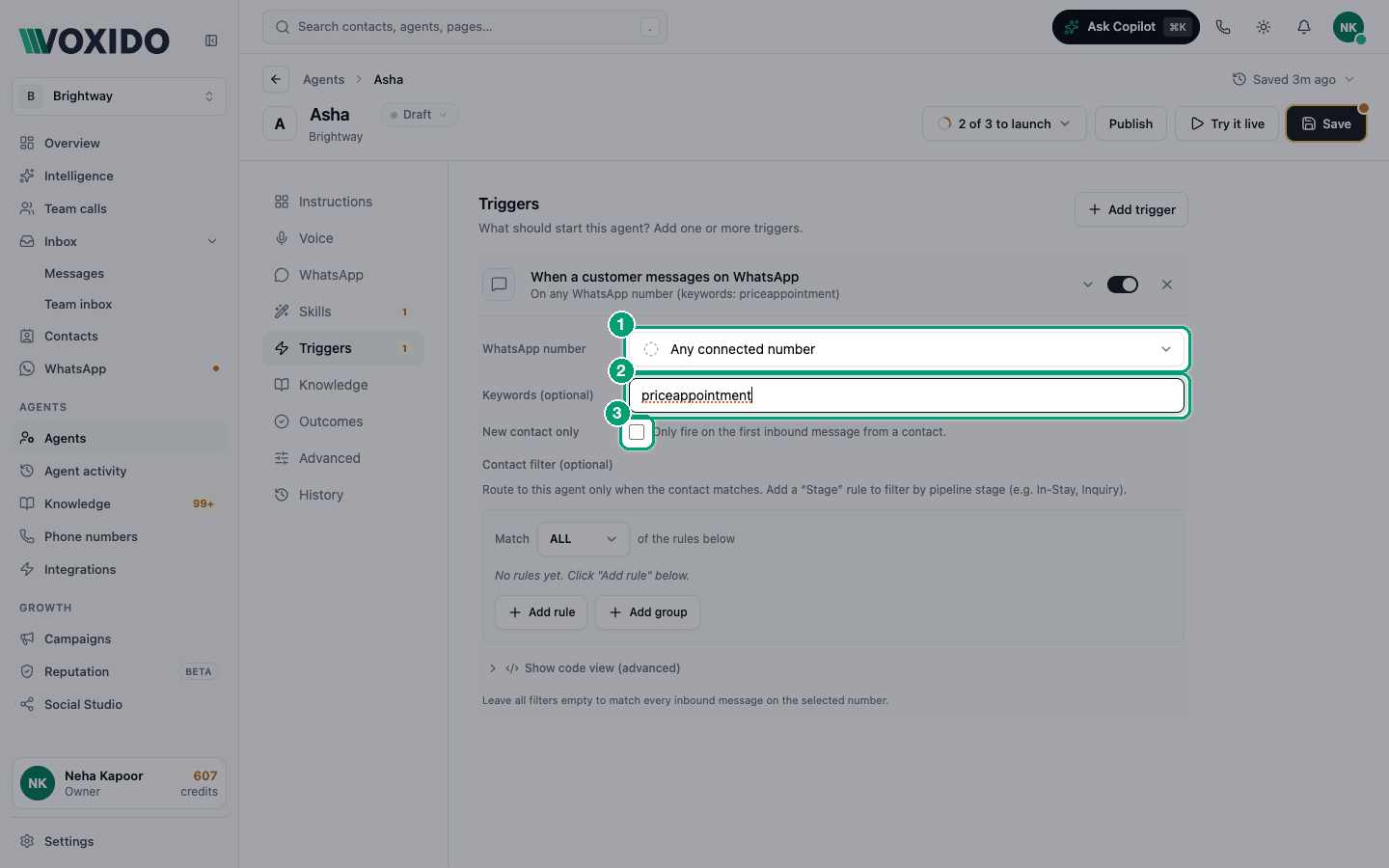
- Pick the WhatsApp number, or leave Any connected number. You'll see: each number shows "Available to assign" or "Already assigned · workspace · agent".
- Optional: type Keywords (optional), separated by commas, for example
fees, admission. - Optional: tick New contact only.
- Optional: add a Contact filter (optional) rule, for example Stage equals "Enrolled".
- Close the trigger row. You'll see: a summary such as "On selected WhatsApp number (keywords: fees, admission)".
Leave all filters empty to answer every message on that number.
| Setting | What it does | Tip |
|---|---|---|
| WhatsApp number | Which number this agent answers. | Any connected number covers all. |
| Keywords (optional) | The message must contain at least one word. Not case-sensitive. | Matches inside words too: "book" also matches "booking" and "Facebook". |
| New contact only | Only for someone who has never had a conversation with you before. | It's about chat history, not when the contact was added. |
| Contact filter (optional) | The contact must match these rules. | Use Stage to split new leads from existing customers. |
When a customer calls one of my numbers
- Open your agent → Triggers → Add trigger → When a customer calls one of my numbers. You'll see: the trigger with Phone number and Contact filter (optional).
- Pick the Phone number, or leave Any connected number.
- Optional: add a Contact filter rule so only some callers reach this agent.
- Close the trigger row. You'll see: "On selected phone number" or "On any connected phone number".
Only numbers that can take calls are listed. WhatsApp-only numbers don't appear here.
Moving a number from another agent
A number answered by another agent shows "Already assigned". If you pick it, Voxido asks Reassign this number? and explains it will disconnect the number from the other agent. Click Reassign only if you mean it.
When several agents could answer
Only one agent answers each message or call. If more than one trigger matches, the most specific one wins: a trigger with a chosen number, keywords or a contact filter beats one with nothing set.
Example (school): a general "Front office" agent answers Any connected number. A "Fees" agent has the same number plus keywords fees, payment. A parent writing "When are fees due?" reaches the Fees agent. "What time does school start?" reaches Front office.
Turning an inbound trigger off
Switching the trigger off means the agent stops answering those messages or calls until you switch it back on. Make sure another agent or a person covers them.
Common problems
The agent doesn't reply to some messages. The message didn't contain a keyword, the contact failed the filter, or a more specific trigger on another agent won. Check the agent is Active.
"New contact only" fired for a contact I added last month. That's expected. "New" means they've never had a conversation with you, not that they were added recently. Once they've talked to any agent, it won't fire for them again.
A call went to the wrong agent. Check which agent the number is assigned to, and whether another agent has a more specific trigger.