

Setting up your business (first-time setup)
Right after you sign up, Voxido asks a few questions about your business. Your answers create your account, your first workspace and a starter pack: sample agents, knowledge and contact stages you can change later.
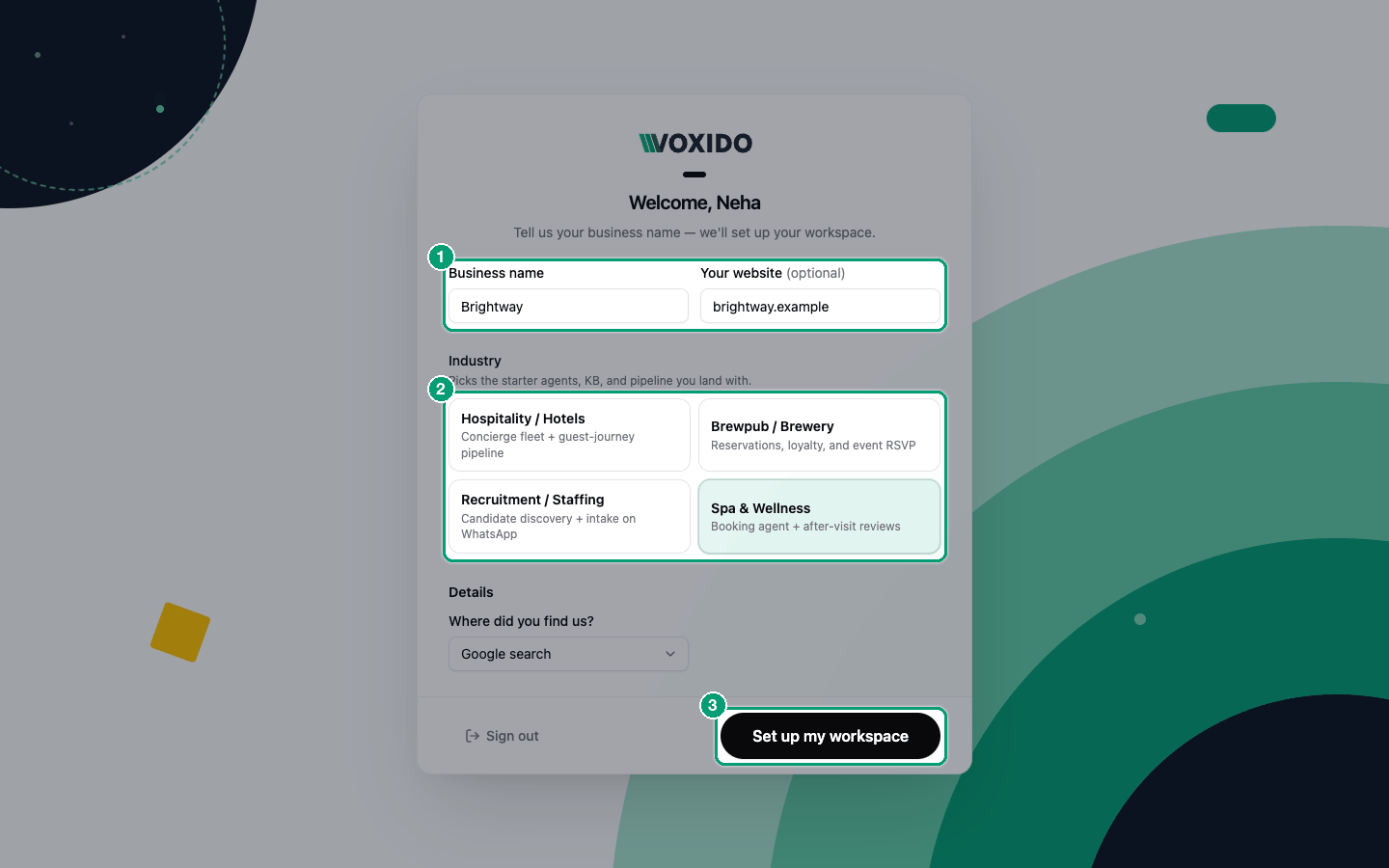
Find it: it opens by itself after your first sign-in, on a screen that says "Welcome, your first name". You can't reach the app until it's done.
Before you start
- Know your business name. It must not already be used on Voxido.
- Have your website address ready (for example
brightway.com). It's optional, but it helps a lot.
Pick your industry
The Industry choice decides your starter pack. It's the one choice on this screen that matters most.
| Your business | Choose | What you start with |
|---|---|---|
| Hotel, resort, homestay | Hospitality / Hotels | Guest-journey agents, a longer setup with a free trial number |
| Bar, brewpub, restaurant with events | Brewpub / Brewery | Reservations, loyalty and event RSVP |
| Staffing or hiring agency | Recruitment / Staffing | Candidate discovery and intake on WhatsApp |
| Spa, salon, clinic | Spa & Wellness | A booking agent and after-visit reviews |
| Something else (like Brightway) | The closest match | Pick the one most like how your customers reach you. You will edit the starter agents anyway. |
Not sure?
For a business that mostly books appointments (a clinic, a coaching centre, a repair service), Spa & Wellness is the closest fit: a booking agent plus review follow-ups. You can rename, change or delete every starter agent later.
Fill in the first screen
- Type your Business name. You'll see: an error "Company name already exists" if someone else uses it. Add your city or a word like "Clinic".
- Type Your website (optional), like
brightway.com. You'll see: "Use your company website, not a public platform." if you type a social or email site. - Click your Industry. You'll see: the picked card turns blue.
- Pick Where did you find us?.
- Hotels only: pick your PMS (the software that holds your bookings), or Other and type its name.
- Click Set up my workspace. Hotels click Continue instead and go on to the steps below. You'll see: "Setting up…", then the Overview page with your starter content.
If you typed a website, a message says "Building your Knowledge Base". Voxido reads your site in the background. It takes a few minutes, and you can keep working.
Voxido also takes your timezone from your computer. You can change it later in Working hours.
Hotels: the extra steps
If you picked Hospitality / Hotels, setup has six short steps. Dots at the top show where you are.
- What should AI handle? Tick the guest journeys you want covered: Reservation, Before Arrival, During Stay, Checkout, After Stay, Marketing. Then click Continue. You'll see: the agents Voxido will create, for example Mira (bookings), Pooja (upsell), Kavitha (in-stay) and Priyanka (reviews).
- Connect your channels. Pick a Trial phone number (included free for a limited time, for voice and WhatsApp), or Add a number later from Phone Numbers. Then click Continue. You'll see: "WhatsApp is ready on this trial number" when you pick one.
- Building your AI Employee… Wait on this screen. It ticks through steps like "Learning your website" and "Training booking agent". You'll see: it moves on by itself, usually in 1–3 minutes.
- Your agent is ready. Call or WhatsApp the number shown to talk to your agent. Then click Continue.
- Add credit. Your Trial balance shows your free trial credits and how long they are valid. Click Add credit to buy more, or Skip for now. You'll see: the Overview page (or Billing, if you chose to add credit).
If you refresh the page halfway, setup opens again on the same step.
What you get
- Your account and first workspace, both named after your business.
- Starter agents for your industry. They are a starting point, not finished agents. Open each one and adjust it. See Creating an agent.
- Knowledge built from your website, if you gave one.
- Contact stages and sample contacts so pages don't look empty. Sample contacts carry a Sample tag.
- Free trial credits to test calls and messages. See Your free trial.
Common problems
"Company name already exists." Another account uses that name. Make it more specific, like "Brightway Pune".
"Couldn't finish setup." Something failed while creating your account. Read the message under it, fix the field, and try again.
I'm not ready yet. Click Sign out at the bottom. The same screen opens next time you sign in.
The website build failed. Setup still finishes. Add your website or documents later in Knowledge.