

Hand off to another AI agent
You can split work across several agents, each good at one job. When a conversation drifts into another agent's job, the Send to another AI agent skill passes it over. Same customer, same chat, the right expert.
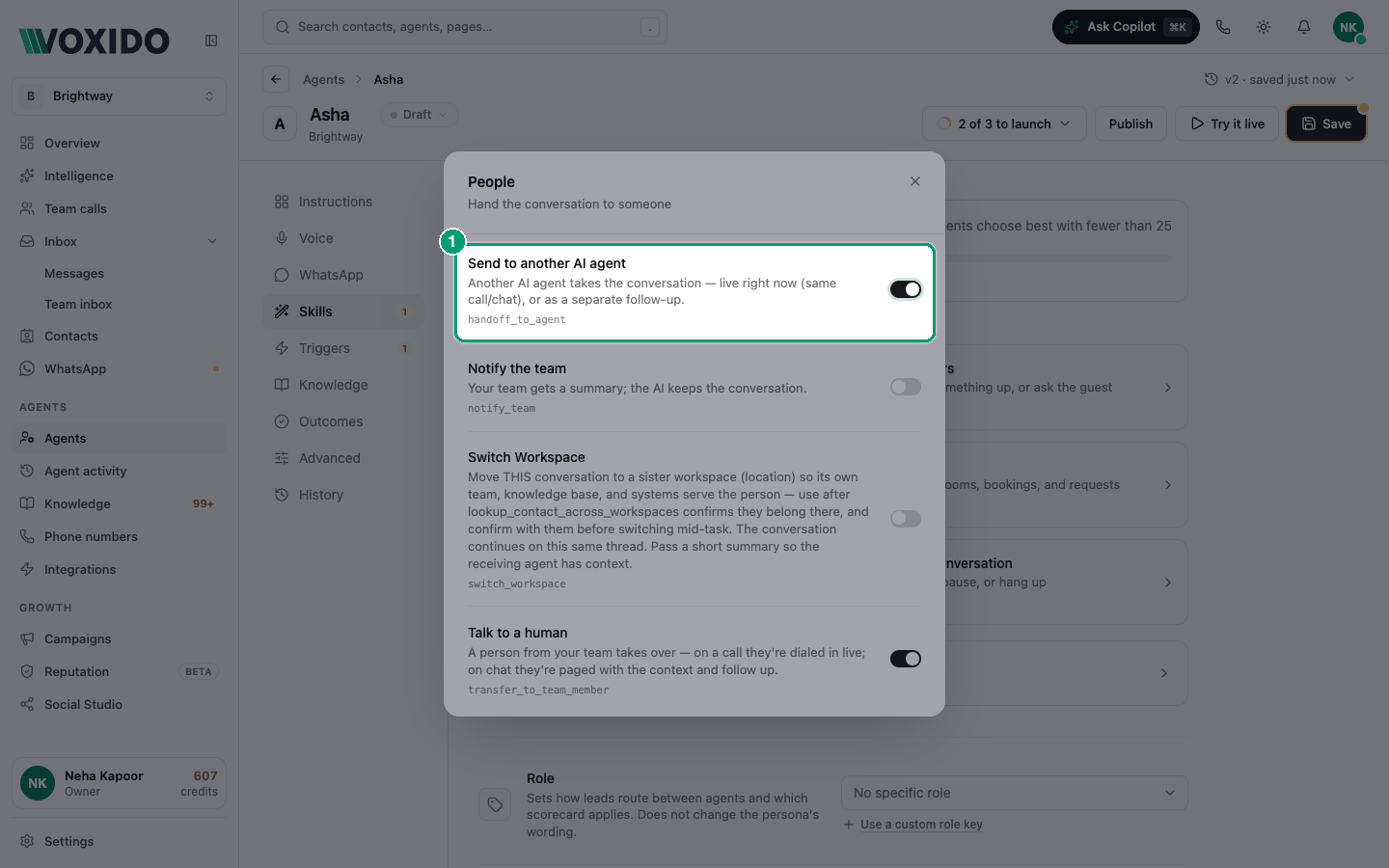
Find it: Sidebar → Agents → open an agent → Skills → People → Send to another AI agent
Pick your path: now or later?
The skill has two modes. The agent picks one based on your instructions.
| Mode | What happens | Use it when |
|---|---|---|
| Live (now) | The other agent takes over this same conversation right away. The first agent says a short "connecting you" line and steps out. | The customer is still talking and needs the other job done now. |
| Follow-up (later) | The first agent keeps the conversation. The other agent reaches out separately: immediately, within 24 hours, or this week. | The next step can wait, like a call back tomorrow or a check-in later this week. |
Examples
- Coaching centre: the enquiry agent answers course questions. When a parent says "I want to enrol now", it sends them live to the admissions agent.
- Real estate: the lead agent qualifies a buyer, then sends a follow-up so the site-visit agent books a visit within 24 hours.
- Hotel: the booking agent hears "my room's AC isn't working". It sends the guest live to the in-stay agent.
- Retail: the sales agent finishes an order and sends a follow-up so the feedback agent checks in this week.
On phone calls
A live handoff works on calls too. The new agent's instructions, greeting and skills take over, but the voice stays the same for the rest of the call.
How the right agent is found
Handoffs use roles. Each agent has a Role (for example "Admissions"). The skill asks for a role, and Voxido finds the active agent with that role in the same workspace.
If no active agent holds the role, Voxido alerts a person on your team instead, and the agent tells the customer someone will be in touch. Nobody is left waiting.
Set it up
Before you start: create the second agent, give it a Role, and publish it so it's Active.
- Open the receiving agent → Skills, scroll down to Role, and pick its role (for example "Admissions"). You'll see: a "Role updated" message.
- Open the sending agent → Skills → People. You'll see: Send to another AI agent with a switch.
- Switch on Send to another AI agent and click Save. You'll see: "Saved".
- In the sending agent's instructions, say when to hand off, to which role, and whether now or later (see below).
- Test with Try it live. Ask something that belongs to the other agent. You'll see: the first agent says it's connecting you, and the second agent's greeting follows.
Examples for your instructions
Live handoff
If the customer wants to book or change an appointment, hand off
live to the role "bookings". Say: "Let me connect you with our
bookings assistant." Pass a one-line summary.
Follow-up handoff
When a buyer is qualified and wants a site visit, send a follow-up
to the role "site_visits" within 24 hours. Tell the buyer our team
will message them to fix a time.
Always ask the agent to pass a short summary (dates, problem, what was promised). The next agent only knows what's in the summary and the conversation.
Move a customer to another location (Switch Workspace)
If you run several branches as separate workspaces, a customer can land at the wrong one. Switch Workspace moves the conversation to the right workspace, so its own team, knowledge and systems take over. It works well with Lookup Contact Across Workspaces (under Contacts), which checks if the caller already has a profile at another branch.
Example: a guest calls Brightway Suites Goa about a booking at Brightway Suites Pune. The agent checks, confirms with the guest, and switches the conversation to Pune.
Turn on both skills in Skills, click Save, and tell the agent when to use them.
Agent handoffs vs. stage-change triggers
If the first agent moves the contact to a new stage with Move contact to a stage, that does not start the next agent's "When a contact's status changes" trigger. Agent-made stage moves never start another agent. Use Send to another AI agent to chain agents. See Contact-change triggers.
Common problems
A person was alerted instead of the other agent. No Active agent has that role in this workspace. Check the receiving agent's Role and status.
The handoff says it can't send to the same agent. The role you named belongs to the agent that's already talking. Use a different role.
The new agent doesn't know the context. Ask the first agent, in its instructions, to pass a clear summary every time.