

Choose the speech and reasoning models
Every phone call runs through three models, one after another:
- Listening model (speech-to-text, or STT) turns the caller's voice into text.
- Reasoning model (the LLM, a large language model) reads that text and decides what to say.
- Speaking model (text-to-speech, or TTS) turns the reply into a voice.
The defaults work well for most agents. Change them when your callers speak Indian languages, or when you need the agent to handle longer tasks.
Find it: Sidebar → Agents → open an agent → Advanced → open the Voice group (listening and speaking) or the Reasoning group (thinking)
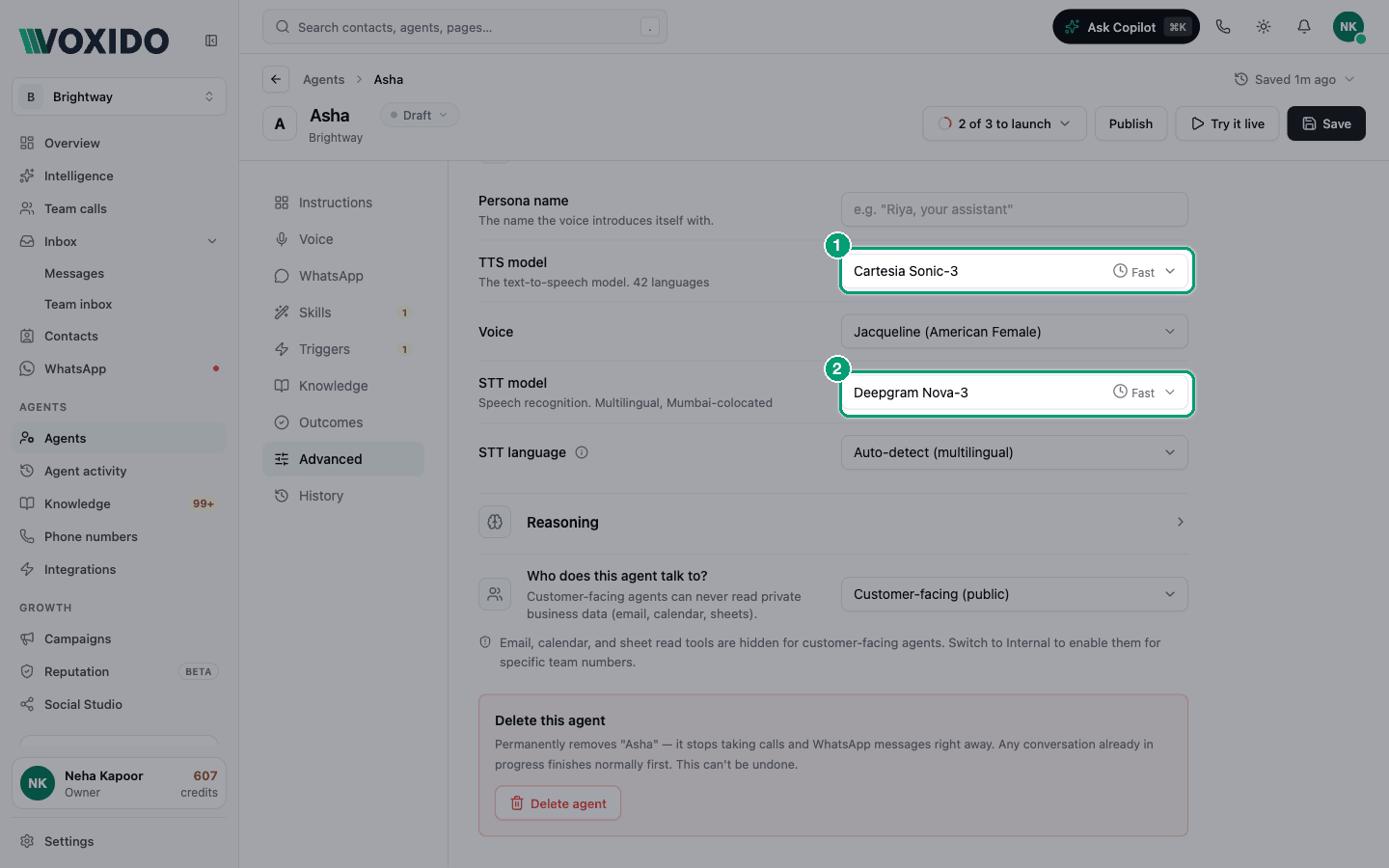
These settings change phone calls (and Try it live). They don't change WhatsApp replies.
Reading the model lists
Each model in a list shows:
- its name, grouped by provider (Deepgram, Sarvam, Cartesia, OpenAI, Google…);
- a small clock with Fast, Balanced or Slow — how quickly it answers;
- tags such as default, recommended, beta or needs benchmark.
The line under the box tells you what the picked model covers, for example "Multilingual, Mumbai-colocated" or "Hinglish/Tanglish". In this guide we write that note in brackets after the name, like "Deepgram Nova-3 (English, Mumbai-colocated)".
Several entries can share a name (there are a few called "Deepgram Nova-3"). Type the note's words, such as English, Mumbai, Hindi or Hinglish, in Find a model… to find the one you want.
What "default" means: it's the model your agent uses if you never pick one. If Voxido later improves its default, agents that never changed it follow along. Once you pick a model yourself, your agent keeps your pick.
"needs benchmark" and "beta" mark models that are still being tested. Avoid them for live customers unless you've tested them yourself.
Choose the listening model (STT model)
The problem: "The agent mishears our callers when they mix Hindi and English."
| If your callers… | Choose | Why |
|---|---|---|
| Speak different languages, or you're not sure (default) | Deepgram Nova-3 (Multilingual, Mumbai-colocated) | Fastest. Detects the language each turn. |
| Speak English only, in India | Deepgram Nova-3 (English, Mumbai-colocated) | Fast and focused on English |
| Mix Hindi and English in one sentence | Sarvam Saaras v4 — Code-mix (Hinglish/Tanglish) | Keeps English words in English, built for support calls |
| Speak one Indian language (Hindi, Tamil, Telugu, Bengali…) | Sarvam Saaras v4 (Indian languages, telephony-tuned) | Most accurate on Indian phone lines |
| Mostly speak Hindi, and speed matters most | Deepgram Nova-3 (Hindi, Mumbai-colocated) | Fastest Hindi option |
| Call from outside India | Deepgram Nova-3 (Multilingual, generic Inference) or (English, generic Inference) | Use only if your callers aren't in India |
| Speak a rare dialect | Cartesia Ink Whisper (100 languages) | Widest language list, a little slower |
STT language, under the STT model, is the language the listening model expects. Auto-detect (multilingual) is always offered. You usually don't touch it: choosing Speaking language on the Voice section sets it for you.
Choose the speaking model (TTS model) and voice
The problem: "The agent sounds foreign to our customers."
| If you want… | Choose | Voices to try |
|---|---|---|
| Clear English, the widest language list (default) | Cartesia Sonic-3 (42 languages) | Jacqueline, Blake |
| Indian voices for Hindi and Indian languages | Sarvam Bulbul v3 (Hindi + Indian languages) | Shubh, Ritu, Simran, Amit, Rahul |
| The newest Indian voices, incl. Hinglish and Indian English | Sarvam Bulbul v4 Flash (Hindi + Indian languages) | Ishita — Hinglish customer care, Neha — Customer care, Dev — Conversational |
| Warm or energetic American English | xAI TTS-1 | Ara (warm), Eve (energetic), Leo (authoritative), Rex (confident) |
| Calm or professional English | Deepgram Aura-2 | Athena (professional), Odysseus (calm), Theia (polite) |
When you change the TTS model, the Voice box switches to a voice that model has. Pick the voice here or on the Voice section — it's the same setting. See Voice and language.
Persona name, at the top of the group, is the name the voice introduces itself with, e.g. "Riya, your assistant". Your greeting can use it as {persona_name}.
Choose the reasoning model (Reasoning → Model)
The problem: "The agent forgets steps when it books an appointment."
The default, Gemma 4 31B (LiveKit-hosted), is fast and works for most agents. The line under the box describes the picked model.
| If your agent… | Choose | Why |
|---|---|---|
| Answers questions and takes simple requests | Gemma 4 31B (default) | Fast, good with skills |
| Runs long tasks with many steps (bookings, rescheduling) | OpenAI GPT-4.1 or OpenAI GPT-4.1 mini | Better at following detailed instructions |
| Needs the best price-for-quality on voice | OpenAI GPT-4o mini | Solid with skills, quick replies |
| Talks naturally in Indian languages | Sarvam 105B Conversations | Tuned for Indian-language conversations. Has no automatic backup if Sarvam has a problem. |
| Answers short FAQs only | OpenAI GPT-4.1 nano | Cheapest; weaker on multi-step tasks |
Avoid models marked Slow for live calls: callers wait longer for every answer. OpenAI GPT-4o (premium) is about 10× the cost of the mini models — choose it only when you need stronger reasoning.
Creativity and reply length
| Setting | What it does | Default | Tip |
|---|---|---|---|
| Creativity | 0 = the same answer every time, 2 = very free. | 0.70 | Voice agents work best between 0.6 and 0.8. Go lower (0.3–0.5) for payment reminders or anything legal. |
| Max output tokens | How long one reply can be. A token is a piece of a word. | 120 | Keeps replies short. If replies stop mid-sentence, raise it — the screen suggests 256–512 for voice. |
Good, better, best
For an English-speaking business (like Brightway):
| Level | Listening | Thinking | Speaking |
|---|---|---|---|
| Good | Defaults | Defaults | Defaults |
| Better | Deepgram Nova-3 (English, Mumbai-colocated) | Default | Cartesia Sonic-3 / Jacqueline or Blake |
| Best | Deepgram Nova-3 (English, Mumbai-colocated) | OpenAI GPT-4.1 mini (for multi-step bookings) | Sarvam Bulbul v4 Flash / Neha — Customer care (Indian English) |
For Indian callers who mix Hindi and English (hotel, clinic, shop):
| Level | Listening | Thinking | Speaking |
|---|---|---|---|
| Good | Defaults (auto-detect) | Default | Sarvam Bulbul v3 / Shubh or Ritu |
| Better | Sarvam Saaras v4 — Code-mix | Default | Sarvam Bulbul v4 Flash / Ishita — Hinglish customer care |
| Best | Sarvam Saaras v4 — Code-mix | Sarvam 105B Conversations or OpenAI GPT-4.1 mini | Sarvam Bulbul v4 Flash / a Hinglish voice that fits your brand |
Always test with Try it live after a change. Speed and accuracy depend on your callers and your instructions.
How to change a model
- Click Advanced in the section list. You'll see: Conversation tuning open, and closed groups for Watchdog, Voice and Reasoning.
- Click Voice (or Reasoning) to open the group. You'll see: the current models, each with a Fast/Balanced/Slow clock.
- Click a dropdown and pick a model. You'll see: the line under it describes what the model covers.
- Click Save, then Try it live. You'll see: the agent answers with the new model.
Common problems
My language disappeared from Speaking language after I changed the voice. The new speaking model can't say it. Pick a model that lists your language.
The STT language went back to Auto-detect. The listening model you picked doesn't support the language that was set, so Voxido switched to auto-detect to keep calls working.
The agent got slower after I changed the reasoning model. Check the clock tag. Switch back to a Fast model.