

Call contacts on a schedule
The Place a call on a schedule trigger makes your agent phone contacts. On each run, it dials every contact that matches your Target audience.
Find it: Sidebar → Agents → open an agent → Triggers → Add trigger → Place a call on a schedule
When to use it
The problem: "Leads fill our form and nobody calls them for a day." "We need to call every borrower with an overdue EMI each morning."
Why this trigger: a phone call gets answers faster than a message, and this trigger keeps dialing new people as they match your filter.
| If you want… | Use instead |
|---|---|
| A WhatsApp message, not a call | On a recurring time |
| Retry calls, then a WhatsApp if nobody answers | Campaigns |
| To answer people who call you | When a customer calls one of my numbers |
Before you start: connect a phone number that can make calls, and set your working hours in Sidebar → Settings → Working hours.
Set it up
- Open your agent → Triggers → Add trigger → Place a call on a schedule. You'll see: Enable automatic outreach? Click Enable.
- Choose the schedule. It starts as Daily / weekly / monthly at 09:00. For fast follow-up, pick Every N minutes / hours / days and set Every to 5 minutes.
- Pick the From number, or leave Auto-pick connected number.
- Under Target audience (optional), click Add rule and say who to call.
- Close the trigger row. You'll see: a summary such as "Every 5 minutes · from selected number", followed by your filter.
Never leave Target audience blank
Blank means "dial every contact in this workspace" on every run. Each call uses credits.
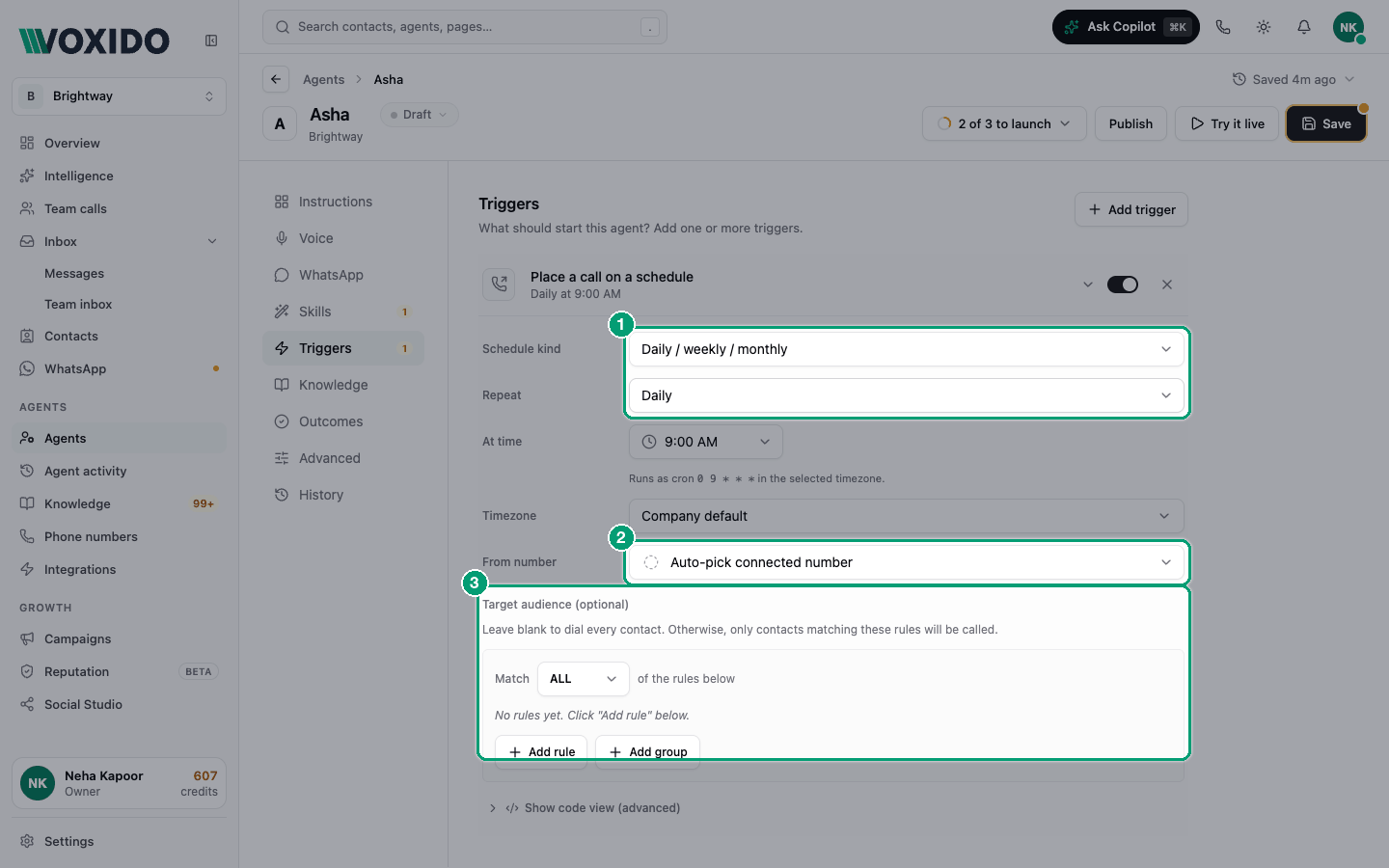
What each setting means
| Setting | What it does | Tip |
|---|---|---|
| Schedule kind | Daily / weekly / monthly, Custom cron (advanced), or Every N minutes / hours / days. | Same options as On a recurring time. |
| Timezone | The clock for daily, weekly, monthly and cron times. | Not shown for "Every N…". |
| From number | The number your call comes from. | Use a local number people recognise. |
| Target audience (optional) | Who gets called. | Add a rule that stops matching after the first call (see below). |
Call each person once, not every run
The trigger dials everyone who matches each time it runs. So build a filter that stops matching once someone has been called.
Voxido fills the built-in Call result field after every outbound call (for example talked, no answer, busy). Use it:
- Stage equals "New lead"
- Match ALL
- Call result is empty
After the first call attempt, Call result is filled in, so that person drops out of the next runs.
What stops a call
- Working hours. Scheduled calls only go out inside your working hours. A call that falls due outside them waits until your hours open.
- Opt-outs and contact status. Deleted, blocked, snoozed and opted-out contacts are never called.
- Safety limits. The same trigger calls a contact at most 4 times an hour. Voxido also applies daily limits on outbound calls and usage for your account.
- The agent is not Active. Only active agents dial.
Examples
- Brightway: Every 5 minutes — new leads with no call result. "Hi, you asked about our service. Is now a good time?"
- Loan recovery: Weekdays at 10:00 (cron
0 10 * * 1-5) — Tags contains "overdue". Polite reminder, then Talk to a human for disputes. - Real estate: Daily at 11:00 — Stage equals "Site visit done". Ask for feedback and a next step.
Full walk-through: Trigger recipes.
Common problems
No calls went out. Check it's inside working hours, the agent is Active, and the audience matches someone. See Troubleshooting.
The summary says "Schedule not set". Open the trigger and choose a schedule.
The same person was called again. Your filter still matches them. Add Call result is empty, or move them to another stage after the call (see the agent's Outcomes section).