

How credits work
Voxido works like a prepaid phone card. You add credits, and every call and message uses a few. 1 credit = ₹1. There's no monthly fee to use the app itself; you pay for what your agents do.
Find it: header → your photo → Billing. Your balance also shows at the bottom of the sidebar, on your profile card. Who can use it: Owners and Admins open Billing. Everyone sees the credits left on their sidebar card.
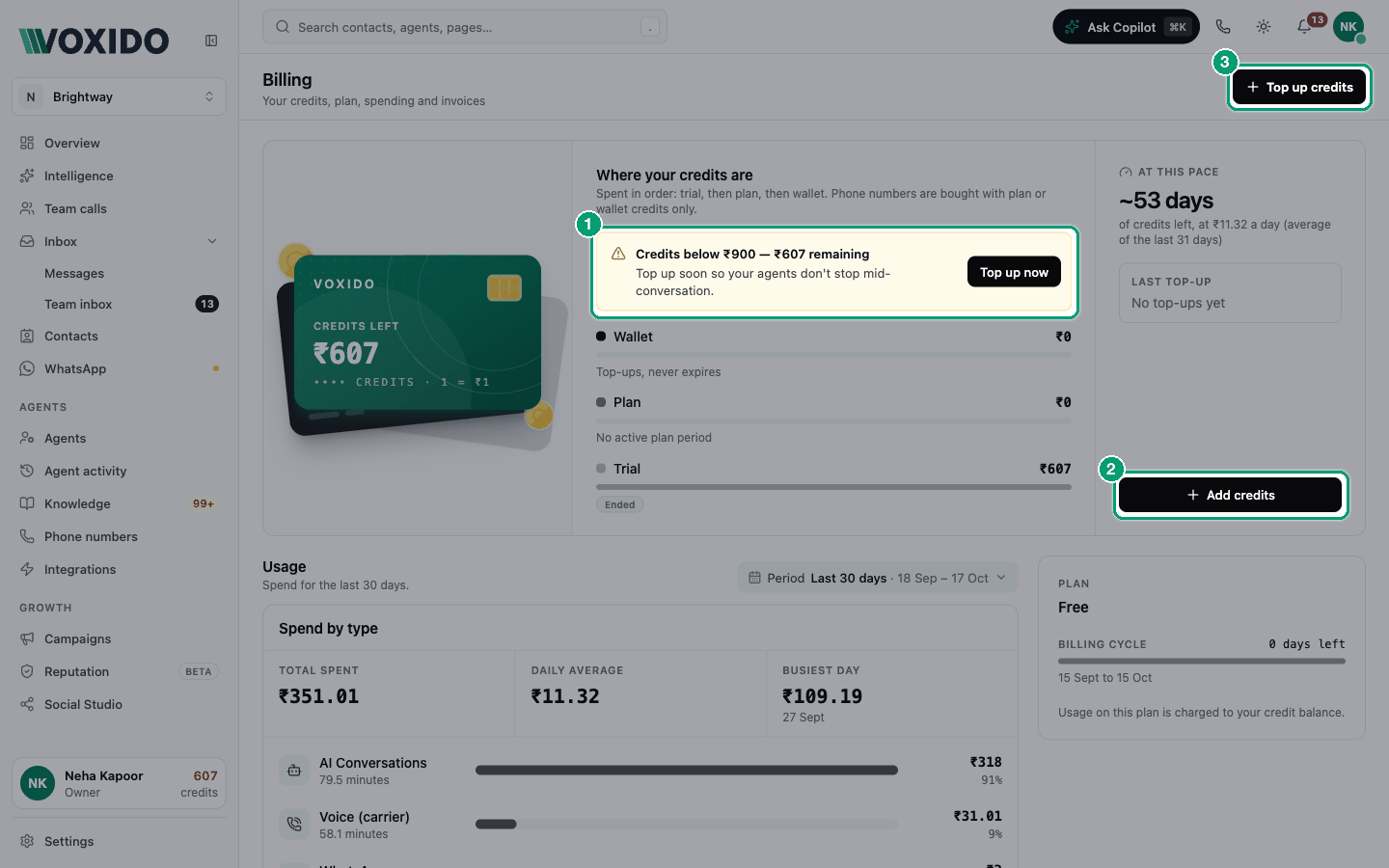
Where your credits come from
The Billing page shows Credits left, then Where your credits are:
| Bucket | What it is | Expires? |
|---|---|---|
| Trial | Free credits when you set up your business. | Yes, at the end of the trial (the date shows on the Trial row). See Your free trial. |
| Plan | Credits from a plan, if your account has one. Most accounts show "No active plan period". | The page shows when the current period ends. |
| Wallet | Credits you buy. | Never. "Top-ups, never expires" |
Voxido spends them in this order: trial first, then plan, then wallet. So your free credits are used before your paid ones. You can't change the order.
One exception: phone numbers are bought with plan or wallet credits only, never trial credits.
One balance for the whole account
All workspaces share one balance. If Brightway has two branches as two workspaces, both spend from the same credits. The usage table shows which workspace used what.
What uses credits
Mainly four things:
- AI talk time: each minute an agent spends on a call (and the thinking time for chats)
- Phone line time: each minute of a phone call
- Messages: WhatsApp messages and SMS
- Phone number rent: each month you keep a number
See the full list with prices: What actions cost credits.
Other numbers on the Billing page
| You see | It means |
|---|---|
| At this pace | About how many days your credits will last at your recent spending. "No spend yet" if nothing was used. |
| Last top-up | Your most recent purchase. |
| Usage | A chart of spending for the period you pick, split by type. See Viewing your usage history. |
| Activity | Tabs for Usage, Payments and Invoices. |
Pick your billing setup
The problem: "I don't want my agents to stop on a busy day because credits ran out. But I don't want surprise charges either."
| If you… | Choose | Why |
|---|---|---|
| Are still trying Voxido | Trial credits only | Enough to test calls and messages. Top up before the trial ends. |
| Have small or uneven use (a few calls a day) | Top up when needed | You decide every payment. Watch the low-balance warnings. |
| Have steady use every month | Auto-recharge, Monthly | The same pack is added every month by itself, so you rarely run low. |
| Know your yearly spend and want the best price | Auto-recharge, Annually | You pay for 10 months and get 12 months of credits. |
| Have a busy season (a festival sale, admissions) | Top up a bigger pack before it starts | Your agents won't stop in the middle of your busiest days. |
How: Topping up your wallet · Setting up auto-recharge
Good habit
Check At this pace once a week. If it says fewer than 7 days, top up.
Low-balance warnings
Voxido warns everyone when the total balance gets low. A strip appears at the top of every page, with an Add Credits button:
| Balance | The strip says |
|---|---|
| Under ₹900 | "Credits below ₹900 — ₹… remaining" |
| Under ₹500 | "Getting low — under ₹500 (₹… left)" |
| Under ₹100 | "Critically low — under ₹100 (₹… left)" |
| ₹0 or less | "Out of credits — agents may stop until you top up" |
You can close the strip for 24 hours. It comes back sooner if the balance drops to a lower band. Below ₹900, the credits on your sidebar card also turn amber.
The account owner also gets an email each time the balance crosses one of these lines on the way down.