

Setting up auto-recharge
Auto-recharge buys the same credit pack for you on a fixed schedule: every month, or once a year. Razorpay charges your saved payment method each time, and the credits go into your wallet.
Find it: header → your photo → Billing → Top up credits → Auto-recharge walletWho can use it: Owners and Admins
It runs on a schedule, not on your balance
Auto-recharge adds credits on the same date each month (or year). It does not wait for your balance to run low. If you have a very busy month, you may still need an extra top-up.
Is auto-recharge right for you?
| Your situation | Choose | Why |
|---|---|---|
| You spend about the same every month | Monthly | Credits arrive before you run low. One less thing to remember. |
| You know your yearly spend and prefer one payment a year | Annually | One charge a year. The window shows if paying yearly saves you anything. |
| Your use goes up and down a lot | No auto-recharge | Top up by hand when the warnings show. See Topping up your wallet. |
| You're still on your free trial | Wait | Learn your monthly spend first. |
To pick the right pack size, look at Total spent for the last 30 days on the Billing page, then choose the pack closest to it.
Turn it on
- On the Billing page, click Top up credits. You'll see: the Add Credits window with the packs.
- Click a pack.
- Turn on Auto-recharge wallet ("Never run out of credits — refill on a schedule"). You'll see: two choices, Monthly and Annually. If a pack says "Not available for this pack", pick another pack.
- Pick Monthly or Annually. You'll see: the price: Subtotal, GST (18%) and Total charged per month (or per year).
- Add your GSTIN if you need GST invoices.
- Click Set up auto-recharge — ₹… / month (or / year).
- Approve the payment in the Razorpay window. You'll see: "Auto-recharge enabled" and "Monthly auto-recharge set up." (or "Annual…").
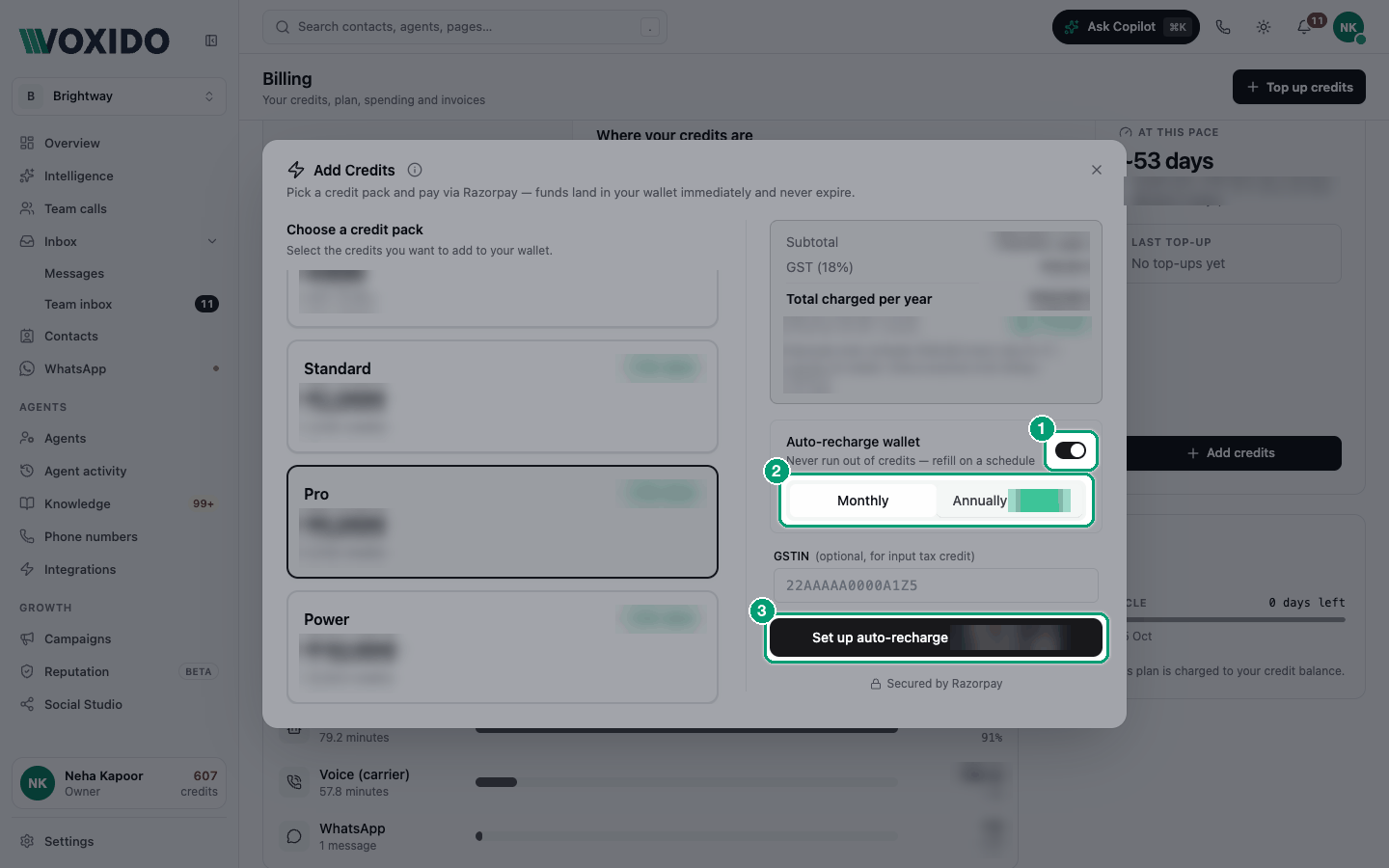
Monthly vs Annually
| Monthly | Annually | |
|---|---|---|
| You pay | The pack price + GST, every month | The yearly price + GST, once a year |
| You get | The pack's credits, every month | 12 months' worth of the pack's credits |
The window shows the exact amounts for the pack you picked. With Annually, it also shows the effective price per month and any saving, so you can compare the two.
Stop auto-recharge
The window says you can "Cancel anytime from billing settings", but the Billing page has no cancel button yet. To stop auto-recharge, contact Voxido support and they'll cancel it for you.
WARNING
Until it's cancelled, Razorpay keeps charging on schedule. Contact support a few days before the next charge date.
Common problems
I set up auto-recharge but ran out of credits anyway. Auto-recharge adds credits on a schedule, not when you run low. Pick a bigger pack, or top up by hand in busy months.
I can't turn on the switch. That pack doesn't support auto-recharge ("Not available for this pack"). Choose another pack.
I was charged GST. GST (18%) is added to every charge, one-time or automatic. Add your GSTIN to get a GST invoice.