

A tour of the app: sidebar and header
The Voxido app has three parts. The sidebar on the left takes you to every page. The header along the top holds search, Copilot and your account. The page you open fills the middle.
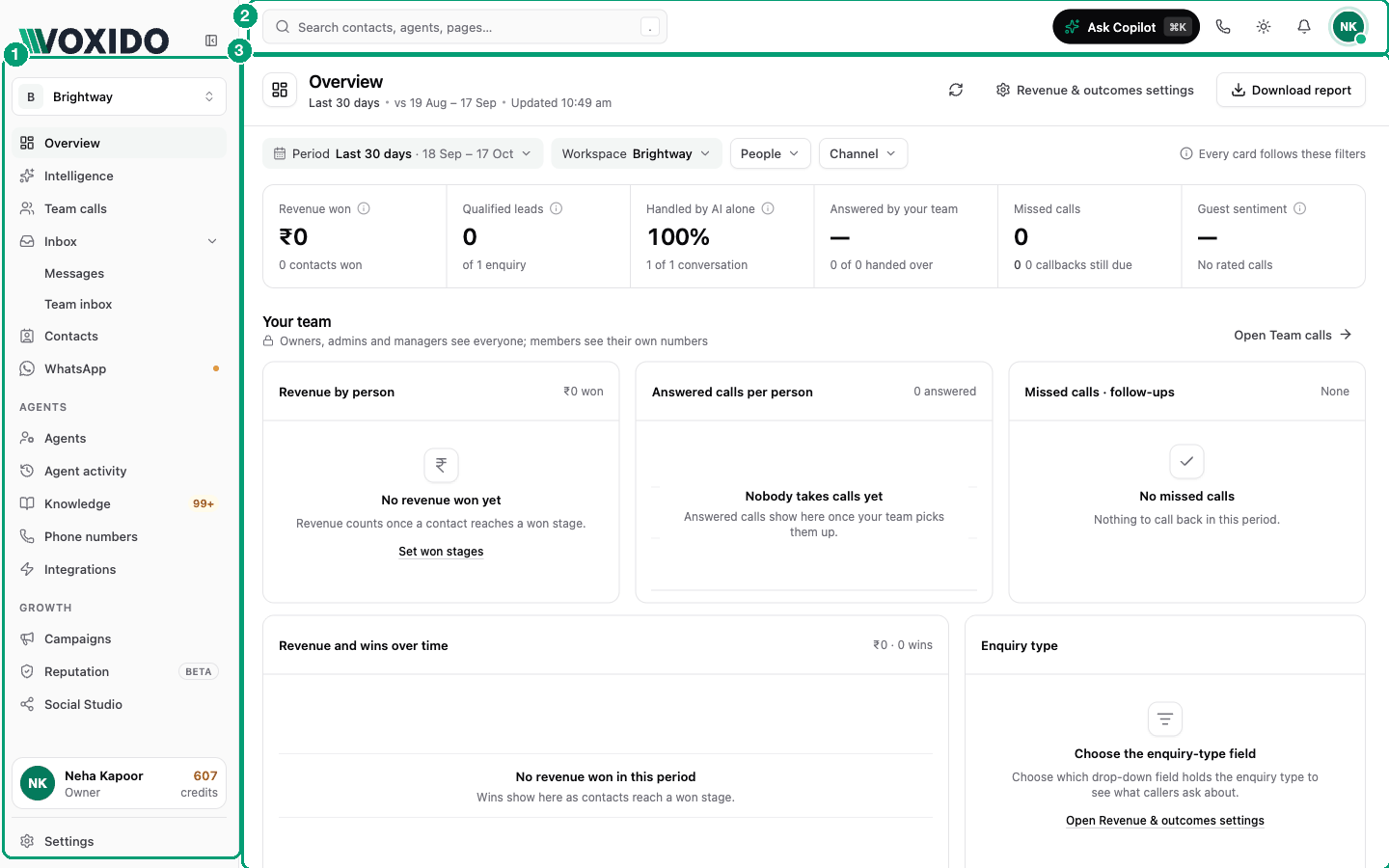
Take the built-in tour
Voxido has its own short tour of the sidebar and header. Open it any time: header → your photo → Preferences → Start tour (or Replay all tours).
The top of the sidebar
| Item | What it does |
|---|---|
| Your logo | Your business logo, set in Brand settings. |
| Workspace switcher | Shows which workspace you're in. Click it to switch, see All workspaces, or create a new one. See Workspaces. |
Everyday pages
| Item | What it's for |
|---|---|
| Overview | Your home page: headline numbers, your team and your agents, for the period you pick. See the Overview dashboard. |
| Intelligence | A daily briefing of what your conversations said, with action items and topics. |
| Team calls | Calls your AI handed to your team, and how long everyone talked. Only shows when call handover is on in Call routing. |
| Inbox → Messages | Every chat with customers, on every channel. The number shows unread chats. |
| Inbox → Team inbox | Jobs your agents passed to people, each with its next step. |
| Contacts | Everyone who called or messaged you, with their stage, owner and history. See Contacts. |
| Your WhatsApp numbers, templates and flows. A dot means something needs you. |
The Agents section
| Item | What it's for |
|---|---|
| Agents | Create and edit your AI agents. See Creating an agent. |
| Agent activity | Every call and chat your agents had, with recordings and transcripts. |
| Knowledge | The facts your agents answer from. A number shows questions waiting for your review. |
| Phone numbers | Buy and manage the numbers customers call. See Getting your first phone number. |
| Integrations | Connect other apps, like your calendar or CRM, so agents can use them. |
The Growth section
| Item | What it's for |
|---|---|
| Campaigns | Planned outreach in steps, like a call and then a WhatsApp. See Campaigns. |
| Reputation | Your online reviews in one place, with help replying. Marked Beta. |
| Social Studio | Draft and schedule social media posts. |
| Properties | Hotel rate tracking. Marked Beta. Only shows if Voxido has turned it on for your account. |
The bottom of the sidebar
| Item | What it does |
|---|---|
| Onboarding card | Four first tasks: Create an agent, Add knowledge, Claim a number, Import contacts. Hides when all are done. |
| Your profile card | Your photo, name, role and the credits left. The number turns amber when credits run low. Click it to open Billing. |
| Settings | Your business settings: brand, people, permissions, workspaces and more. |
To make the sidebar thin (icons only), click the panel button at its top, labelled Collapse sidebar. Click it again (Expand sidebar) to open it. Voxido remembers your choice on this browser.
The header
From left to right:
| Item | What it does |
|---|---|
| Search ("Search contacts, agents, pages…") | Find a contact, an agent or a page. Press . (full stop) from anywhere to open it. |
| Ask Copilot | Opens Copilot, a helper you type to in plain words. Shortcut: ⌘K on Mac, Ctrl+K on Windows. See What Copilot can do. |
| Make a call | Call any number from your browser. Only shows for people who can make calls. |
| Theme button | Pick Light, Dark or System (follows your device). This is your own choice; it doesn't change anyone else's screen. |
| Bell | Unread Messages and Team inbox items. Shows "You're all caught up." when there's nothing new. |
| Your photo | Your account menu (below). |
Your account menu
Click your photo in the header. You'll see:
- Your name, email and your company ID, with a button to copy it. Voxido support may ask for this ID.
- Your status and leave, if your team shares calls (call handover is on). Set yourself Available or Away, or mark leave. See People and teams.
- Your calls today, if you take calls.
- Profile and Preferences: see Your account and preferences.
- Billing: credits and invoices. See How credits work.
- Help
- Sign out
Why you might see fewer items
Voxido hides pages you can't use. What you see depends on your role.
| Sidebar item | Owner | Admin | Manager | Member |
|---|---|---|---|---|
| Overview, Intelligence, Inbox, Contacts, Agent activity | ✓ | ✓ | ✓ | ✓ |
| Reputation, Social Studio | ✓ | ✓ | ✓ | ✓ |
| Agents, Campaigns, Knowledge | ✓ | ✓ | – | – |
| Phone numbers, WhatsApp, Integrations | ✓ | ✓ | – | – |
| Settings | ✓ (all tabs) | ✓ (all tabs) | ✓ (People, Revenue & outcomes) | – |
Team calls also needs call handover turned on. Properties also needs Voxido to turn it on. See Roles and permissions.
On a phone
- Tap the menu button at the top left. The full sidebar slides in, workspace switcher included.
- A shortcut bar at the bottom holds Home, Agents, Activity, Settings, Inbox and Contacts (the ones your role can open).
- The header search is hidden on small screens.