

Get AI help in the agent editor
The agent editor has AI help built in. It opens the Copilot, Voxido's assistant, with a ready-made request about the agent you are editing. The Copilot can read the whole agent (instructions, skills, triggers, knowledge) and suggest changes. Nothing changes until you confirm it.
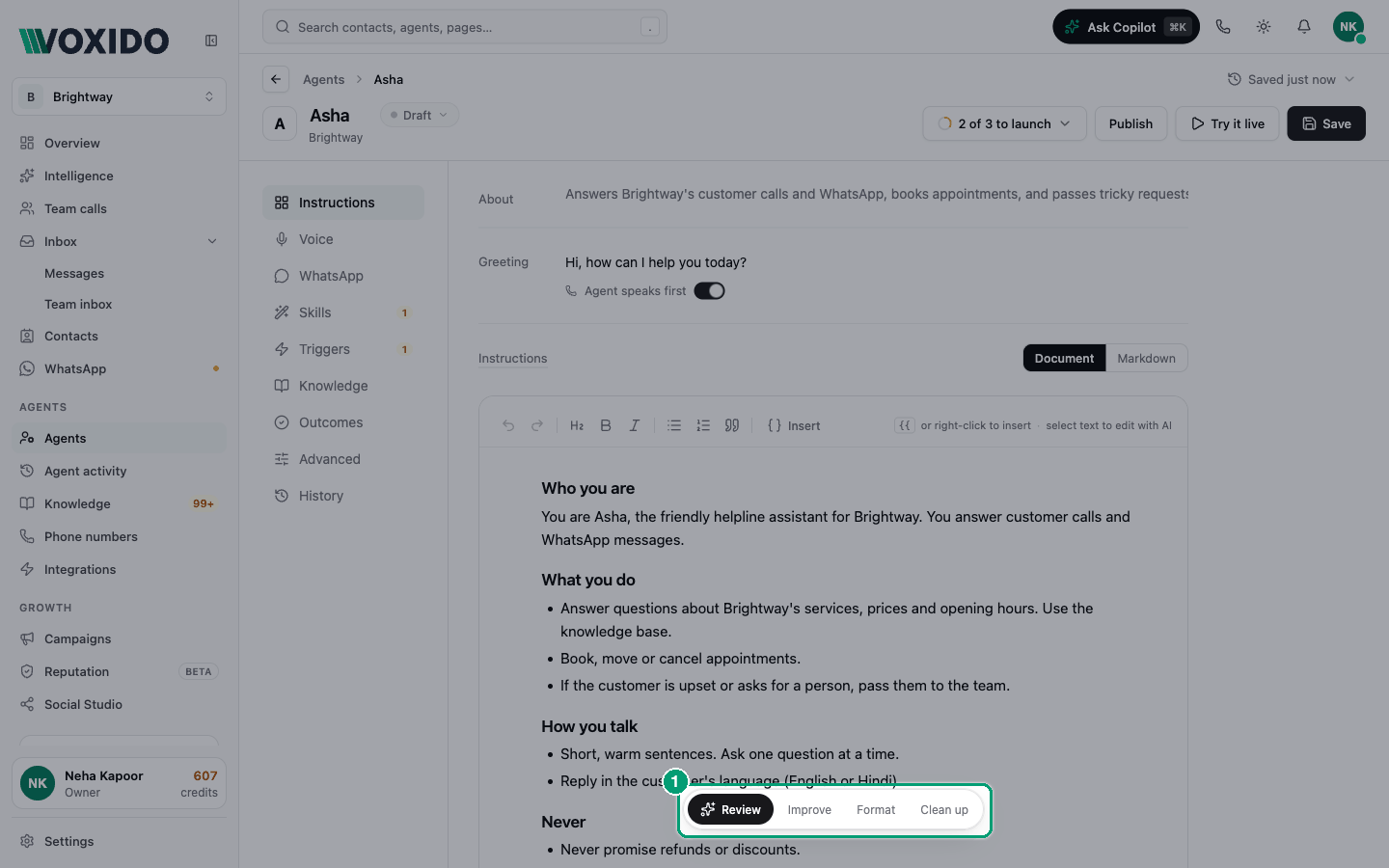
Find it: Sidebar → Agents → open an agent → Instructions → the floating bar under the document
Which button do I need?
| Your problem | Click | What the Copilot does |
|---|---|---|
| "Is this agent ready? What could go wrong?" | Review | Checks the prompt, skills, triggers, knowledge and channels, and lists the problems. It doesn't change anything. |
| "The prompt works but reads badly." | Improve | Rewrites it in a clear structure, keeping every fact and rule. It tells you first what the prompt already does. |
| "The headings and bullets are a mess." | Format | Fixes section order, headings and bullets only. The wording stays the same. |
| "It names tools or templates that don't exist." | Clean up | Lists skills the prompt mentions that don't exist, skills that are on but never used, templates that aren't approved, and variables that don't work. Shows you the list before removing anything. |
| "There are red chips in my prompt." | N to fix (red, shown only when there are problems) | Fixes each broken reference and explains each fix. |
Review an agent before you publish
- Click Save, so the Copilot reads your latest version.
- Click Review in the bar under the document. You'll see: the Copilot panel opens on the right and starts answering.
- Read the list of problems. Ask follow-up questions in the panel, for example "Fix the first two."
- When the Copilot proposes a change, read it and confirm it. You'll see: the editor updates by itself with the change.
Rewrite one passage
- Select a sentence or a few lines in the document. You'll see: a small bubble with Improve, Format, Remove and Ask copilot.
- Pick one:
- Improve rewrites just that passage more clearly, keeping its meaning, facts, skills and variables.
- Format fixes the markup of that passage without changing a word.
- Remove deletes the passage straight away (no AI needed).
- Ask copilot sends the passage to the Copilot and waits for you to say what you want.
Start a new agent with the Copilot
On the Agents page, click Set up with Copilot and describe what you need. See Create an agent.
Good to know
- You stay in control. The Copilot proposes changes; you confirm them.
- Unsaved edits. If you have unsaved edits in the document and confirm a Copilot rewrite of it, the rewrite wins and you'll see "Your unsaved edit was replaced". Use undo in the editor to get your words back.
- The buttons wait their turn. While the Copilot is answering, the buttons are greyed out.
- Always check the result. Read the updated document, then test it with Try it live.