

Start an agent from another system (webhook trigger)
The When an external system notifies us trigger gives your agent its own web address. When another system sends a request to it, the agent starts for that customer. This is called a webhook (a web address another app calls to tell Voxido something happened).
Find it: Sidebar → Agents → open an agent → Triggers → Add trigger → When an external system notifies us
When to use it
The problem: "Someone fills our website form and waits a day for a reply." "When a payment fails in our billing system, we want to tell the customer at once."
Why this trigger: the event happens in another system. The webhook lets that system tell Voxido the moment it happens.
| If you want… | Use instead |
|---|---|
| The agent to fetch data from your system during a chat | A Custom API skill |
| To react to a stage change made in Voxido | When a contact's status changes |
The webhook only runs when someone calls it, so there's no credit warning when you add it.
Set it up
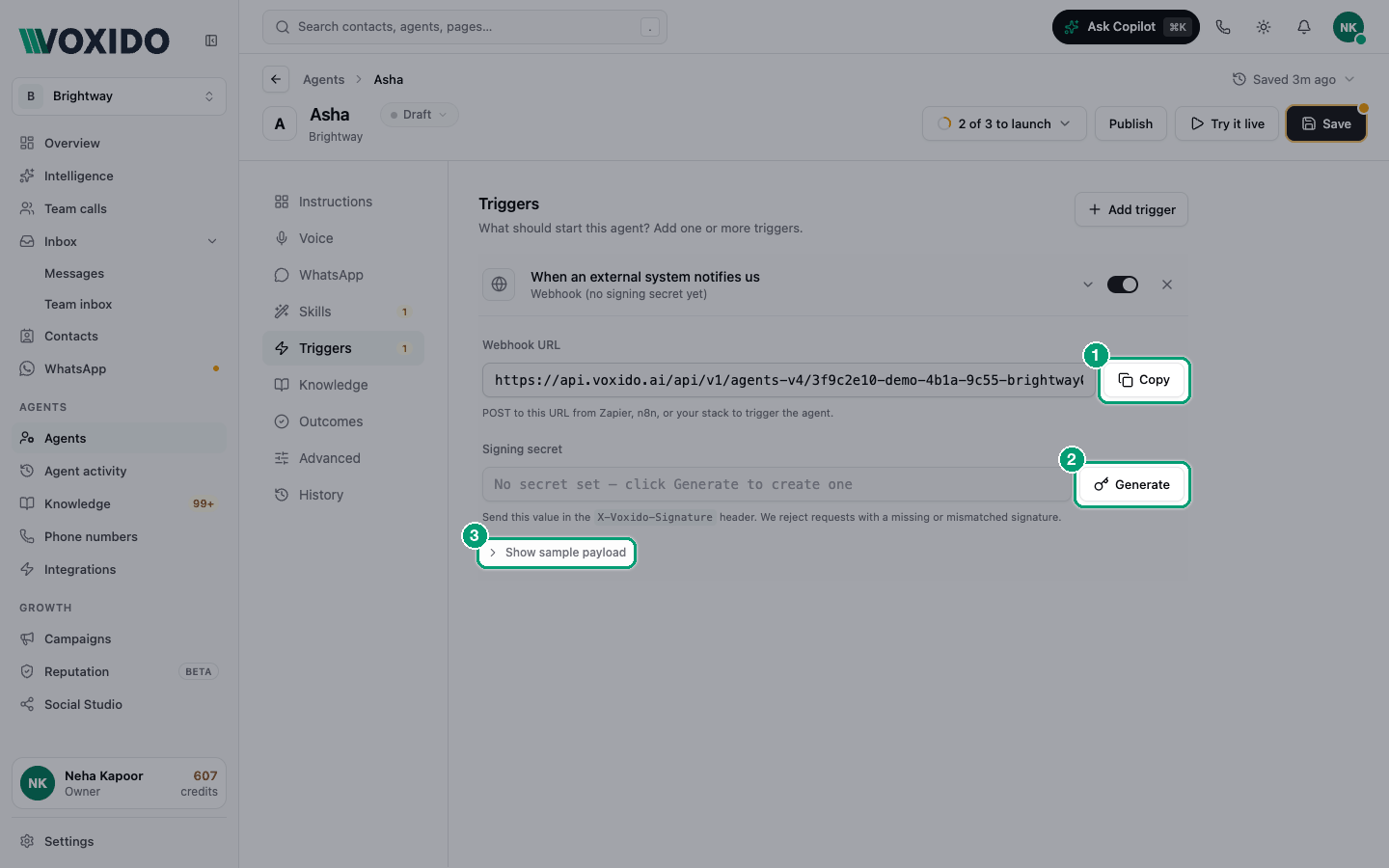
- Open your agent → Triggers → Add trigger → When an external system notifies us. You'll see: Webhook URL, Signing secret, and Show sample payload.
- Click Copy next to Webhook URL. You'll see: "Webhook URL copied to clipboard".
- Click Generate next to Signing secret, then click Copy. You'll see: the secret in full, with a yellow note: "Copy this now. For your protection, we'll mask it after you navigate away — regenerate if you lose it."
- In your other system (Zapier, n8n, your website), add a step that sends a POST request to the webhook URL, with a JSON body (see below) and the signature header.
- Make sure the agent is Active, then send a test. You'll see: the trigger row says "Authenticated webhook (secret set)", and the agent messages the customer.
What to send
The body is JSON. It must say who the customer is, using one of:
contact_id— a Voxido contact IDphone(orphone_number) — the customer's phone number, with country codeemail
If no contact has that phone or email yet, Voxido creates one. Anything else you send (like a booking number) is passed to the agent.
Click Show sample payload to see an example and Copy it:
{
  "contact_id": "c_01H...",
  "phone": "+919876543210",
  "trigger_source": "booking_confirmed",
  "context": {
    "reservation_id": "R-12345",
    "check_in_date": "2026-05-18"
  }
}
The signature header proves the request came from you. Send a header named X-Voxido-Signature. Its value is an HMAC-SHA256 of the exact body you send, using your signing secret, written as hex (a "fingerprint" of the body that only someone with the secret can make). Most tools can make this for you: n8n's Crypto node, or a Zapier Code step.
Sign the exact body
Sign the body exactly as you send it. If a tool adds spaces or changes key order after signing, the signature won't match.
What Voxido does with a request
| What you sent | Result |
|---|---|
| Correct signature, a contact Voxido can find or create, agent Active | Accepted, and the agent runs for that customer. |
| Missing or wrong signature | Rejected with an error. The agent doesn't run. |
Correct signature, but no contact_id, phone or email | Accepted, but the agent doesn't run. |
| Correct signature, but the agent is a draft or paused | Accepted, but the agent doesn't run. |
The last two fail quietly. If nothing happens, check them first.
Lost the secret, or want to stop old requests?
Click Regenerate. The old secret stops working at once. Update the secret in your other system.
Example: reply to a website form in seconds
Brightway has an enquiry form on its website. A Zapier zap runs when the form is submitted:
- Trigger: new form entry.
- Code step: builds
{"phone": "+91…", "name": "Priya Sharma", "service": "deep cleaning"}and signs it. - Webhooks by Zapier → POST to the webhook URL, with header
X-Voxido-Signature.
The agent's instructions say: "When started by a website enquiry, greet the person by name with a WhatsApp template and offer two time slots." The agent needs Send WhatsApp template turned on.
Common problems
My request is rejected. The signature is wrong. Check you used the current secret and signed the exact body.
The request is accepted but nothing happens. Check the agent is Active and the body has contact_id, phone or email.
I want to pause the webhook. Click Regenerate so old requests are refused, or remove the trigger.