

Write guardrails that work
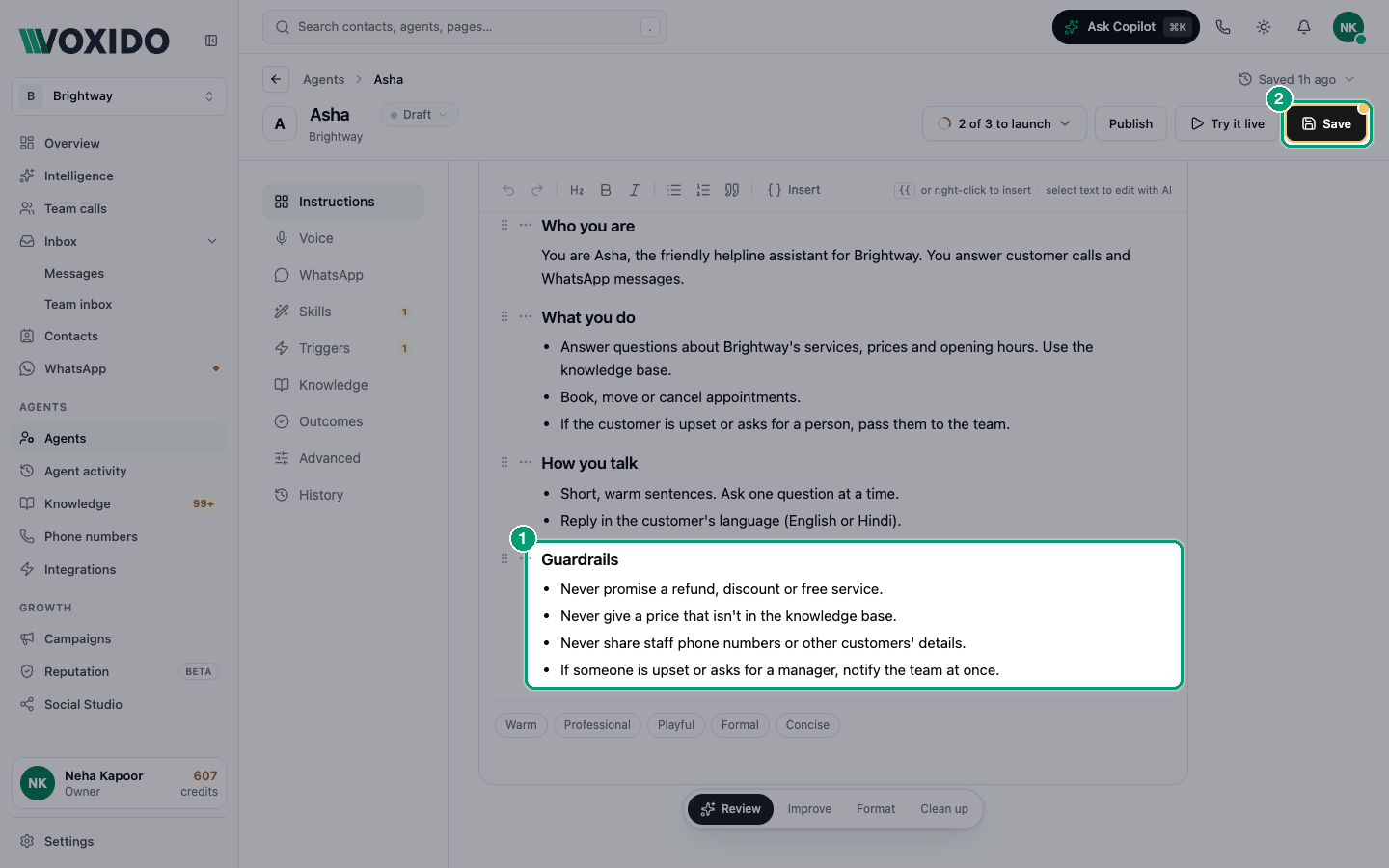
Guardrails are the few hard rules your agent must never break — for example, "Never promise a refund." You write them in the agent's Instructions document, under their own heading.
Find it: Sidebar → Agents → open an agent → Instructions → the Instructions document
There's no separate Guardrails box any more. If your agent was made before the single Instructions document, its old rules were moved into the document under a Guardrails heading.
When you need a guardrail
The problem: "Our agent told a caller we'd waive the late fee. We never do that."
A guardrail is right when:
- a mistake would cost money or trust (prices, refunds, discounts, medical or legal advice);
- the agent must hand over instead of answering (complaints, emergencies);
- something must never be said (staff phone numbers, other customers' details).
It's the wrong tool for style ("be friendly") or for how to do a task. Put those in the rest of your instructions.
Add guardrails
- Open the agent and click Instructions. You'll see: the Instructions document.
- Add a heading called Guardrails (use the H2 button), if there isn't one. You'll see: a new section in the document.
- Under it, add a bullet list with one rule per line. You'll see: a numbered or bulleted list of rules.
- Click Save, then test a tricky question with Try it live.
Write rules that work
Keep it to about 8 rules, each 15 words or fewer. A long list buries the rules that matter.
| Good | Not so good |
|---|---|
| "Never promise refunds, discounts or upgrades. Offer to ask a manager." | "Be careful about what you offer to customers." |
| "Never share staff names or phone numbers." | "Please try to protect privacy where it seems sensitive." |
| "If a caller mentions chest pain, tell them to call 112 and notify the team." | "Use your best judgement in emergencies." |
| "Quote only prices from the knowledge base." | "Don't make things up." (Voxido already says this.) |
A good rule names one action and one limit. Say what to do instead, so the agent isn't stuck.
Examples by business
| Business | Guardrails to consider |
|---|---|
| Brightway (service business) | Never confirm an appointment without a free slot. Never quote a price not in the knowledge base. |
| Clinic | Never give a diagnosis or dosage. For emergencies, say "call 112" and notify the team. |
| Payment reminders / loan recovery | Never threaten or shame. Never ask for a card PIN or OTP. Stop if the person asks not to be called. |
| School or coaching centre | Never confirm admission or fees outside the published list. Never share student details. |
| Hotel | Never promise a room upgrade or late checkout. Hand complaints to the duty manager. |
Don't repeat what Voxido already tells the agent
On every phone call, Voxido already tells the agent to:
- keep replies short and ask one question at a time;
- reply in the caller's language;
- say business, product and service names in English as written;
- say "I don't know" instead of inventing details;
- check the knowledge base before answering questions about your business, prices, hours or policies (when it has a knowledge base);
- use a skill before claiming it did something, and never promise a callback it can't confirm.
On WhatsApp it also tells the agent to format messages for WhatsApp and to check the knowledge base before quoting a price or policy. Writing these again only makes the document longer.
Rules for one channel only
Everything in the Instructions document applies to calls and WhatsApp. If a rule is only for one channel, say so in the rule ("On calls, …"), or put WhatsApp-only rules in WhatsApp → WhatsApp instructions (Agent WhatsApp settings).
Common problems
The agent still broke a rule. Make the rule shorter and more specific, and say what to do instead. Then test that exact question with Try it live.
I can't find the Guardrails box. It's gone. Guardrails live in the Instructions document now.