

Send reminders before or after a date
The Before or after a contact date trigger starts your agent at a time based on a date saved on each contact. "1 day before the appointment." "On the EMI due date at 10 am." "2 days after check-out."
Find it: Sidebar → Agents → open an agent → Triggers → Add trigger → Before or after a contact date
When to use it
The problem: "Patients forget appointments." "Borrowers miss EMI dates." "Guests arrive without directions."
Why this trigger: each person has their own date. This trigger works it out per contact, so everyone gets the reminder at the right time for them.
| If you want… | Use instead |
|---|---|
| The same message to a group on a fixed day | On a recurring time |
| A reminder call on a date as part of a sequence | Campaigns |
Before you start: the date must be saved on the contact in a date field. Create one in Sidebar → Settings → Custom fields (for example "Appointment date"), and fill it in by import, by your team, or by an agent with Update contact information.
Set it up
- Open your agent → Triggers → Add trigger → Before or after a contact date. You'll see: Enable automatic outreach? Click Enable.
- Pick the Date field, for example "Appointment date". You'll see: only date-type fields in the list. If there are none, it says to add one in Settings → Custom Fields.
- Next to Fire, type the number of days and pick before the date, on the day of or after the date.
- Set At time, for example 10:00.
- Under Limit to contacts (optional), add a rule such as Stage equals "Booked".
- Close the trigger row. You'll see: a summary such as "1 day(s) before Appointment date at 10:00", followed by your filter.
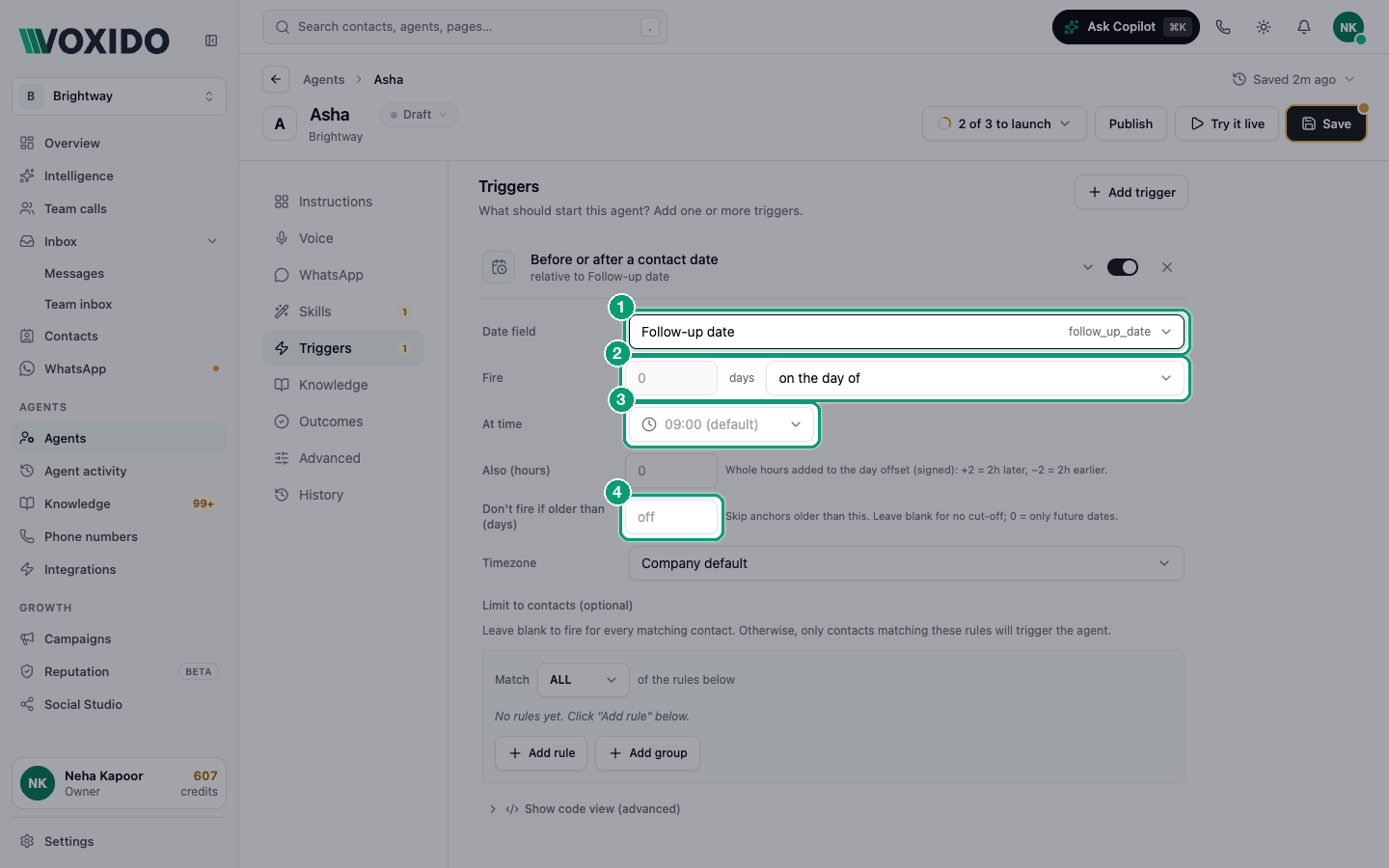
What each setting means
| Setting | What it does | Tip |
|---|---|---|
| Date field | The contact's date to count from. | Must be a date-type field. |
| Fire … days | How many days before the date, on the day of, or after the date. | — |
| At time | The clock time it fires on that day. | Always set it. See the warning below. |
| Also (hours) | Whole hours added on top. +2 = 2 hours later, −2 = 2 hours earlier. | For "3 hours before" type reminders. |
| Don't fire if older than (days) | How late it may still fire after the due time. | Leave blank for the safe default (up to 24 hours late). Don't use 0. |
| Timezone | The clock used for At time. Company default follows your settings. | Change it for customers abroad. |
| Limit to contacts (optional) | Who it covers. | Use the stage so cancelled bookings don't get reminders. |
Set "At time"
If At time is blank, the reminder fires at the time stored with the date. For a date with no time, that can be the middle of the night. Always pick a time.
How it fires
- Voxido checks every minute and fires once per contact per date.
- If the due time has passed by more than 24 hours (or your Don't fire if older than value), the contact is skipped. This stops old dates from firing when you pause and resume an agent.
- Deleted, blocked, snoozed and opted-out contacts are skipped. Messaging rules are checked again just before sending, so someone who opts out a minute earlier is never messaged.
- If the date changes (for example a rescheduled appointment), the reminder follows the new date.
Examples
| Business | Date field | Fire | At time | Filter |
|---|---|---|---|---|
| Clinic | Appointment date | 1 day before | 18:00 | Stage equals "Booked" |
| Loan recovery | EMI due date | on the day of | 10:00 | Tags contains "active-loan" |
| School | Fee due date | 3 days before | 11:00 | Stage equals "Enrolled" |
| Hotel | Check-in date | 1 day before | 11:00 | Stage equals "Confirmed" |
| Brightway | Follow-up date | on the day of | 10:00 | — |
The agent sends the first message, so turn on Send WhatsApp template in Skills. See Skills reference.
Common problems
The summary says "Anchored to a contact date (not configured)". Pick a Date field.
Some contacts didn't get it. Their date field is empty, or the time was more than 24 hours ago when the agent became active, or they're filtered out. See Troubleshooting.
It fired at night. Set At time and check Timezone.