

Recipe: reminders around each customer's own date
The problem
"Every customer has a different date — an appointment, a due date, an order, a check-in. We need a reminder that lands at the right moment for each of them."
Why this campaign fits
A campaign timed Around contact date fields reads a date from each contact's record and counts from it: "1 day before", "on the day", "3 hours after". Change the date and the reminder moves with it.
| You need… | Use |
|---|---|
| A reminder the evening before | 1 day(s) before the date, at 18:00 |
| A nudge a few hours after something | 3 hour(s) after a date-and-time field |
| Reminders only while something is still true (unpaid, unconfirmed) | A Condition on that step |
| No reminder that arrives too late to be useful | Advanced timing → skip if more than N hours late |
Pick your path: campaign or trigger?
| If the date… | Use | Why |
|---|---|---|
| Happens once per person (a first appointment, one overdue due date, a stay) | A campaign (this page) | Several steps, audience rules, Tasks and Logs |
| Comes round again and again for the same person (every appointment, every month's EMI) | A date-anchored trigger on the agent | It fires for every new date |
| Needs only calls, never WhatsApp | Either | Call steps in a campaign also run again for a new date |
A campaign's WhatsApp steps reach each person once. After its last WhatsApp step, the person has finished the campaign, even if their date changes later.
Before you start
- Create the date field. Settings → Custom fields → add a field with a date type, such as Appointment date. See Custom fields.
- Fill it in for each contact. Use a CSV import, let your team or agent fill it, or have your own system send it through an inbound API.
- Get your reminder templates approved. Reminders are usually utility templates. See Build a WhatsApp template.
A contact with an empty date field never gets these steps.
Clinic appointment reminders
Problem: "New patients forget their first appointment, and empty slots cost us money."
This campaign suits first appointments (or one treatment course). For regular patients who book again and again, use a date-anchored trigger instead.
| Step | Timing | Channel | Content |
|---|---|---|---|
| Day-before reminder | 1 day before Appointment date at 18:00 | Utility template: "Hi {{1}}, see you tomorrow at {{2}}. Reply 1 to confirm, 2 to change." | |
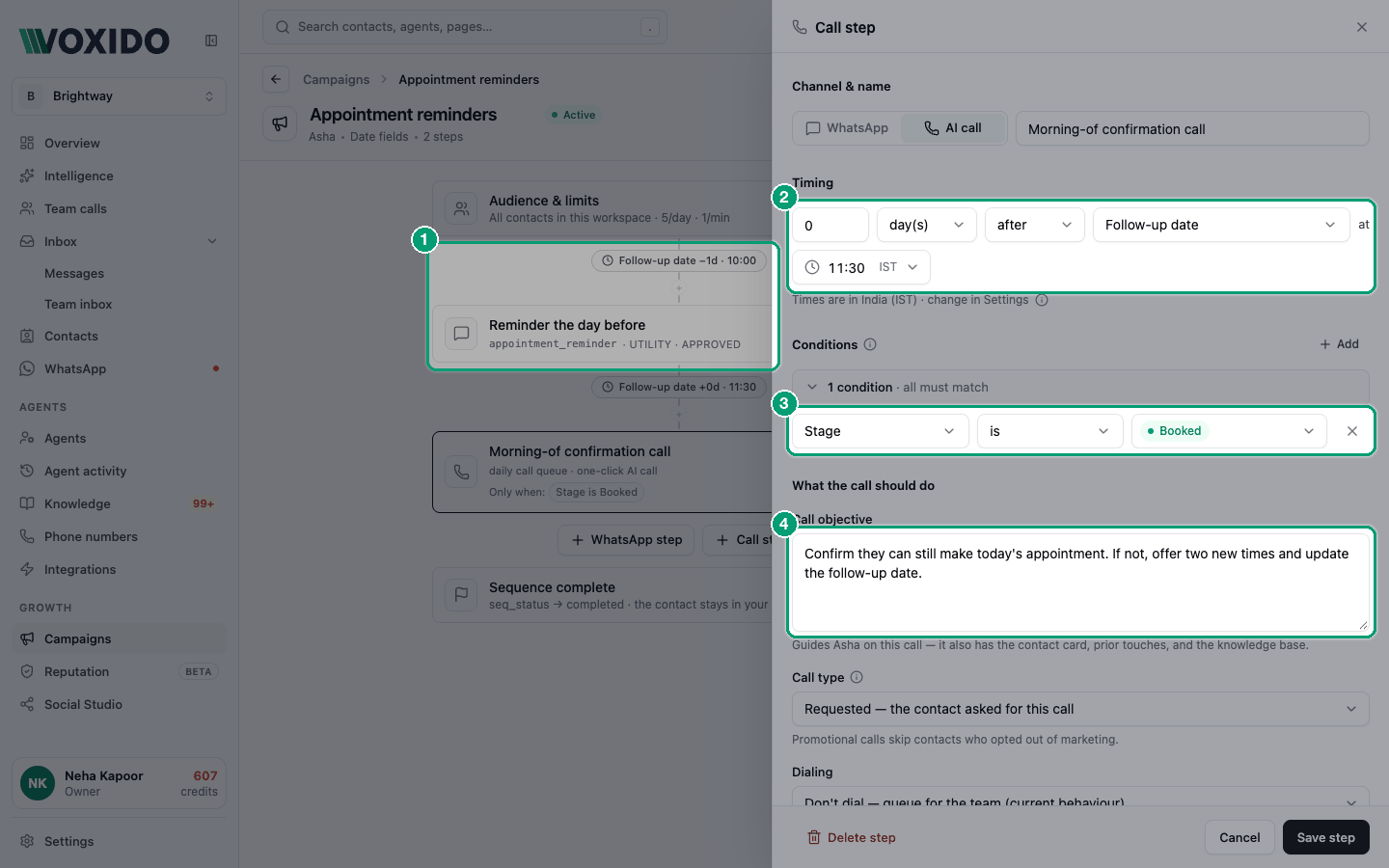
| Morning call | 0 days after Appointment date at 09:00 | Call, Dial automatically | Objective: "Confirm they're coming. If not, offer the next free slot." Condition: Confirmed · is not · yes |
How to build it:
- Click New campaign, name it
Appointment reminders, choose Around contact date fields, pick the clinic's agent and click Continue. - Attach a number that can call and send WhatsApp.
- Click Audience & limits → Add → Appointment date · is not empty. Click Done.
- Click the WhatsApp step button. Name it
Day-before reminder. Under Timing set 1 · day(s) · before · Appointment date · at 18:00. Pick the template and map its variables. - Open Advanced timing and set Skip this step if it's more than 3 hours late, so nobody gets a "see you tomorrow" message the next morning. Click Save step.
- Click the Call step button. Set 0 · day(s) · after · Appointment date · at 09:00. Write the objective, keep Requested, choose Dial automatically. Add the same goal to the agent's Instructions — the agent runs the call from them.
- Under the call step's Conditions, click Add → Confirmed · is not ·
yes. Click Save step. - Click Save, then Test step 1 on yourself. You'll see: "Test run started" and the reminder on your phone.
Loan EMI reminders
Problem: "Borrowers with an overdue EMI forget the date, not because they won't pay."
Use this for one due date per borrower — for example, an overdue account you're recovering. For a reminder before every monthly EMI, use a date-anchored trigger: a campaign's WhatsApp steps reach each borrower only once.
| Step | Timing | Channel | Condition |
|---|---|---|---|
| 3 days to go | 3 days before EMI due date at 10:00 | WhatsApp utility template | — |
| Due today | 0 days after EMI due date at 09:30 | WhatsApp utility template | Amount due · greater than · 0 |
| Gentle follow-up | 2 days after EMI due date at 11:00 | Call, Dial automatically, Requested | Amount due · greater than · 0 |
Keep Amount due up to date (an inbound API from your loan system works well). When it drops to 0, the later steps skip that customer.
Be kind and clear
Write the call objective like a helpful reminder: "Remind them the EMI of {{amount}} was due on Monday, offer the payment link, and ask if they need more time." Calls only go out in your working hours.
D2C cash-on-delivery confirmation
Problem: "Too many COD orders are refused at the door."
Use a date-and-time field, such as Order placed at, so you can count in hours.
| Step | Timing | Channel |
|---|---|---|
| Confirm the order | 1 hour after Order placed at | Call, Dial automatically, Requested. Objective: "Confirm the items, the address and that they'll pay cash on delivery." |
Add the audience condition Payment method · is · COD so prepaid orders are left out. Set the call step's Advanced timing to skip if it's more than 4 hours late.
Because this campaign has only a call step, it runs again for each new order date — repeat customers get a call for every COD order (at most one a day).
Send the time with its timezone
If your store sends Order placed at through an inbound API, include the timezone, such as 2026-10-17T14:05:00+05:30. A time without a timezone is read as UTC.
Call back on the day they asked
Problem: "A lead says 'call me on Thursday', and nobody remembers."
When the agent agrees a callback, it can save the day in the built-in Follow-up date field. A call-only campaign then calls on that day.
| Step | Timing | Channel |
|---|---|---|
| Callback | 0 days after Follow-up date at 11:00 | Call, Dial automatically, Requested. Objective: "They asked us to call back today. Pick up where the last conversation left off." |
Audience: Follow-up date · is not empty. Because it has no WhatsApp step, it never "finishes" — each new follow-up date gets its own call.
Hotel pre-arrival
Problem: "Guests arrive without knowing about parking, ID rules or airport pick-up — and we miss upsells."
| Step | Timing | Channel |
|---|---|---|
| Pre-arrival details | 2 days before Check-in date at 11:00 | WhatsApp utility template with ID rules and a pick-up offer |
| Directions | 0 days after Check-in date at 08:00 | WhatsApp utility template with the map link |
If you connect a property management system, guest details can arrive on their own. See Connect a hotel PMS. A returning guest who already finished this campaign won't get its WhatsApp steps again.
Hotel accounts may already have this
New hotel accounts can come with ready-made campaigns such as Guest journey, created paused. Open it under Campaigns, check its templates, and switch it on.
Costs
- Each WhatsApp template message is one WhatsApp template message charge.
- Each call costs AI conversation minutes plus carrier voice minutes.
- Skipped steps (for example, a paid EMI or a confirmed appointment) cost nothing — conditions save you money.
See What actions cost credits.
Quiet hours and limits
- Everything waits for Settings → Working hours. A 07:00 reminder in a clinic that opens at 09:00 goes out at 09:00 — use Advanced timing if that would be too late.
- A contact who wrote to you in the last 48 hours is held, so the agent doesn't interrupt a live chat.
- Automatic calls follow the campaign's Limits.
See Rate caps and quiet hours.
Common problems
Nobody gets the reminder. Check the date field is filled in, the audience matches (try date field · is not empty), and the campaign isn't Waiting.
The warning says a step "fires earlier than the step listed before it". List steps in time order. Put "3 days before" above "on the day".
The reminder came after the appointment. Add Advanced timing → skip if late, and check your working hours cover the reminder time.