

What Copilot can do
Copilot is a helper built into the Voxido app. You type (or say) what you want in plain words, like "How many calls did we miss today?" or "Add a WhatsApp trigger to Asha". Copilot looks up the answer, or gets the change ready for you to approve.
It's like asking a colleague who knows Voxido inside out. It never changes anything until you click Confirm.
Find it: header → Ask Copilot, or press ⌘K (Mac) or Ctrl+K (Windows) on any page. Who can use it: everyone. Copilot can only do what your own role allows.
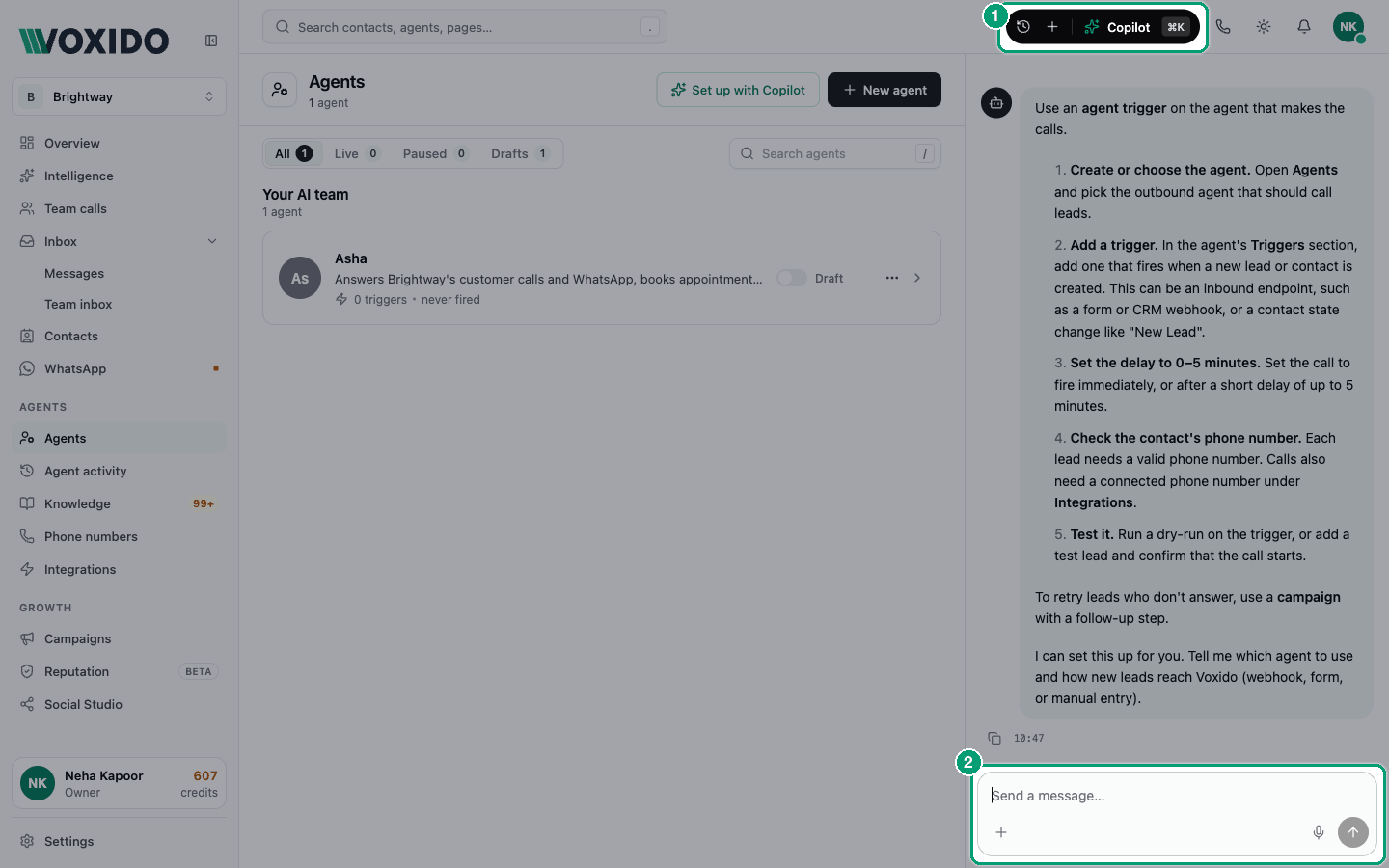
Try it in one minute
- Click Ask Copilot in the header. You'll see: a panel opens on the right with a greeting, like "What are we working on?", and a few starter ideas.
- Type: "How did my agents do yesterday?" and press Enter. You'll see: Copilot shows what it's checking, then answers with numbers.
- Type: "Make a segment of contacts in the Inquiry stage." You'll see: a card marked Needs approval with Confirm and Dismiss. Nothing has changed yet.
- Click Confirm. You'll see: the card says Applied, with an Undo button.
Everything it can do, by job
See how things are going
Copilot reads your dashboard numbers, call insights and reviews.
- "How many calls did we get today, and how many did we miss?"
- "Show me today's call leaderboard by agent and channel."
- "Why are calls down this week?"
- "What are customers complaining about lately?"
- "Summarise our latest reviews."
Look after your agents
It can list, explain, create and edit agents, and change their instructions.
- "Audit my agents. What's broken?"
- "Explain what the Bookings agent does."
- "Create a new agent for appointment reminders." (It's made as a Draft.)
- "Improve Asha's instructions so she asks for the customer's name first."
- "Add a trigger so Asha answers WhatsApp messages."
- "Try Asha with: 'Can I book for Sunday at 4?'" (a practice run that changes nothing)
- "Show Asha's earlier instruction versions and roll back to yesterday's."
- "Take the Sales agent offline now." / "Bring it back."
Work with contacts
- "Find Priya Sharma."
- "Add a contact: Ravi Kumar, phone +91 90000 00001, interested in the gold plan."
- "Move Priya to the Booked stage."
- "Build a segment of contacts who haven't replied in 30 days."
- "Add a custom field called Preferred branch."
Keep knowledge up to date
- "Which knowledge bases does Asha use?"
- "Add this price list to the Services knowledge base." (attach the file)
- "Show me suggested FAQs to review." / "Approve the one about parking."
Run campaigns
- "Which campaigns are running?"
- "Pause the Diwali offer campaign."
- "Why isn't Priya in the follow-up campaign's tasks?"
- "Change the reminder step to 10 am."
Messages and templates
- "Draft a WhatsApp template for appointment reminders." (saved as a draft; nothing is sent to Meta)
- "Create an SMS template for payment reminders."
- "Send Priya a WhatsApp: 'Your visit is confirmed for 4 pm.'" (one message to one contact, after you confirm)
Connect apps
- "What apps are connected?"
- "Connect Google Calendar." (Copilot shows a sign-in button)
- "Guide me through setting up a custom API for our booking system."
Set up many things at once
Ask for a bigger job and Copilot writes a plan: a list of steps you approve once.
- "Set up a new branch with a reception agent, a knowledge base and two contact stages."
- Drop a PDF brief into the chat: "Turn this into a setup plan."
See Using Copilot for how plans run.
Your team list and profile
- "Add Ravi to the team with his mobile number for alerts."
- "Change my name to Asha Rao."
What Copilot can't do
These need you to do them by hand:
| Can't do | Do it here instead |
|---|---|
| Billing, top-ups, invoices, auto-recharge | Header → profile → Billing. See How credits work. |
| Invite people, change roles, remove logins | Settings → People. See Inviting a teammate. |
| Buy phone numbers or connect them to agents | Sidebar → Phone numbers |
| Create, rename or archive workspaces | Workspaces |
| Place a phone call | Make a call in the header |
| Send email | Connect an email app in Integrations |
| Brand, working hours, call routing settings | Settings |
| Questions not about Voxido | It answers: "I'm the Voxido Copilot — I can only help with Voxido platform features." |
It also never opens a different page on its own. When a page would help, it shows an Open page button and you choose.
Copilot or by hand?
The problem: "Should I ask Copilot, or just click through the screens?"
| If you want to… | Use | Why |
|---|---|---|
| Get a quick number or answer | Copilot | One question beats opening three reports. |
| Make many similar changes (5 fields, 3 segments) | Copilot (a plan) | You approve once, it does the rest. |
| Start from a document (a menu, a price list, a brief) | Copilot | Drop the file in and ask. |
| Improve an agent's instructions | Copilot, then review | It shows every line it removes in red before you confirm. |
| Choose voices, routing or anything with many options | By hand | You see every option and its effect. |
| Delete something | By hand, or very carefully | Deletes can't be undone, even with Copilot. |
| Learn how a screen works | By hand first | Then let Copilot speed you up. |