

Your numbers list and what each status means
Every number you own is one row on the Numbers tab. A glance at the row tells you if the number is live, still setting up, or needs you.
Find it: Sidebar → Phone numbers (opens the Numbers tab) Who can use it: Owners and Admins
Read a row
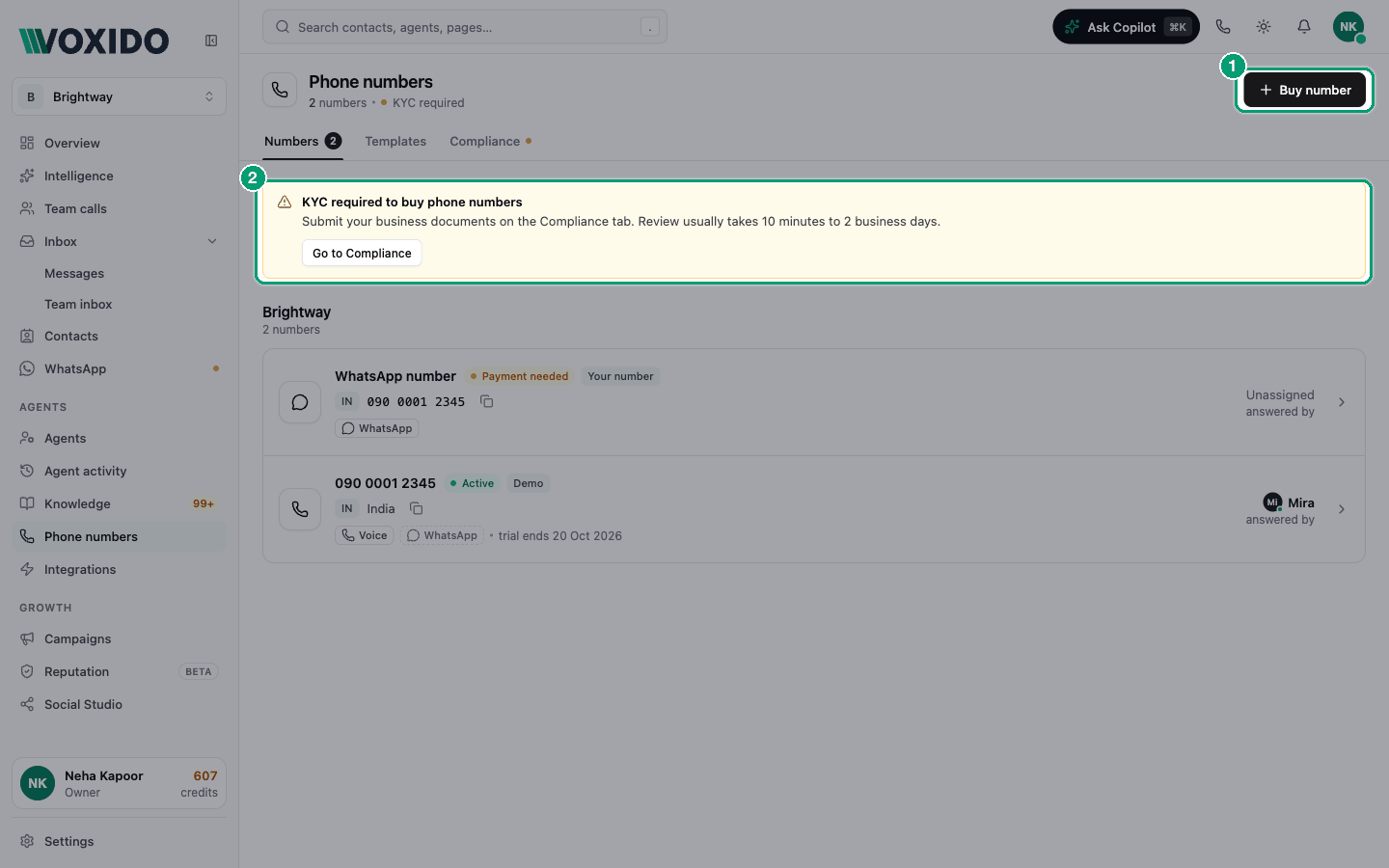
| Part of the row | What it shows |
|---|---|
| Title | The name you gave the line, or the number itself. |
| Status pill | Where the number is in its life. See the table below. |
| Country and number | A country tag (like IN) and the number. Click the copy icon to copy it as people dial it. |
| Voice / WhatsApp tags | What the number can do. A dashed tag means that channel is off. Voice is hidden on WhatsApp-only numbers. |
| Region and rent | The city and the monthly rent, for example "₹…/mo". |
| answered by | The agent that answers calls and chats on this number, or Unassigned. |
If your numbers belong to different workspaces, the list is split into groups, one per workspace. Numbers without a workspace are under No workspace. A number's workspace follows the agent that answers it.
Status pills
| Pill | What it means | What to do |
|---|---|---|
| Active | Live. Calls and messages work. | Nothing. |
| Provisioning… | Voxido is still setting the number up with the carrier. | Wait a moment. |
| Releasing… | You released the number and it's being returned. | Nothing. |
| Released | It's no longer yours and can't take calls. | Nothing. |
| Failed | Something went wrong during setup or release. | Open the number, click Re-Sync, or contact support. |
| Payment needed | WhatsApp on this number has no working payment method on Meta. Messages you start (templates, reminders, campaigns) aren't delivered. Replies still work. | Add a card in Meta Business Suite → Billing & payments. |
Tags you may see
| Tag | What it means |
|---|---|
| Demo | A free trial number from Voxido. Hover to see when the trial ends. Paid accounts keep it for the monthly rent; otherwise it goes back to Voxido's trial pool. |
| Your number | A number you own, connected through your WhatsApp Business app. Voxido only uses it for WhatsApp. |
| Connected via DoubleTick | (In the details panel.) This number is managed under Integrations → DoubleTick. |
Open a number's details
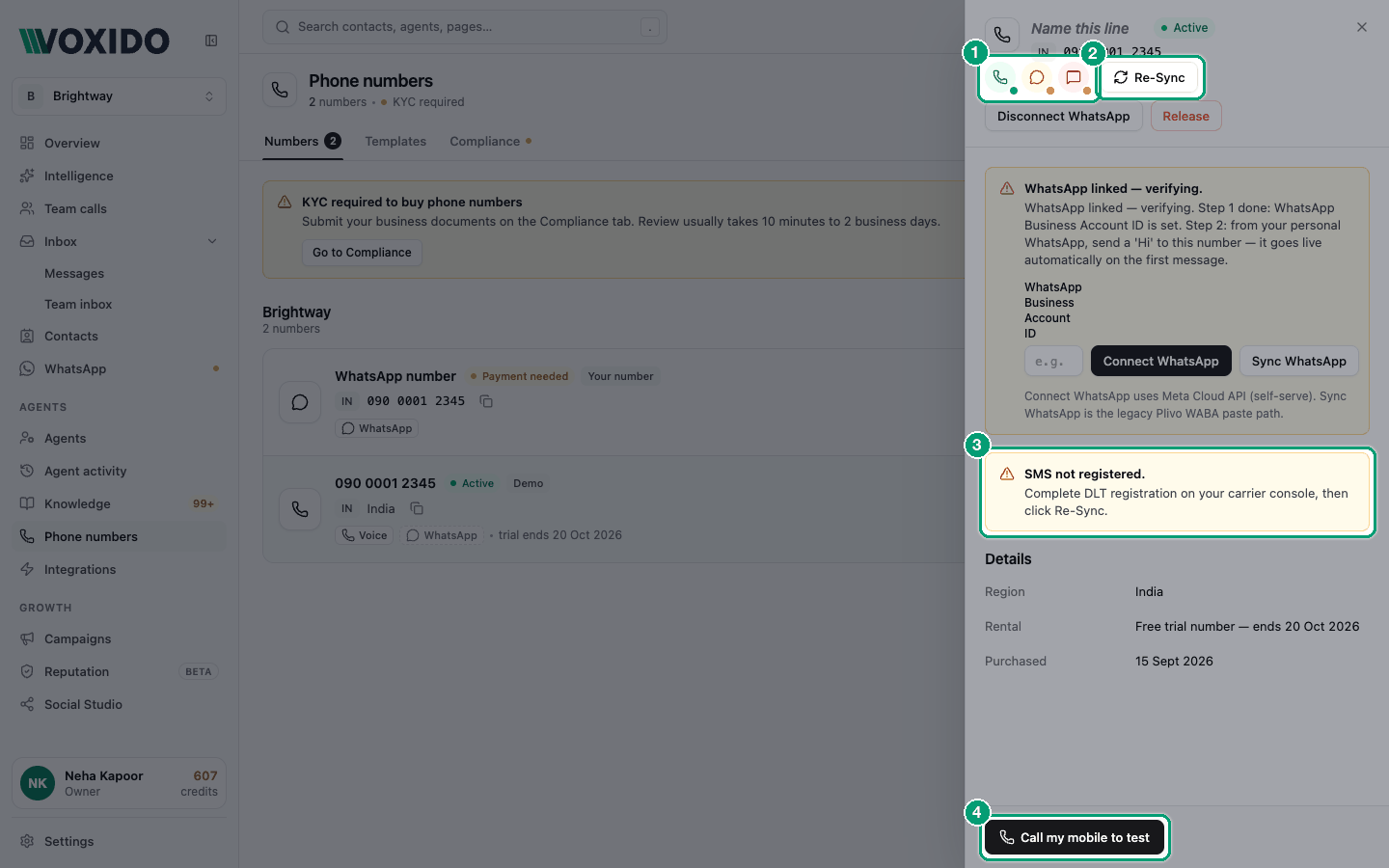
Click any row. A panel opens on the right.
| Area | What's there |
|---|---|
| Top | The line name (click it to rename), the status pill and the number. |
| Channel icons | Voice, WhatsApp and SMS, each with a coloured dot. Hover for a short note. |
| Buttons | Re-Sync, Disconnect WhatsApp (when WhatsApp is on) and Release. |
| Notes | Yellow notes appear only when something needs you: WhatsApp not active, a missing Meta payment method, or SMS not registered. |
| Details | Region, Rental and Purchased (the date you bought it). |
| Bottom | Call my mobile to test. |
What the channel dots mean
| Dot label | Meaning |
|---|---|
| Active | This channel works. |
| Pending activation | WhatsApp is linked and waiting for its first message. Send "Hi" to the number from your own WhatsApp. |
| Not registered | SMS needs DLT registration (an Indian sender check) on your carrier's console. Then click Re-Sync. |
| Not configured | WhatsApp isn't set up on this number yet. See Connect WhatsApp. |
| Inactive | The channel is off. For WhatsApp, contact support. WhatsApp-only numbers show Voice and SMS as inactive. |
Re-Sync asks the carrier for the latest Voice, SMS and WhatsApp state. Use it after DLT approval or a WhatsApp change.
Call history moved
The details panel doesn't show calls or usage. Find calls in Agent activity.
Release a number
Release a number when you no longer need it. It stops working for you right away.
- Open the number and click Release. You'll see: "Release this number?" — "Releasing this number frees it back to the pool. Calls to it will fail."
- Click Release. You'll see: "Number released — It's back in the pool." The row slides out of the list.
For a Your number line, the button and message say Remove. Removing disconnects WhatsApp from Voxido, but the phone number stays yours.
Releasing can't be undone
Once released, the number goes back to the pool and someone else may get it. Update your website and signboards first.
Common problems
My number has said "Provisioning…" for a long time. Click the row, then Re-Sync. If it doesn't change, contact support.
The WhatsApp tag is dashed. WhatsApp isn't connected on this number. See Connect WhatsApp.
SMS shows "Not registered". Finish DLT registration on your carrier's console, then click Re-Sync.