

Make calls sound natural
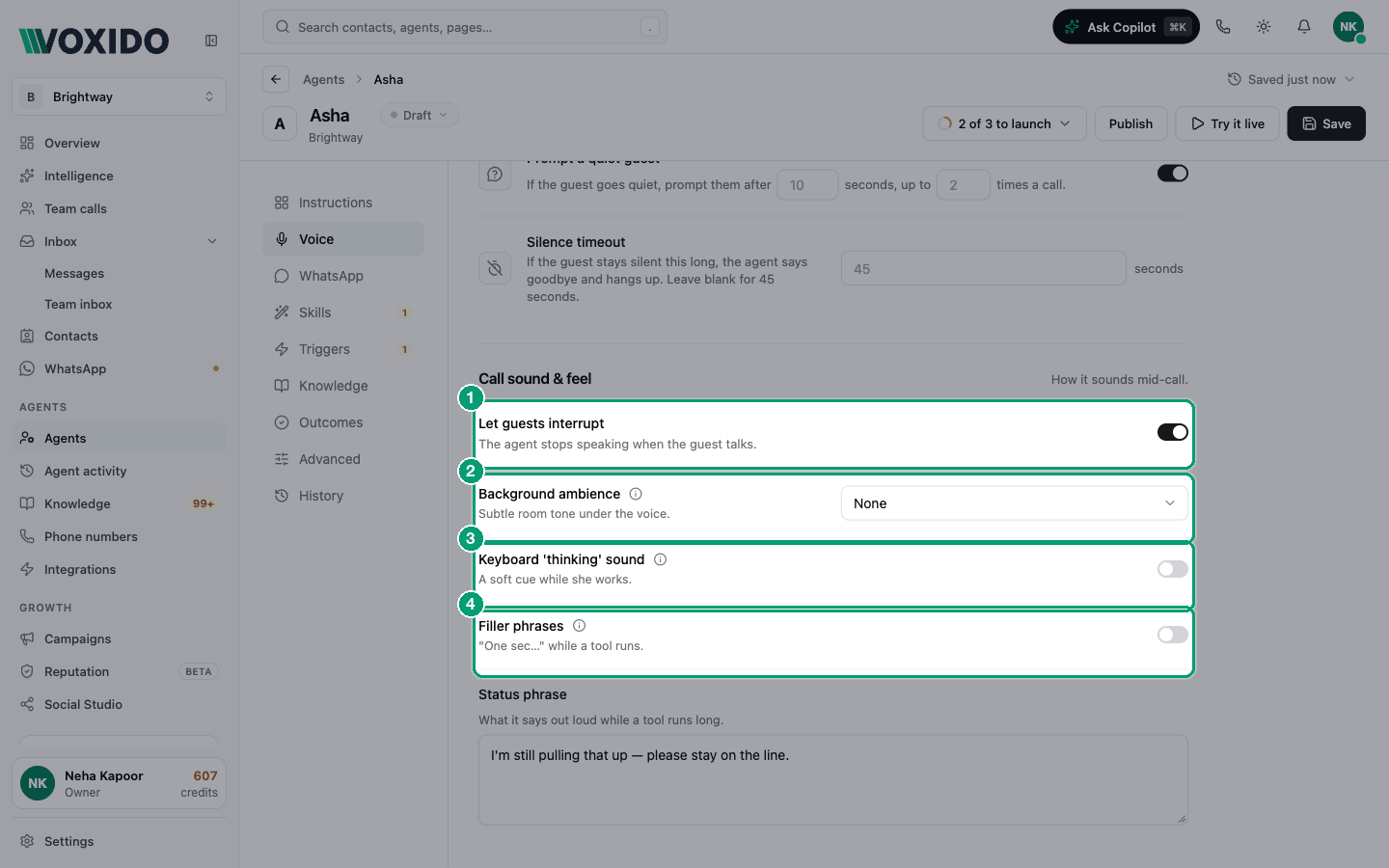
The Call sound & feel block shapes how a call feels in the middle: can the caller cut in, is there quiet room sound, and what fills the gap while the agent looks something up.
Find it: Sidebar → Agents → open an agent → Voice → scroll to Call sound & feel
Why silence is the enemy
On a phone call, two seconds of silence feels like a dropped line. Your agent goes quiet whenever it looks something up — a price, a free slot, an order. The controls here fill that gap so callers stay on the line.
| If your callers say… | Turn on |
|---|---|
| "Hello? Are you there?" while the agent looks something up | Keyboard 'thinking' sound, then Filler phrases |
| "It sounds like a robot in an empty room" | Background ambience (low volume) |
| "I couldn't stop it talking" | Let guests interrupt (keep it on) |
| "It keeps saying the same line" | Add more Filler phrases |
| "It went quiet for ages on a slow search" | Edit the Status phrase |
Let guests interrupt
On (default): the agent stops speaking when the caller talks. Voxido tells a real interruption ("wait, not Tuesday") from a small sound like "mm-hm", so it doesn't stop for every noise.
Off: the agent always finishes its sentence. Callers can't cut in.
Keep it on for almost every business. People interrupt on the phone all the time. An agent that can't be stopped feels rude. Turn it off only if the agent keeps stopping on a very noisy line, and test the result with Try it live.
How the agent knows you've finished talking
You don't need to set this. Voxido listens to how the caller speaks, not just to silence. It waits through "umm… let me think" and answers when the caller is really done. Background noise from the caller's side is also reduced automatically.
Background ambience
Plays a quiet office hum under the agent's voice. Options: None (default) or Subtle office ambience. When it's on, an Ambience volume slider appears (default 20%).
| Use it when… | Skip it when… |
|---|---|
| You want a lived-in front-desk feel (salon, hotel, showroom) | Callers are older or hard of hearing (clinics) |
| The agent sounds too clean and "studio-like" | Calls are serious (payment reminders, complaints) |
| Your callers are often on noisy roads already |
Keep the volume between 15% and 25%. Above about 40% it starts to cover the agent's voice on small phone speakers.
Keyboard 'thinking' sound
Plays soft typing while the agent looks something up, so the caller hears that someone is working. It never repeats words, so it's the most natural way to fill short gaps.
When it's on, two more rows appear:
- Typing clips — Typing – crisp, Typing – soft, or both. If you pick none, Voxido blends both.
- Thinking volume — default 20%.
Turn it on for any agent that searches your knowledge base or checks bookings. It's the first thing to try.
Filler phrases
Speaks a short line, like "Let me check that for you", when a lookup takes more than about 1.5 seconds. Fast lookups get no filler, so callers don't hear it on every turn.
When it's on, you can write up to 12 phrases with Add phrase. The agent picks a different one each time and never repeats the last one.
Good phrases are short and honest:
- "One moment, let me check."
- "Let me pull that up for you."
- "Checking the calendar now."
- For Hinglish callers: "Ek minute, main check karta hoon."
Write phrases in your callers' language. If you never edit the phrases, a Hindi-first agent says a Hindi default line instead of the English one.
Status phrase
What the agent says out loud when a lookup runs long — by default after 5 seconds, then again after 5 more seconds, at most 2 times a call. The default is "I'm still pulling that up — please stay on the line."
You change the timing in Advanced → Watchdog (Advanced settings). Like the filler, an unedited status phrase is spoken in Hindi on a Hindi-first agent. Once you type your own, the agent says exactly your words.
Good, better, best
| Level | Settings | Feels like |
|---|---|---|
| Good | Defaults: interrupt on, nothing else | Fast and clean, but silent during lookups |
| Better | + Keyboard 'thinking' sound on | Callers hear activity during lookups |
| Best | + Filler phrases (3–5 lines in your callers' language) + a custom Status phrase | Natural, like a person at a desk |
Turn on one thing at a time. Save, call with Try it live, listen, then add the next.
Presets by use case
| Use case | Interrupt | Ambience | Thinking sound | Filler phrases |
|---|---|---|---|---|
| Brightway front desk / reception | On | Subtle office, 20% | On | On: "One moment, let me check." |
| Hotel front desk | On | Subtle office, 15% | On | On: "Let me check the rates for those dates." |
| Clinic appointments | On | None | On, 15% | On: "Let me check the doctor's calendar." |
| Sales / lead follow-up calls | On | None or subtle office, 15% | On | On: "Good question — one second." |
| Payment reminders | On | None | On, 15% | On: "One moment, let me pull up your account." |
| Customer support (shop, D2C) | On | None | On | On: "Let me look up your order." |
Things Voxido does for you
You don't need to set these up:
- If the caller speaks but the words weren't caught, the agent says "Sorry, I didn't catch that — could you say that again?"
- Before the Max call duration runs out, the agent warns the caller, then says goodbye.
- After the Silence timeout, the agent says goodbye before hanging up.
These lines are spoken in the agent's language (Hindi, Bengali, Tamil and other Indian languages included).
Common problems
The filler plays on top of the answer. Use fewer, shorter phrases. Fillers stop when the answer is ready.
Callers say the agent talks over them. Check Let guests interrupt is on.
The ambience is too loud on mobiles. Lower Ambience volume to 15%, or set Background ambience to None.