

How calls and requests reach your team
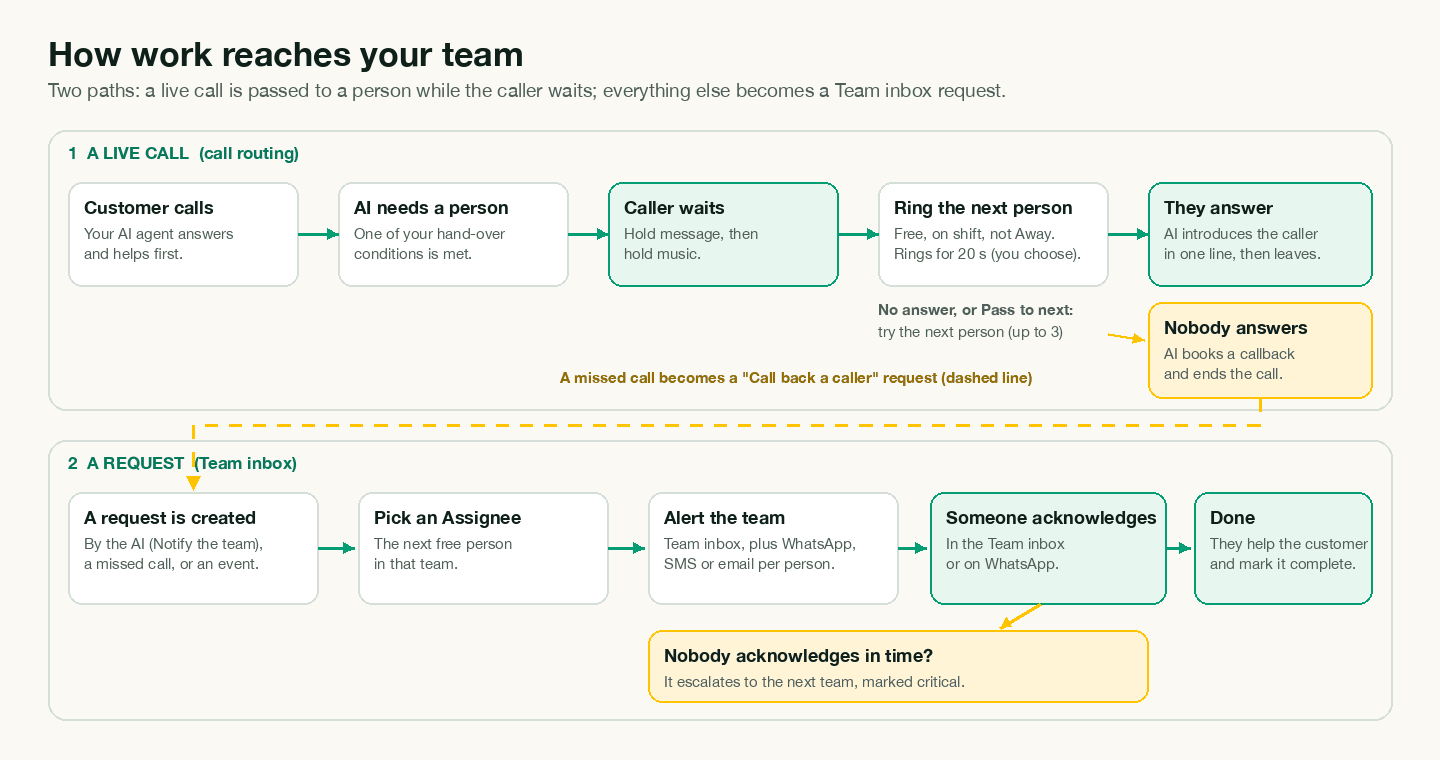
Your AI agent handles most conversations alone. When it needs a person, work reaches your team in one of two ways:
- A live call: the AI rings someone on your team while the caller waits on hold. This is call routing.
- A request: the AI puts a job in the Team inbox and alerts the team. Someone picks it up and follows up. This is how WhatsApp, chat, and missed calls reach people.
This page explains both, end to end. For help choosing settings, see Choose a routing setup for your team.
The big picture
A live call
- A customer calls. Your AI agent answers.
- The AI decides the caller needs a person, using your conditions in Call routing.
- The caller hears a hold message, then hold music.
- Voxido picks the next free person in the team and rings them (mobile or browser).
- They answer → the AI introduces the caller in one sentence and leaves. Done.
- They don't answer or pass → the next person is rung, up to People to try.
- Nobody answers → the AI promises a callback and ends the call. A Call back a caller request goes to the Team inbox. Continue at step 3 below.
A request
- Your AI agent (or an event) creates a request for a team.
- Voxido picks one person as the Assignee.
- The team is alerted: Team inbox, plus WhatsApp, SMS or email, as each person chose.
- Someone acknowledges it, in the Team inbox or by replying on WhatsApp. The clock stops.
- If nobody acknowledges it in time, it escalates to the next team, marked critical.
- Someone contacts the customer and marks it complete.
Before anything works: the setup
| Piece | Where | Why it matters |
|---|---|---|
| Teams | Settings → People → Teams | Calls and requests go to a team, never to "anyone". |
| People in teams | Settings → People | Each person has one team. |
| Takes calls | Person dialog | Only these people are rung for live calls. |
| Working days and shift | Person dialog | Outside them, a person isn't rung or assigned new requests. |
| Send alerts by | Person dialog | How each person hears about requests. |
| Call routing On | Settings → Call routing | Turns on everything on this page for live calls. |
| Talk to a human / Notify the team | Your agent's skills | Lets the AI pass calls and create requests. See Skills. |
Who can take work right now
| Check | Live calls | New requests (Assignee) |
|---|---|---|
| In the right team | Yes | Yes |
| Active (not marked inactive) | Yes | Yes |
| Takes calls on | Yes | Not needed |
| Covers the customer's workspace | Yes (see the workspace switch below) | Yes |
| Inside working days and shift | Yes | Yes |
| Not on leave | Yes | Yes |
| Not Away | Yes | Yes |
| Didn't say no to today's check-in | Yes | Yes |
| Not already on a call, or being rung | Yes | Not needed |
| Voxido open (Computer answerers only) | Yes | Not needed |
A person who passes every check for calls has the status Available. Otherwise their status says why: Away, On leave, Off shift, Not available today, On a call or Offline. See Your status and leave.
The checks for requests apply while call routing is On. With it off, see How a request reaches a person.
Who gets the call
Voxido builds a line of everyone who passes the checks, then rings them one at a time.
- The caller's Owner first. If the caller's contact has an Owner who is free, they're rung first. The popup says "Your guest · you're their owner".
- Then the Backup owner: "Their owner isn't free · you're the backup".
- Then everyone else, in turn. People who have never been offered a call go first. Then the person who has waited longest since their last offer.
If the team takes calls By level (Settings → Call routing → How each team takes calls), step 3 goes level by level: everyone free on Level 1 in turn, then Level 2, and so on. Owners still come first. See How each team takes calls.
With Try people from the caller's workspace first, then anyone available on, people who cover the caller's workspace come before people who cover all workspaces, and then everyone else. For a team on levels, the caller's workspace still wins: its people by level, then everyone else by level. With the switch off, only people who cover the caller's workspace are rung.
What counts as a turn: being rung, pressing Pass to next, or getting a callback request. After a turn, you go to the back of the line. Being rung as the Owner or Backup owner doesn't use up your turn.
Two calls at the same moment always go to two different people. Nobody is rung twice on the same call.
Ring time, passes and answering
- Each person rings for Ring each person for (20 seconds to start). Then the next person is rung.
- Up to People to try people are rung (3 to start).
- Computer answerers get a popup in Voxido. Mobile answerers' phones ring. See Answer calls in your browser.
- Pass to next moves the call on at once. It's not counted as a miss for Away.
- Declining on a phone, or letting it ring out, counts as a miss. Two misses in a row set the person to Away, and their Escalates to team is alerted.
- If the caller hangs up while a phone rings, the ringing stops. Nobody else is rung, and it isn't a miss.
When someone answers, the AI says one sentence that both hear, then leaves. From then on it's a normal call between two people. The person may become the caller's Owner (or Backup owner) if the contact doesn't have one.
When nobody answers
- The AI says sorry that everyone is busy, and promises a callback on the same number within your If nobody answers time (15 minutes to start). If the caller's number is hidden, it first asks for a number.
- The AI ends the call.
- A Call back a caller request goes to the Team inbox, with the AI's summary and a deadline equal to the callback time.
- It's assigned to the caller's Owner, then the Backup owner, then the next person in turn. People who are On a call or Offline can still get it, because it's done later.
- If the caller already has an open request with that team, the callback joins it instead of making a new one.
Transfers: what moves where
| From → to | Possible? | How |
|---|---|---|
| AI → a person, live on a call | Yes | Talk to a human, with call routing. Goes to a team, not a named person. |
| AI → another AI agent | Yes | Send to another AI agent, live or as a follow-up. |
| Person → person, on a live call | No | End the call and use the Team inbox, or call back. |
| AI or person → an outside phone number | No | |
| Request → another teammate | Yes | Transfer in the Team inbox. |
| Request → the next team | Yes | Automatic when the SLA runs out, or ⋯ → Escalate to (team). |
How a request reaches a person
Which team. The team the AI or the event names. On hotel accounts, service requests follow Request routing. If the team has nobody in it, the Backup team gets it. See How requests are created.
Who is the Assignee.
- The customer's Owner, then Backup owner, if they are in that team and free.
- With call routing On: the free person in the team who was given a request longest ago. Never-assigned people go first. If nobody is free, the person who will be free soonest. In a team on levels, only the lowest level with someone free is used: Level 1 people get requests while any of them is free.
- With call routing Off: in a one-person team, that person. Otherwise the person with the fewest open requests. Status isn't checked.
"Free" means not on leave, not Away, inside their shift, and not "no" on today's check-in.
Who is alerted. Everyone in the team who covers that workspace, on the channels they ticked. People on leave, or who said no to today's check-in, are skipped. People who are Away or off shift are still alerted. See Team alerts.
Taking it. The first person to Acknowledge, Assign to me, or reply on WhatsApp with a time takes it. The clock stops (or, for a WhatsApp time, becomes the new deadline). See Team inbox and Work a request from WhatsApp.
Escalation. If nobody takes it within the team's Reply within time, a critical copy goes to the Escalates to team. This can repeat up to level L5. See SLA timers and escalation.
Who hears about what
| Event | Who is told | How |
|---|---|---|
| A call rings for you | You only | Popup in Voxido, or your phone |
| A new request | The whole team (minus leave and check-in "no") | Team inbox + WhatsApp / SMS / email as chosen |
| A request is assigned or transferred to you | You | |
| A request escalates | The next team | Same as a new request, marked critical |
| Someone is set to Away after two misses | Their Escalates to team | Team inbox + all channels |
| A customer rates a call Not good | The team's Managers | Team inbox + their channels |
| Your daily numbers | You, if you turned it on | Email. See Daily email. |
Scenarios
Priya is Away. Priya picked Away → 30 min for lunch. A call comes in for Sales. Priya is skipped; Rahul is rung. A WhatsApp lead comes in too: the request is assigned to Rahul, but Priya still gets the team's WhatsApp alert. After 30 minutes Priya is Available again, and next in line.
It's 11 pm. Your AI agent still answers every call and WhatsApp. If a caller asks for a person, everyone whose shift has ended is Off shift, so nobody is rung. The AI books a callback, and promises it within your callback time. The request goes to the first person whose shift starts next, and the team's WhatsApp alerts go out at night. To avoid that, put someone on a night shift, or tell your agent in its instructions not to pass calls at night and to promise a morning callback instead.
Nobody answers. Three people are rung for 20 seconds each, about a minute in total. Nobody picks up. The AI says sorry, promises a call back within 15 minutes, and ends the call. A Call back a caller request lands in the Team inbox, assigned to the caller's Owner. If nobody acknowledges it within 15 minutes, it escalates to Supervisors.
A customer asks for a refund on WhatsApp. Brightway's agent has Talk to a human on. Priya Sharma writes "I want my money back". The AI tells her a person will follow up, and creates a High-priority request titled "Escalation: …" for Support. Rahul (next in turn) is assigned and everyone in Support gets a WhatsApp alert. Rahul replies 10 min on WhatsApp: the request is his, and Priya gets "You're all set — someone will be with you in about 10 minutes."
A returning customer calls. Anita, a clinic patient, has Dr Mehta's receptionist Kavya as her Owner. When Anita asks for a person, Kavya is rung first, even if it isn't her turn. If Kavya is busy, the line continues as usual.
Common problems
Calls always go to the same person. Probably they're the only one Available, or they own many of the callers. Check Team calls → Who takes calls.
Requests are Unassigned. Nobody in the team was free and nobody will be (for example, everyone is Away until back), or the team is empty. Assign it by hand, and check the team.
People get alerts on their day off. Book leave, or use the daily check-in. Shifts and Away don't stop team alerts.