

Voice and language
The Voice section decides how your agent sounds on a phone call. You pick its voice, the languages it speaks, and the limits that end a call politely.
Find it: Sidebar → Agents → open an agent → Voice
The section has three blocks:
- Voice & language — the voice, the languages it speaks, and what to do when a caller uses another language.
- Call limits — how long a call can last, and what happens when the caller goes quiet.
- Call sound & feel — interruptions, background sound and "one moment" lines. See Make calls sound natural.
All of it is saved with the Save button at the top of the editor (or Ctrl+S / Cmd+S).
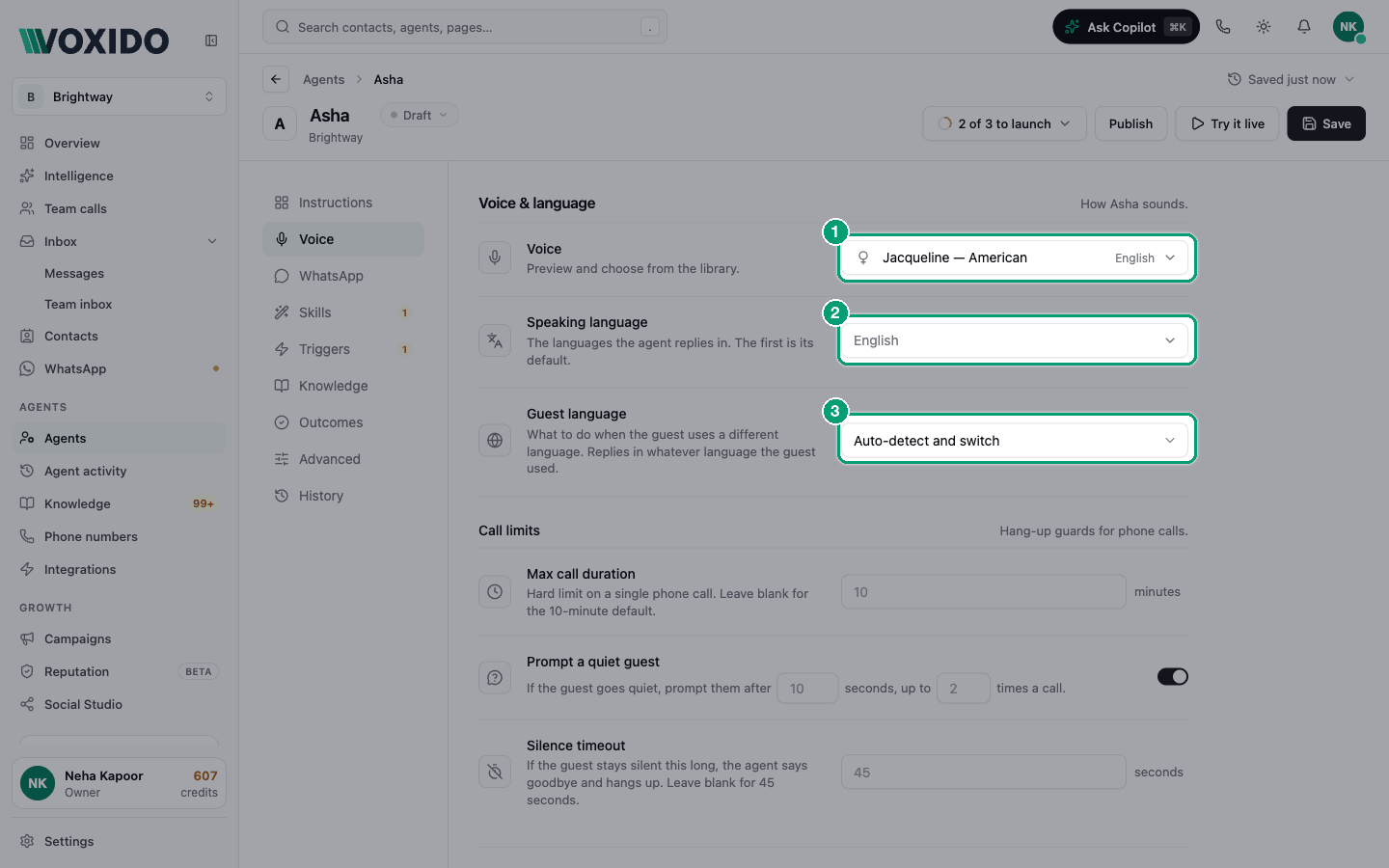
Quick start (2 minutes)
- Pick a Voice your callers will trust.
- Pick the Speaking language (or two).
- Leave Guest language on Auto-detect and switch.
- Leave the Call limits blank (10 minutes, 45 seconds).
- Click Save, then Try it live and talk to your agent.
Pick your path
| If you want… | Do this |
|---|---|
| An Indian voice, or Hindi and other Indian languages | Change the speaking model to a Sarvam model first (see Choose a voice) |
| An English-only agent | Keep the default voice model; set Speaking language to English |
| Callers who mix Hindi and English to be understood | Pick both Hindi and English, and a Sarvam listening model (Choose the models) |
| Calls that don't drag on | Set Max call duration and Silence timeout |
| The agent to check on a quiet caller | Keep Prompt a quiet guest on |
Choose a voice
The problem: "Our customers are in Pune, but the agent sounds American."
Why it happens: the Voice list only shows voices of the speaking model (text-to-speech, the part that turns words into sound). The default speaking model is Cartesia Sonic-3. Its voices are Jacqueline, Blake (American) and Daniela (Mexican). To get Indian voices, change the speaking model in Advanced first.
| Your callers | Speaking model (Advanced → Voice → TTS model) | Voices to try |
|---|---|---|
| Speak English, anywhere | Cartesia Sonic-3 (default) | Jacqueline — American, Blake — American |
| Speak Indian English | Sarvam Bulbul v4 Flash | Neha — Customer care, Ishita — Customer care, Dev — Conversational |
| Mix Hindi and English (Hinglish) | Sarvam Bulbul v4 Flash | Ishita — Hinglish customer care, Simran — Hinglish customer care, Sunny — Hinglish customer care |
| Speak Hindi | Sarvam Bulbul v3 | Shubh — Friendly default for IVR & support, Ritu — Soft, approachable for customer interactions |
| Speak Tamil, Bengali, Gujarati, Kannada… | Sarvam Bulbul v4 Flash | Voices tagged with that language, e.g. Roopa (Bengali), Pooja (Gujarati) |
Which voice for which audience?
- Calm and clear for clinics, older callers and complaints: Ritu (soft), Shreya (precise pronunciation), Odysseus (calm, Deepgram Aura-2).
- Warm and friendly for front desks, salons and shops: Simran (warm), Ara (warm, xAI TTS-1), Jacqueline.
- Formal and trustworthy for payment reminders, banks and loan recovery: Amit (formal business voice), Rahul (builds trust), Athena (professional, Deepgram Aura-2).
- Upbeat for sales and offers: Eve (energetic, xAI TTS-1), Sumit (warmth with professionalism).
To pick a voice:
- Click Advanced in the section list, open the Voice group, and choose a TTS model. You'll see: the Voice box under it switches to a voice that model supports.
- Click Voice in the section list. You'll see: the Voice & language block, with a female, male or neutral icon next to each voice.
- Click the Voice box and type a name or language in Find a voice…. You'll see: each voice with its language on the right, e.g. "Simran — Warm conversational interfaces" and "Hindi".
- Pick a voice and click Save. You'll see: the amber dot on Save disappears.
Hear the voice before callers do
There's no play button in the voice list. To hear your choice:
- Click Save. You'll see: "Saved just now" in the header.
- Click Try it live and allow your microphone if the browser asks. You'll see: a dark panel on the right. When it says Connected · voice preview, the agent speaks its greeting.
- Talk to it like a customer would. Ask a question it has to look up. You'll see: a live transcript of both sides.
- Change the voice, click Save, then click Restart session (the circular arrow) and listen again.
Try it live uses the saved agent, so always save first. A test uses voice credits like a real call. More in Try it live.
Choose the languages
Speaking language is the list of languages the agent replies in. The first one is its default and is tagged default. The list only offers languages the chosen voice can say. For example, Sarvam voices offer English (India) but not plain English.
What you pick changes how the call works:
| You pick | What happens on the call |
|---|---|
| Nothing | No language rule is added. The agent follows your instructions. |
| One language | The agent speaks that language. |
| Two or more | The agent listens for all of them. Its voice starts in English and switches when the caller speaks another of your languages. |
Guest language is what the agent does when a caller uses a different language:
| Option | What it does | Good for |
|---|---|---|
| Auto-detect and switch (default) | Replies in whatever language the caller used. | Most businesses |
| Detect and ask first | Offers once, in the caller's language, and switches only if they agree. | Businesses that prefer one language but don't want to be rude |
| Do nothing | Always replies in the speaking language. | A strict English-only line, e.g. an international helpdesk |
Switching mid-call needs a Sarvam voice
Voxido can change the voice's language during a call only with a Sarvam speaking model (Bulbul). With other voices, pick the language you want callers to hear.
WhatsApp replies stay in English
These language settings shape phone calls. On WhatsApp, the agent currently replies in English even when the customer writes in another language.
Set the call limits
| Setting | What it does | Default | Change it when… |
|---|---|---|---|
| Max call duration | Hard limit on one phone call, in minutes (1 to 10). About 30 seconds before the end, the agent says the call is almost over, then says goodbye. | 10 minutes | You want short calls, e.g. 3–5 minutes for reminders. |
| Prompt a quiet guest | If the caller goes quiet, the agent speaks up after a few seconds. It finishes what it promised to check, or asks one short check-in line. | On: after 10 seconds, up to 2 times a call | Older callers need more time (try 15 s), or you want fewer check-ins. |
| Silence timeout | If the caller stays silent this long, the agent says goodbye and hangs up. | 45 seconds | You call many numbers that may not answer (try 20–30 s). |
The silence timeout is never shorter than 15 seconds. It is also always at least 5 seconds longer than the quiet-guest check-in, so the caller can answer it. If a call is handed to a team member, the time limit stops applying.
Example: Priya Sharma calls Brightway and goes silent while she finds her diary. After 10 seconds the agent asks, "Take your time — are you still there?" If she says nothing for 45 seconds in total, the agent says goodbye and ends the call.
Recommended setups
Brightway (an English-only service business):
| Setting | Value |
|---|---|
| TTS model / Voice | Cartesia Sonic-3 / Jacqueline (or Sarvam Bulbul v4 Flash / Neha — Customer care for an Indian accent) |
| STT model (Advanced) | Deepgram Nova-3 (English, Mumbai-colocated) |
| Speaking language | English (or English (India) with a Sarvam voice) |
| Guest language | Do nothing if you only serve English; else Detect and ask first |
| Call limits | Blank (10 minutes, 45 seconds) |
A hotel in India where guests mix Hindi and English:
| Setting | Value |
|---|---|
| TTS model / Voice | Sarvam Bulbul v4 Flash / Ishita — Hinglish customer care (or Sarvam Bulbul v3 / Shubh) |
| STT model (Advanced) | Sarvam Saaras v4 — Code-mix (Hinglish/Tanglish) |
| Speaking language | Hindi and English (India) |
| Guest language | Auto-detect and switch |
| Call limits | Blank; turn on Keyboard 'thinking' sound for rate lookups |
With a Sarvam model, Voxido also tells the agent to speak everyday Hinglish. It keeps the English words people really use, like "booking", "payment" and "confirm", instead of formal textbook Hindi. Write your greeting in the language you want callers to hear first.
Call limits by use case:
| Use case | Max call duration | Prompt a quiet guest | Silence timeout |
|---|---|---|---|
| Front desk / reception | 10 min | 10 s, 2 times | 45 s |
| Clinic appointments | 10 min | 15 s, 2 times | 60 s |
| Sales or lead follow-up calls | 5 min | 8 s, 1 time | 25 s |
| Payment reminders | 5 min | 10 s, 2 times | 30 s |
| Customer support | 10 min | 10 s, 2 times | 45 s |
Common problems
The voice I want isn't in the list. The list only shows voices of the current speaking model. Change TTS model in Advanced → Voice first.
My language isn't in Speaking language. The chosen voice can't speak it. Pick a voice model that can, such as Cartesia Sonic-3 or a Sarvam model.
The agent answers Hindi callers in English. Add Hindi to Speaking language, set Guest language to Auto-detect and switch, and use a Sarvam voice.
Calls end too soon when people think. Raise Silence timeout (for example to 60 seconds) and the quiet-guest delay.
I changed the voice but the test call sounds the same. Click Save before Try it live. The test uses the saved agent.