

Revenue & outcomes
Voxido counts revenue when a contact reaches a won stage. This page is where you say which stages are "won", which field holds the money, and what your team fills in after a call.
Set it up once. After that, Revenue won on the Overview dashboard fills in by itself.
Find it: Sidebar → Settings → Revenue & outcomes. You can also click Revenue & outcomes settings at the top of Overview. Who can use it: Owners, Admins and Managers. Members don't see this tab.
How revenue is counted (in one minute)
- A contact moves into a stage, like Appointment booked. The AI agent can move it, or a person can.
- If that stage is switched on under What counts as won, the contact counts as a win.
- Voxido reads the contact's money field, like Service fee, and saves that amount with the win.
- Revenue won on Overview adds up those amounts for the period you pick.
The person (or AI agent) who made the move gets the credit. You see it in Revenue by person on Overview.
Three things must be true
A won stage is switched on. The contact has an amount in a money field. The contact actually moves into the won stage. If any one is missing, revenue stays at 0.
Before you start
- Your stages exist in Settings → Contact stages. See Contact stages.
- You have a money field on contacts, such as Service fee or Booking amount. Make it in Settings → Custom fields with the type Currency. See Custom fields.
- Optional: a Single-select picklist field for the enquiry type, like "Service type".
Pick your setup
The problem: "I don't know which stage should count as a sale." The rule: count money only when it is agreed or paid. Interest, a visit or a promise is a qualified lead, not revenue.
| Business | Qualified lead (not money yet) | Won stage (money) | Money field | Enquiry type field |
|---|---|---|---|---|
| Brightway (service business) | Callback requested | Appointment booked | Service fee | Service type |
| Hotel | Booking hesitation | Booked | Booking amount | Enquiry type (Room, Banquet, Restaurant) |
| Clinic | Appointment requested | Appointment confirmed | Consultation fee | Department |
| School or coaching centre | Campus visit booked | Admission confirmed | Admission fee | Course or grade |
| Real estate | Site visit booked | Token paid | Token amount | Property type (2BHK, 3BHK, Plot) |
| Loan recovery | Promise to pay | Paid | Amount collected | Overdue bucket (30, 60, 90 days) |
Stage and field names are examples. Use your own names.
Mark one stage per sale as won
A contact counts in every period in which it enters a won stage. Say you mark both Booked and Checked in as won. A guest who books in September and checks in during October then counts in both months. To count each sale once, switch on only the stage where the sale is agreed.
Hotel workspaces start with Booked – Pre-Arrival, Arriving Today, In-Stay, Post-Stay and Repeat / VIP all switched on. Leave only Booked – Pre-Arrival on if you want each booking counted once.
Set it up, step by step
Example: Brightway books appointments by phone and WhatsApp. Priya Sharma books a hair-spa session for ₹2,500.
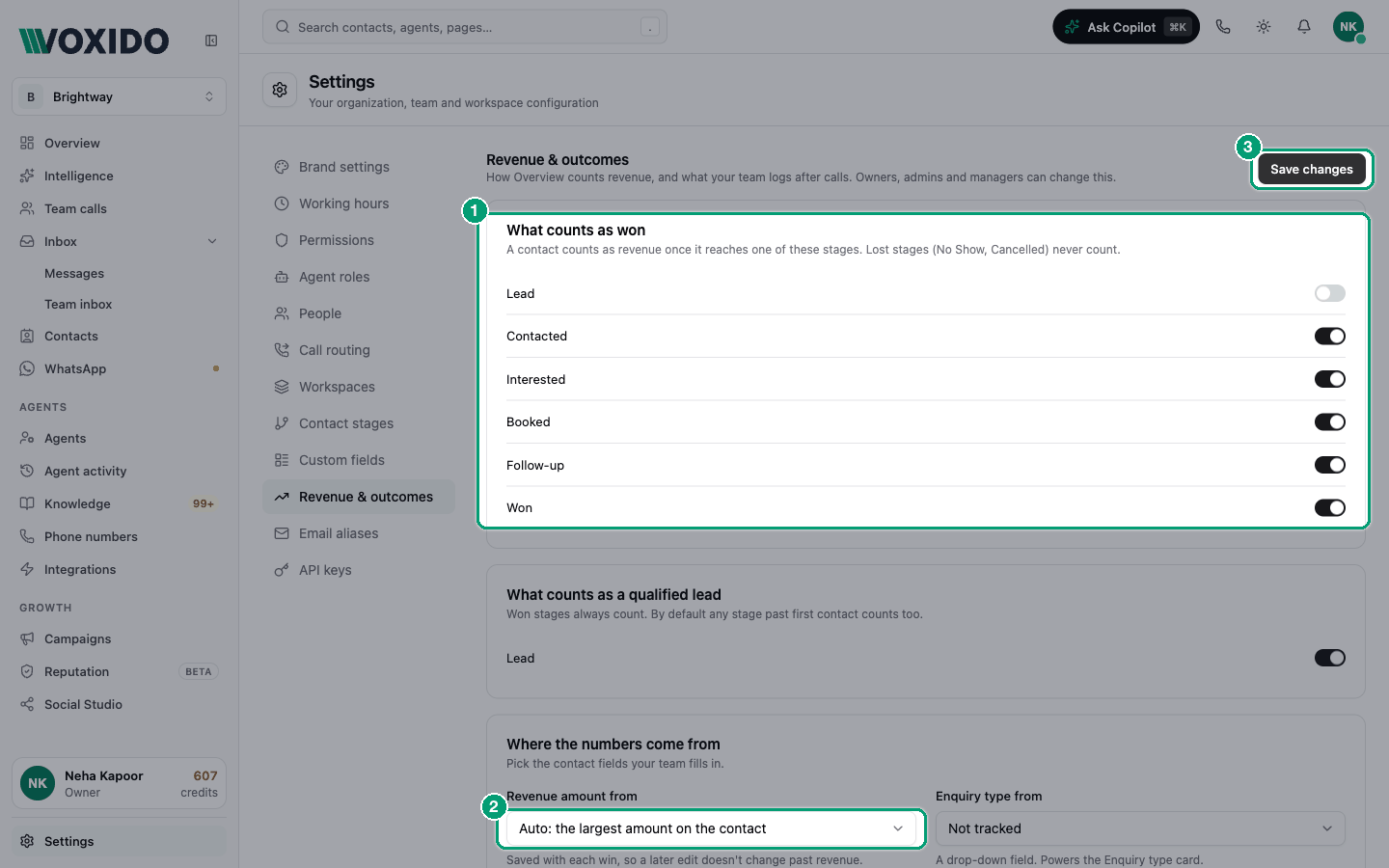
- Click Settings in the sidebar, then Revenue & outcomes. You'll see: four boxes: What counts as won, What counts as a qualified lead, Where the numbers come from and After every call.
- Under What counts as won, switch on Appointment booked. Leave the other stages off. You'll see: the stage leaves the qualified-lead list below, because won stages always count as qualified.
- Under What counts as a qualified lead, switch on the stages that mean "a real lead", like Callback requested. Switch off raw stages like New enquiry. You'll see: only the stages you want stay on.
- Under Where the numbers come from, open Revenue amount from and pick Service fee. You'll see: "Saved with each win, so a later edit doesn't change past revenue."
- Open Enquiry type from and pick Service type (or leave Not tracked). You'll see: the field name in the box.
- Click Save changes at the top right. You'll see: a "Changes saved" message.
- Make sure the amount gets saved and the contact moves. Open your agent → Outcomes and set On success, move to → Appointment booked. In Skills, turn on Update contact information and Move contact to a stage. In the instructions, tell the agent to save the fee and move the contact when the booking is confirmed. See Outcomes and revenue. You'll see: the stage name in On success, move to.
- Test it with Try it live, then open Overview. You'll see: Revenue won goes up by ₹2,500 and "1 contact won" appears under it.
What each setting means
| Setting | What it does | Default / tip |
|---|---|---|
| What counts as won | Stages that count as revenue when a contact enters them. Lost stages (like Archived) never count and aren't listed. | New stages start off. Hotel workspaces start with Booked – Pre-Arrival and the stay stages after it switched on. |
| What counts as a qualified lead | Stages that count in Qualified leads on Overview. Won stages always count too. | Until you change it, every stage that isn't lost counts. |
| Revenue amount from | The contact field Voxido reads the amount from. Only Currency and Number fields are listed. | Auto: the largest amount on the contact. Pick the exact field instead (see below). |
| Enquiry type from | A drop-down field that splits enquiries on Overview's Enquiry type card. | Not tracked. |
| After every call → Fields | Up to 10 contact fields people fill in on the "How did the call go?" form. | Your contact summary's key fields until you choose. |
| After every call → Outcome options | Up to 8 outcome chips on that form, like Payments Collected. | Your call-result outcomes until you choose. |
| Applies to | Which workspace the two lists above are for. Pick a workspace to give it its own list. Click Use the all-workspaces list to undo that. | All workspaces. |
Why "Auto" can be wrong
Auto reads every Currency and Number field and takes the largest. If contacts have a number field like "Pincode" or "Guests", Voxido may read 560001 as revenue. Pick your exact money field.
The "How did the call go?" form is explained in Notes and call outcomes. An outcome your team logs there, like Payments Collected, shows in the Paid step of Overview's funnel.
Which outcome options to offer after calls
Offer only the 3–5 results your team really needs. Fewer chips mean faster, more honest logging.
| Business | Good outcome options |
|---|---|
| Brightway (service business) | Appointments Booked, Follow-ups Scheduled, Payments Collected |
| Hotel | Bookings Confirmed, Deposits Collected, Follow-ups Scheduled |
| Clinic | Appointments Booked, Follow-ups Scheduled |
| School or coaching centre | Appointments Booked (campus visits), Conversions (admissions) |
| Real estate | Appointments Booked (site visits), Leads Qualified |
| Loan recovery | Payments Collected, Follow-ups Scheduled (for a promise to pay) |
The list you can pick from is your company's outcomes, so names may differ slightly.
Where these numbers show up
| On Overview | Comes from |
|---|---|
| Revenue won and Revenue and wins over time | Contacts that entered a won stage, with their amounts |
| Revenue by person | Who moved each contact. Moves by an AI agent or an automation show as AI agent. |
| Qualified leads | Contacts that entered a qualified or won stage |
| Enquiry type | The field you picked in Enquiry type from |
| From enquiry to payment | Enquiries, qualified leads, wins, then payment outcomes |
| Cost and return | Revenue won ÷ what the conversations cost |
Common problems
My revenue shows 0. Check these in order:
- No won stage. Open What counts as won and switch one on. New stages start off.
- No amount on the contact. Open a won contact. If the money field is empty, Voxido counts the win but adds ₹0. Ask the agent to save the amount, or fill it in yourself.
- Wrong field. Revenue amount from points at a different field than the one you fill in. Pick the right one.
- The contact never moved. The stage must change into the won stage during the period. A contact that was already sitting in that stage before the period started doesn't count again.
- Wrong period or filter. Revenue counts on the day of the move. Widen Period and clear People and Workspace on Overview.
- Sample contacts. Demo or sample contacts never count.
Revenue counted the same customer twice. They entered a won stage in two different periods. Switch on only one stage per sale (see the warning above).
I fixed the amount, but past revenue didn't change. Usually the amount is saved at the moment of the win, so later edits don't rewrite past revenue. If no amount was saved at that moment, Overview uses the amount on the contact now.
Amounts show ₹ but we charge in dollars. Overview shows money in rupees today. There's no currency setting yet.
I can't see this tab. Only Owners, Admins and Managers can. Ask one of them.